Best Assignment Writing App to Finish Handwriting Faster
Handwritten assignments have not gone away, even in a year when most schoolwork happens on a screen. If you have ever spent an hour copying an already-finished paragraph onto paper just to keep it neat enough to hand in, you already know where the time actually goes.
Quick answer: The fastest way to produce a handwritten-looking assignment is to write and edit the content as typed text first, then use an assignment writing app to convert that finished text into a handwriting-style page. This keeps the easy editing of typing while still producing a page that reads as handwritten, and it exports cleanly as the PDF most schools expect.
What you'll learn
- Why teachers still ask for handwritten work even in a typing-first classroom
- Where the real time cost of handwriting comes from, based on actual writing-speed research
- How a text-to-handwriting workflow fits between drafting and submitting
- What paper size, format, and spacing choices actually matter for a page to look and read right
- What "faster" honestly means here, and where it does not apply
Why Handwritten Assignments Still Show Up in 2026
Plenty of teachers still assign handwritten work: in-class exams, math problem sets, language practice, and timed assessments in particular. Part of the reason is pedagogical, seeing a student's own process step by step, and part of it has become a practical check against typed, AI-generated text.
That shift is visible in the tools schools use to grade. Turnitin now runs a dedicated "Handwritten Assignment" feature, and it only accepts a single PDF with the pages in the correct order. That single detail says a lot: PDF-based handwritten submission is no longer a workaround, it is the expected format in a growing number of classrooms.
There is also a research thread behind the preference for handwriting. A 2014 study by Mueller and Oppenheimer, published in Psychological Science, found that students who took notes longhand outperformed laptop note-takers on conceptual questions. A 2019 replication attempt found the same direction of effect but a smaller one that did not reach statistical significance. Put plainly: handwriting during live note-taking may help some students, but the evidence is modest, not a slam dunk, and it says nothing about what happens when you format an already-written assignment afterward.
For most students, though, the real obstacle is not the thinking. It is the slow, physical mechanics of writing everything out by hand neatly enough to submit.
Where the Time Actually Goes When You Write by Hand
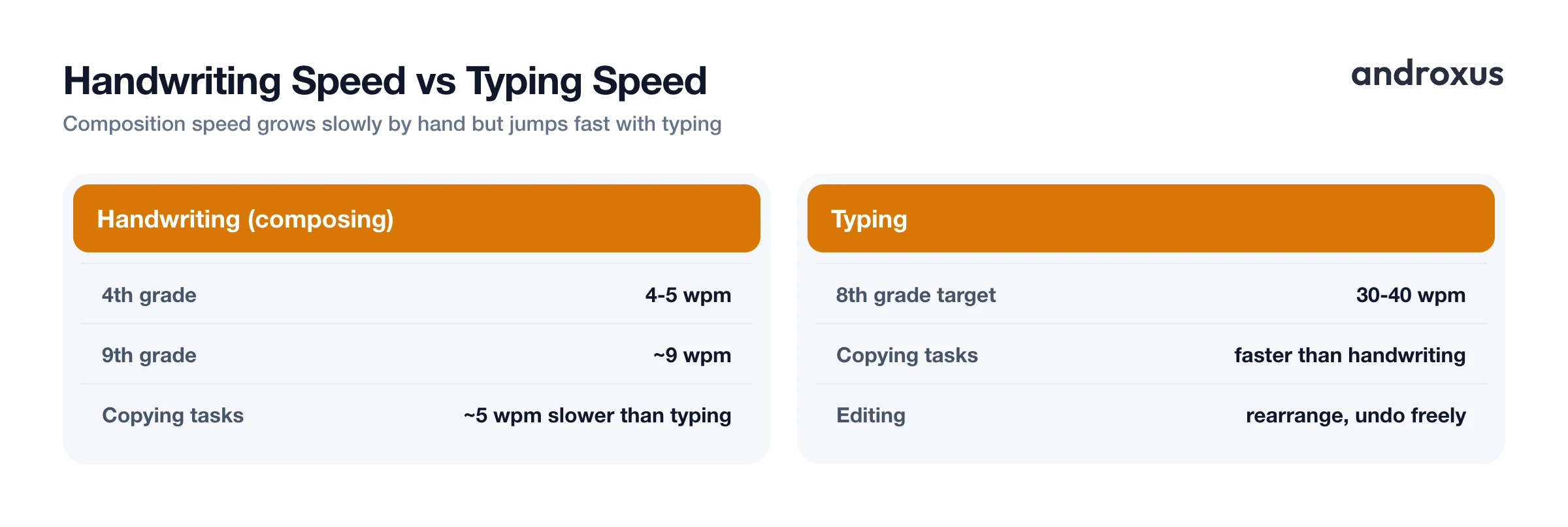
Composing by hand, as opposed to copying something you already know, is genuinely slow. Handwriting-speed research puts fourth graders at roughly 4 to 5 words per minute when composing longhand, climbing to around 9 words per minute by ninth grade. That is composition speed, not the faster rate you get when copying text you have already written.
Compare that to typing. Students are generally expected to type 30 to 40 words per minute by eighth grade, and even in simple copying tasks, typing tends to run about 5 or more words per minute faster than handwriting. The gap is not small, and it does not shrink much with practice the way typing speed does.
Handwriting also has no real undo. A crossed-out word, a cramped margin, or a paragraph that runs long usually means starting the page over, while a typed draft can be rearranged, trimmed, or rewritten freely before it ever touches paper. That asymmetry, not any shortcut around the actual thinking, is what makes converting a finished, edited draft into a handwriting-style page worth considering.
Where a Text-to-Handwriting App Fits the Workflow
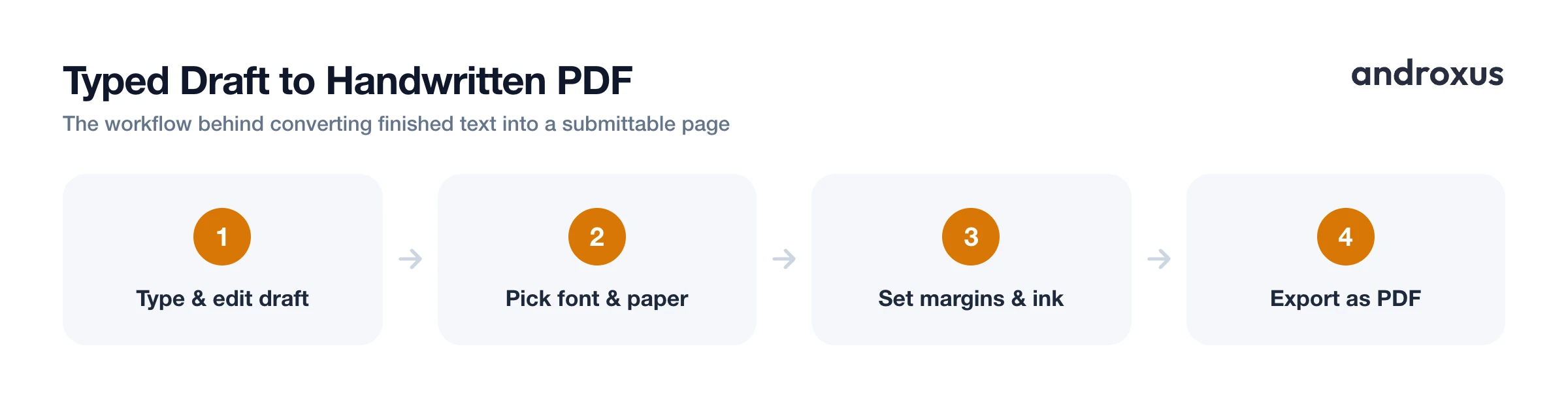
The realistic workflow looks like this: write and edit the assignment as typed text first, where spellcheck, easy fixes, and paragraph rearranging are all available, then convert the finished text into a handwritten-looking page instead of handwriting the final copy from scratch.
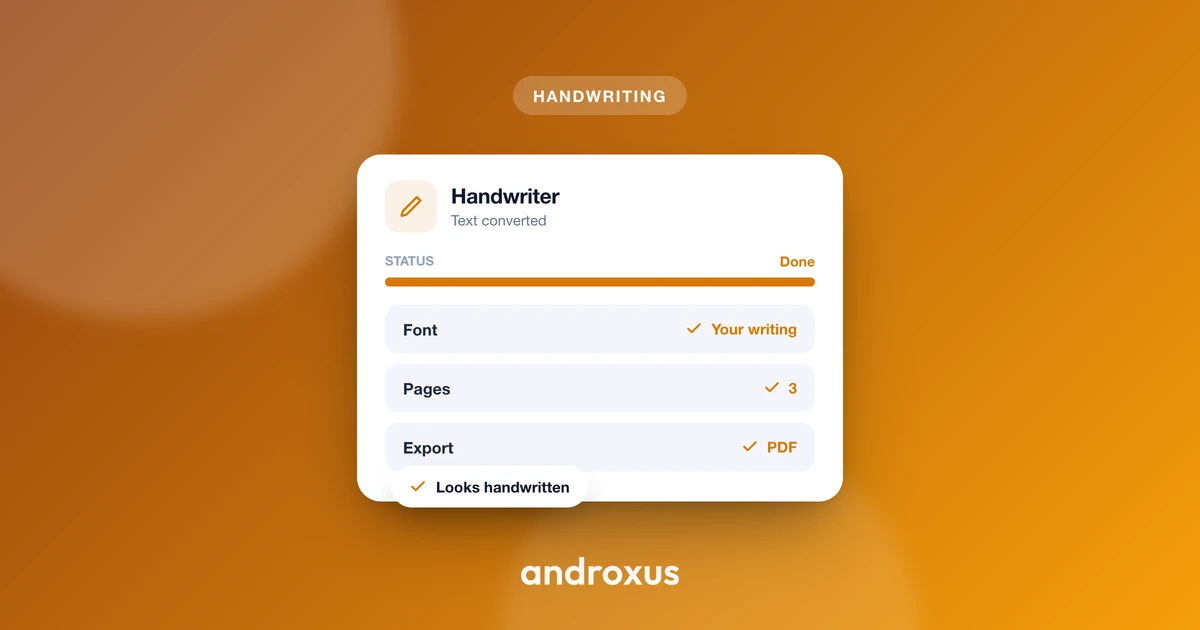
This is the one place an app like Handwriter fits in. It takes typed or pasted text and renders it on a page using a chosen handwriting font, with adjustable margins, letter, word, and line spacing, ink and line colors, plain (no-line) or ruled sheets, scanner and shadow effects for a more natural look, AI smart page rotation, a live preview, and PDF save and share.
It's worth being direct about what this kind of app does and does not do. It formats text you already wrote, it does not write, research, or generate the content itself. It is a formatting and presentation step that comes after the actual homework is done, not a replacement for doing it. Handwriter includes 53 free handwriting fonts, plus the option to upload a custom font, so results can range from tidy print to a more personal, varied hand depending on what the assignment calls for.
Formatting the Page So It Looks and Reads Right
Getting the content converted is only half the job. The output also needs to match whatever format your school or grading platform expects, and a few details matter more than they seem to.
PDF is the format most schools expect. Google Classroom accepts PDFs directly, alongside Doc, Word, and image formats, and Turnitin's Handwritten Assignment feature accepts only a single PDF with pages in the correct order. If you are not sure what your teacher wants, PDF is the safe default.
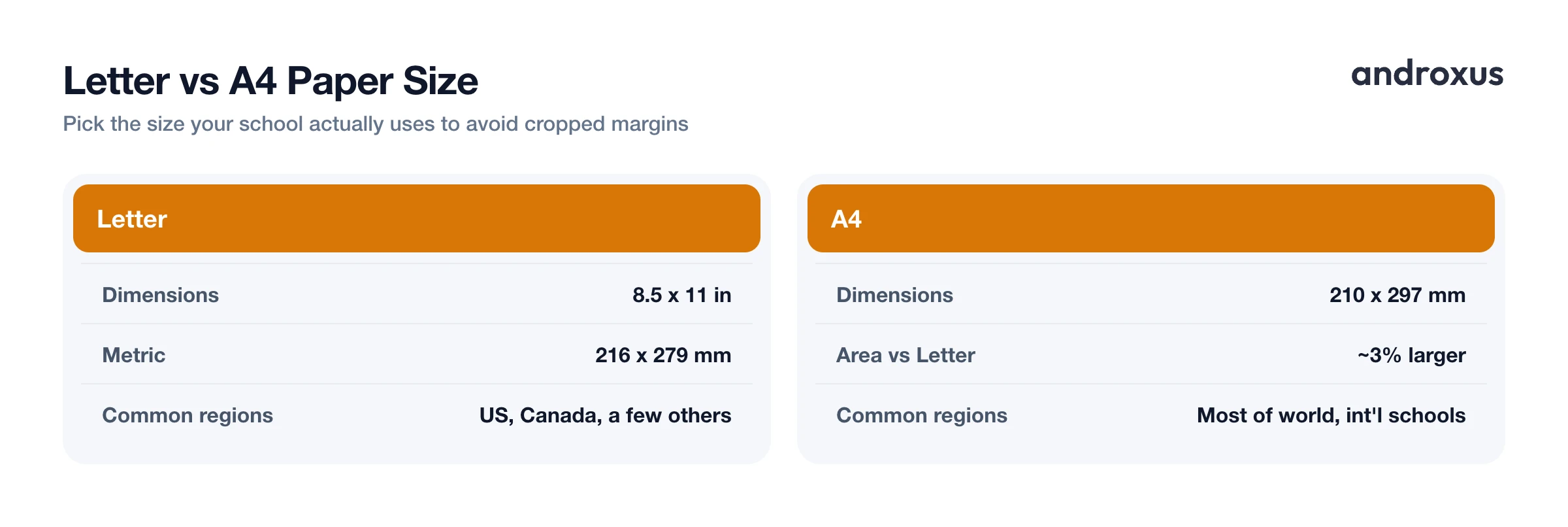
Paper size depends on region, and it is an easy detail to get wrong.
| Paper size | Dimensions | Common regions |
|---|---|---|
| Letter | 8.5 x 11 in (216 x 279 mm) | United States, Canada, a few others |
| A4 | 210 x 297 mm | Most of the rest of the world, including most international schools |
A4 is about 3% larger in area than Letter and has a different aspect ratio, so using the wrong size can shrink margins or crop content when the page is printed. It is worth checking which standard your school uses before exporting a final PDF.
Beyond size, consistent margins and spacing throughout the document read as more natural and are easier for a teacher to mark up than a page where spacing shifts halfway through. A subtle scanner or shadow effect, along with a slight page rotation, can also help a converted page look like an ordinary scanned sheet rather than a flat, obviously-digital rendering. That matters for legibility and general presentation, not for disguising anything about how the page was produced.
Keeping It Honest: What "Faster" Does and Doesn't Mean
"Faster" here refers specifically to formatting and transcription time, not thinking time or writing time. The student still has to compose the actual content, the ideas, the sentences, the argument, before any conversion happens. An assignment writing app shortens the gap between a finished typed draft and a submittable handwritten-looking page. It does not shorten the work of actually writing the assignment.
Policies also vary by school and by assignment type. Live, in-class handwritten exams are a completely different situation from take-home written homework, and it is worth checking with a teacher about which submission format is expected before relying on a converted page for anything time-sensitive or exam-related.
And because the research on handwriting's learning benefits is genuinely mixed (a modest, non-definitive effect from the original 2014 study and its smaller 2019 replication), the fair conclusion is this: handwriting during active, in-the-moment note-taking may help some students process material as they go. Producing a clean, handwritten-style copy of a finished assignment afterward is a separate, presentation-focused task, and it should be treated as one.
How to Convert a Typed Assignment Into a Handwritten-Looking PDF
- Write and edit the assignment as typed text first. Draft it in a word processor or notes app where mistakes are easy to fix, spellcheck works, and paragraphs can be rearranged before anything is finalized.
- Paste the finished text into the handwriting app. Once the content is done and proofread, paste or type it in so the conversion step only handles formatting, not composition.
- Pick a font and paper style. Choose a handwriting font, or a custom uploaded one, and decide between a plain sheet or a ruled sheet, matching what the assignment or teacher expects.
- Set margins, spacing, and paper size to match your school's format. Adjust letter, word, and line spacing and margins, and choose Letter or A4 depending on your country or school's standard.
- Adjust ink color and realism effects. Set the ink and line colors, add a subtle scanner or shadow effect if a more natural look is wanted, and use the live preview to check the page before exporting.
- Export and submit as PDF. Use AI smart page rotation if needed for a natural page angle, then save and share the file as a PDF, since that is the format most classroom and grading platforms expect.
Key takeaways
- The real bottleneck in handwritten assignments is the slow mechanics of writing neatly by hand, not the thinking behind the content.
- Writing and editing as typed text first, then converting to a handwriting-style page, keeps the speed and flexibility of typing while still producing a handwritten-looking result.
- PDF is the format most schools and platforms, including Google Classroom and Turnitin, expect for handwritten submissions.
- Matching paper size (Letter versus A4) and keeping margins and spacing consistent throughout the page avoids cropped or awkward-looking printouts.
- An assignment writing app formats text you already wrote; it does not write, research, or think for you, and in-class handwriting requirements should always be checked with a teacher first.
Frequently asked questions
Does a handwriting app write the assignment for me?
No. An app like Handwriter converts text you already composed into a handwritten-looking page. It does not generate, research, or write the content itself, so the words and ideas still have to be your own.
What file format should I submit for a handwritten assignment?
PDF is the safest choice. Google Classroom accepts PDFs directly, and Turnitin's dedicated Handwritten Assignment feature only accepts a single PDF with pages in the correct order, so exporting your converted page as one PDF covers most submission systems.
Should I use Letter or A4 paper size?
Match whatever your school uses. The US, Canada, and a handful of other countries use Letter (8.5 x 11 in), while most other countries, including most international schools, use A4 (210 x 297 mm). Using the wrong size can cause margins to shift or content to get cropped when printed.
Is it okay to turn in a formatted handwriting-style page instead of writing by hand?
It depends on the assignment and the teacher's policy. Take-home written homework is often fine as a printed or PDF page, but in-class exams or assessments that require handwriting in the moment are a different situation. When in doubt, ask the teacher what format they expect.
Can I use my own handwriting style instead of a built-in font?
Yes, if the app supports custom font uploads. Handwriter, for example, includes 53 free handwriting fonts and also allows uploading a custom font file for a more personal look.
Does handwriting still matter for learning if I type my draft first?
Research on this is mixed. A widely cited 2014 study found longhand note-takers did better on conceptual questions than laptop note-takers, but a 2019 replication found a smaller, non-significant effect. That research is about live note-taking during class, not about formatting an already-finished assignment, so typing a draft first and converting it afterward doesn't cancel out any in-class note-taking benefit.
