What Is Grayscale Screen Mode and Why Use It?
You reach for your phone, unlock it, and the icons look flat and gray instead of the usual bright grid. That's grayscale screen mode, a built-in Android setting that a surprising number of people use on purpose to break the habit of endless scrolling. Here's what it actually does, what it doesn't do, and how to turn it on.
Quick answer: Grayscale screen mode is a system-level display filter that removes color from your entire screen, rendering apps, icons, and notifications in shades of black, white, and gray. It's built into Android through Digital Wellbeing's Bedtime mode (scheduled) or Accessibility's Color correction (on-demand), and studies have linked it to noticeably less time spent on social media and browsing. It doesn't lower brightness, filter blue light, or affect the color of photos and videos you actually capture.
What you'll learn
- What grayscale screen mode changes on your phone, and how it differs from dark mode and blue-light filters
- Why removing color from a screen measurably reduces scrolling time, according to published research
- What grayscale can and cannot do for eye comfort and sleep
- The exact menu paths to turn it on, both scheduled and on-demand
- Whether it actually saves battery
What grayscale screen mode actually does
Grayscale mode is a system-level display filter. It removes color and renders everything on screen in shades of gray, black, and white, without changing any of the underlying app content. Your photos, your messages, your apps are all still there; they just appear without color.
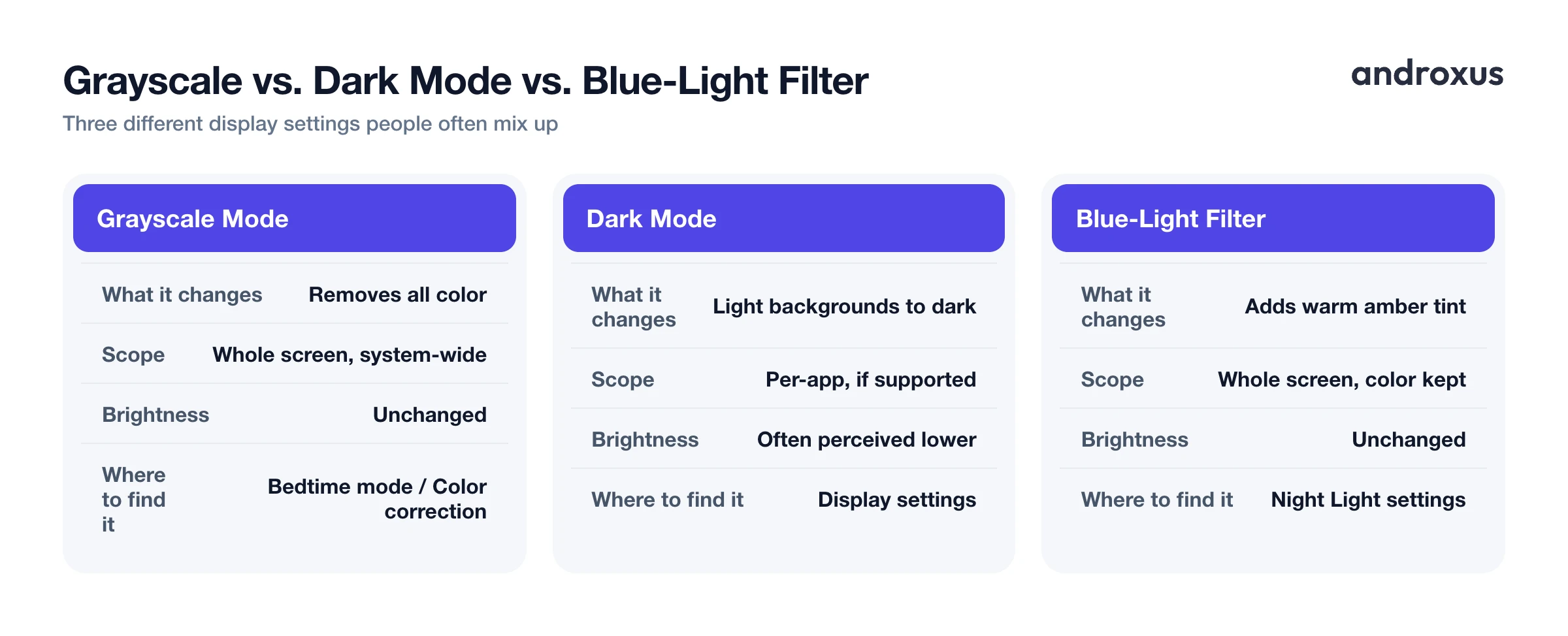
It's easy to confuse grayscale with two other settings that sound similar but do different things:
- Dark mode swaps light backgrounds for dark ones inside apps that support it. It's a color choice made by the app, not a filter over the whole screen.
- Blue-light or night-light filters add a warm amber tint to reduce blue wavelengths coming from the display, while keeping the rest of the color spectrum intact.
Grayscale removes color saturation entirely. It does not change brightness and it does not change color temperature; it just takes color out of the picture.
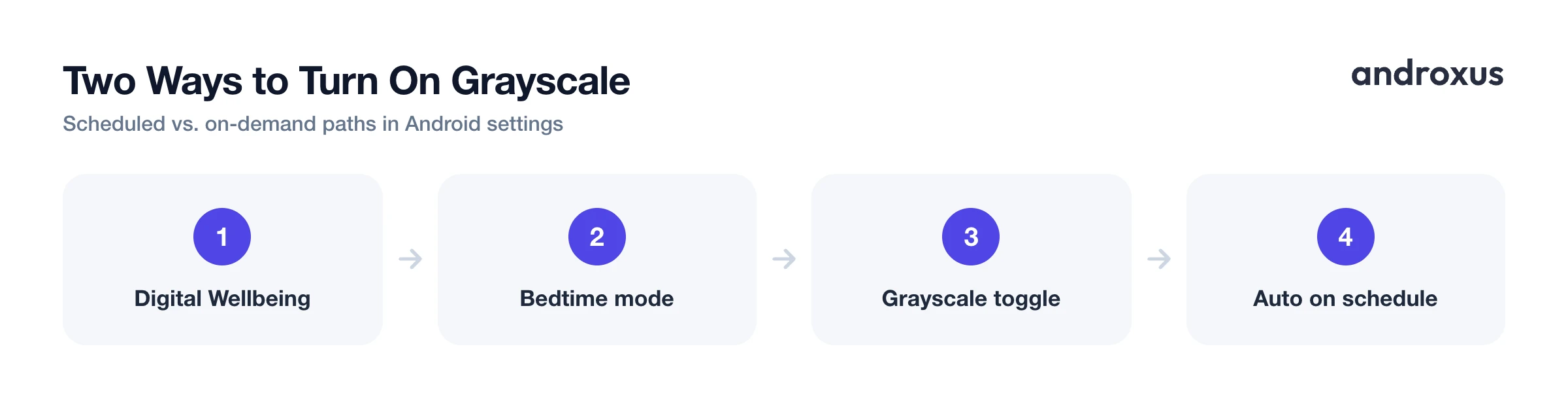
On stock Android, grayscale lives in two main places. The first is Digital Wellbeing's Bedtime mode, under a "Screen options at bedtime" toggle that applies on a schedule. The second is Accessibility > Color and motion > Color correction, an on-demand toggle originally built for color-vision accessibility that people have repurposed as a grayscale switch they can flip any time. There's also a third, less official route through Developer Options > Simulate color space > Monochromacy, but that's a debug and testing feature, not something meant for daily use, and it can behave inconsistently depending on the phone maker's version of Android.
Because grayscale is a display-level filter, it applies system-wide, across every app, the home screen, and notifications. One thing worth knowing: photos and videos you capture while grayscale is on are still saved in full color. Only the on-screen preview looks gray while you're shooting.
Why people use black-and-white screens: the focus benefit
The main reason grayscale has caught on isn't aesthetic, it's behavioral. Several studies have measured real drops in phone use tied directly to turning color off.
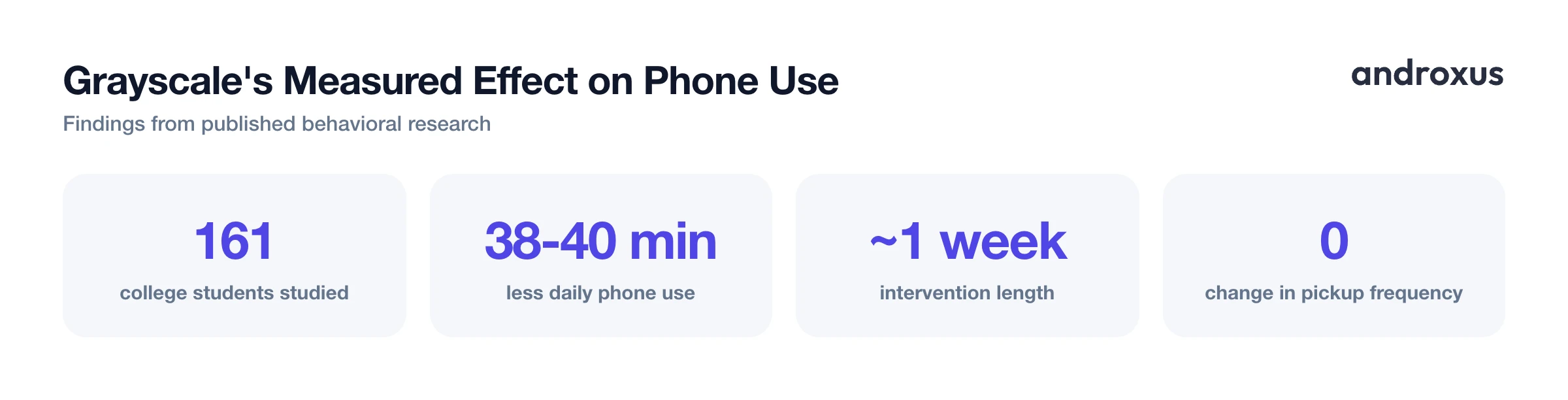
A study published in The Social Science Journal, looking at 161 college students, found participants who switched to grayscale for about a week cut their total daily smartphone use by roughly 38 to 40 minutes on average. A separate study by Dekker and Baumgartner, published in Mobile Media & Communication, tested a one-week grayscale intervention and found it improved people's sense of control over their phone use, and reduced perceived overuse, online vigilance, and stress. That same study did not find a significant change in self-reported productivity or sleep quality, which is worth being upfront about: grayscale is not a cure-all.
The reduction in use is concentrated in specific places. It shows up mainly in social media and general browsing time, with little to no measurable effect on time spent watching video. Interestingly, grayscale reduced how long people used their phones per session, but not how often they picked the phone up in the first place. That suggests it curbs mindless scrolling once you're already looking at the screen, more than it stops the habitual reach for the phone.
The likely mechanism is straightforward. App icons, notification badges, and infinite-scroll feeds are designed with color and contrast specifically to catch your eye and trigger repeated checking. Strip the color out, and that visual pull weakens, even though every feature of the phone still works exactly the same.
Eye comfort, blue light, and what grayscale doesn't do
Some people report that a grayscale screen feels visually calmer during long scrolling sessions, since removing bright, saturated color contrast makes the display less attention-grabbing. That's a real, if subjective, comfort effect worth mentioning.
But it's important to be accurate about the limits here. Grayscale does not reduce the screen's actual brightness and does not filter blue light. It only removes color information, so a phone at full brightness in grayscale mode is still emitting the same amount of light as it would in full color.
Blue-light or warm-tint filters are a separate feature, usually aimed at evening use, and their sleep benefit is genuinely modest and mixed in the research. A Lighting Research Center study on the iPad's Night Shift mode found its warm setting suppressed melatonin by about 10 percent, versus roughly 17 percent under the regular cool setting, a difference the researchers didn't consider meaningful on its own; dimming the screen mattered more than shifting its color. Large real-world studies of night-mode features tend to report only small or negligible improvements in sleep latency or sleep quality.
If you want to pair a color-reducing habit like grayscale with an evening dimming or warm-tint routine, an app like Night Screen offers a blue-light reading-mode filter along with an auto-schedule that gradually applies from sunset to morning. Like grayscale, this works as a screen overlay layered on top of the display, drawn using Android's "Display over other apps" permission; it does not lower the screen's actual hardware brightness below its built-in minimum.
The honest bottom line: treat grayscale as a focus and attention tool first, and treat any blue-light filter as a modest, not guaranteed, sleep aid, not the other way around.
Does grayscale actually save battery?
The battery question comes up a lot, and the honest answer is: it depends on the screen technology, and the effect is usually small.
| Screen type | How grayscale affects power draw |
|---|---|
| OLED/AMOLED | Each pixel is lit individually, so darker gray tones draw less power than bright colors; true black uses only a fraction of the power white does |
| LCD | The backlight stays on regardless of what color is displayed, so grayscale produces negligible savings |
The catch on OLED screens is that grayscale converts colors to gray equivalents, it does not make light-themed apps dark. A white app background rendered as light gray still draws power close to what pure white did. That means grayscale alone delivers only modest savings unless it's paired with dark-themed apps or system dark mode running underneath it.
A realistic expectation is that any battery benefit from grayscale is a secondary bonus, not its main purpose. The primary value is the focus and attention effect described above.
Making grayscale part of a daily routine
A few practical patterns make grayscale easier to live with long-term.
Pair the scheduled Bedtime mode grayscale with your actual sleep hours, so it turns off automatically in the morning without you needing to remember to disable it. Use the Accessibility shortcut for situational grayscale, such as during a focused work block or while you're actively trying to cut back on one specific app, then swipe it off when you need color for tasks like photo editing, maps, or color-coded documents.
Because grayscale is purely a software display filter, it's instantly reversible, doesn't modify the device in any way, and has no effect on warranty or hardware. For evening screen use specifically, grayscale addresses attention and habit, while a blue-light or dimming filter addresses visual comfort. Those are different problems, so it's reasonable to use both rather than expecting one setting to do both jobs.
How to turn on grayscale mode on Android
There are a few routes, and which one fits depends on whether you want it automatic or something you can flip on demand.
Method 1, scheduled. Go to Settings > Digital Wellbeing & parental controls > Bedtime mode > Bedtime routine, and set either start and end times or a charging-based trigger. Then open Customize (labeled "Screen options at bedtime" on some devices) and turn on Grayscale, so it applies automatically during your bedtime window.
Method 2, on-demand. Go to Settings > Accessibility > Color and motion > Color correction, enable "Use color correction," choose Grayscale, and turn on the Color correction shortcut. A two-finger swipe up from the bottom of the screen (or the accessibility button) then toggles it instantly, any time of day.
Method 3, advanced or testing. Go to Settings > About phone and tap the Build number seven times to unlock Developer Options, then navigate to Developer Options > Simulate color space > Monochromacy. This path is less consistent across brands and is really meant for accessibility testing, not daily use.
Exact menu wording and location vary by manufacturer, so labels like "Screen options at bedtime" or "Color correction" may sit one tap deeper on Samsung, Pixel, OnePlus, or other skins than described above.
Key takeaways
- Grayscale screen mode is a system-wide display filter that removes color, distinct from dark mode (which changes app backgrounds) and blue-light filters (which add a warm tint).
- Research links grayscale to real reductions in social media and browsing time, mainly by shortening sessions rather than reducing how often you pick up your phone.
- Grayscale does not lower brightness or filter blue light; it only removes color, so treat separate blue-light features as a modest, not guaranteed, sleep aid.
- Android offers both a scheduled route (Digital Wellbeing's Bedtime mode) and an on-demand shortcut (Accessibility's Color correction) for turning grayscale on and off.
- Any battery savings from grayscale are modest and mostly limited to OLED screens; it's a secondary benefit, not the main reason to use it.
Frequently asked questions
Is grayscale mode the same as a blue light filter or Night Light?
No. Grayscale removes color and renders the screen in black, white, and gray tones; a blue light filter adds a warm amber tint to reduce blue wavelengths while keeping colors. They solve different problems and can be used together.
Does grayscale mode reduce eye strain or blue light exposure?
Grayscale doesn't reduce actual blue light output or lower brightness, since it only removes color information. Some people find the lower visual contrast less stimulating during long sessions, but that's a subjective comfort effect, not a change in the light the screen emits.
Does grayscale mode save battery on Android phones?
On OLED/AMOLED screens it can help modestly, mainly because darker gray tones use less power than bright colors, but a light-themed app converted to gray is still fairly bright. On LCD screens the backlight stays on regardless, so savings there are negligible.
Can I schedule grayscale to turn on automatically every night?
Yes. Android's Digital Wellbeing Bedtime mode lets you set a start and end time (or a charging-based trigger) and turn on Grayscale under its screen options, so it applies automatically during that window and reverts afterward.
Will grayscale mode affect the photos or videos I take?
No. Grayscale is a display filter only. The camera preview will look gray on screen, but photos and videos are captured and saved in full color.
Is grayscale mode reversible or does it affect my phone permanently?
It's fully reversible and involves no hardware or system changes. Turning the toggle off (or swiping the accessibility gesture) restores color instantly with no lasting effect on the device.
