Auto Clicker Without Root: Is It Possible?
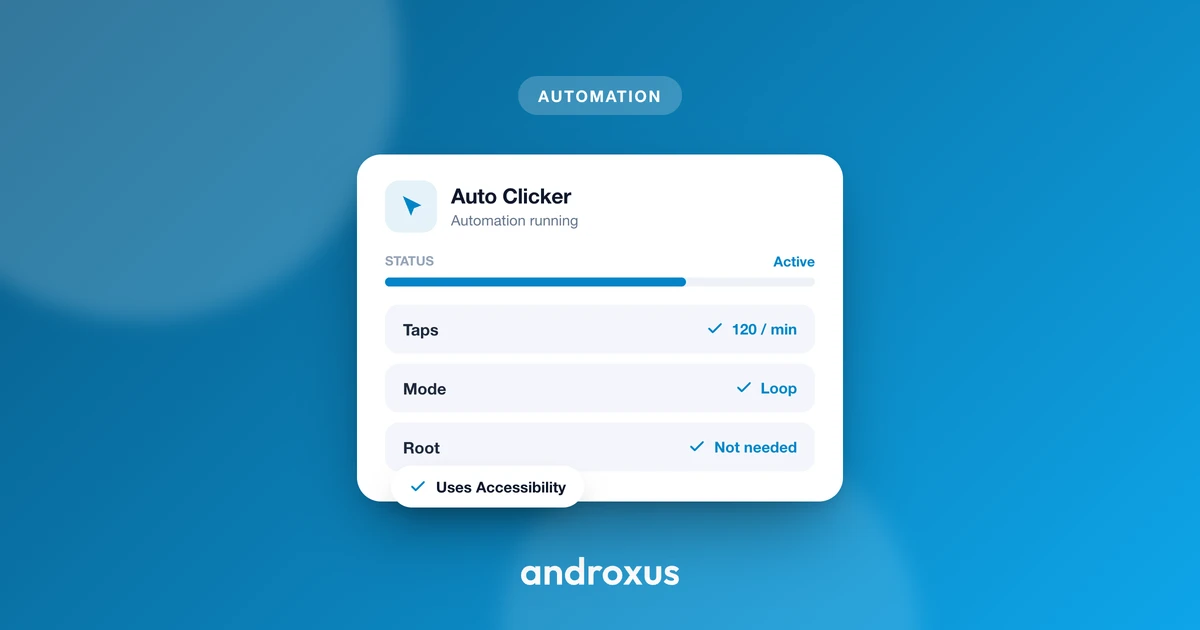
You've probably seen forum posts insisting an auto clicker needs root, or old guides built around rooted-only apps. On modern Android, that's out of date. There's a standard, official way to automate taps that a normal, unmodified phone already supports.
Quick answer: Yes, an auto clicker without root is not just possible, it's the standard approach on Android. Since Android 7.0, apps can use the AccessibilityService API's dispatchGesture() method to generate real taps, holds, and swipes on a completely unmodified device. Rooting was never a requirement for basic auto-tapping, it was only ever relevant to older or more invasive automation methods.
What you'll learn
- Why root isn't required for an Android auto clicker
- How the Accessibility Service actually generates taps under the hood
- What enabling that permission looks like in practice, and why it can't be skipped
- How root and no-root approaches compare on setup, safety, and reliability
- Where no-root automation has limits, and how to use it responsibly
- The exact steps to get a no-root auto clicker running
What "No Root" Actually Means (and Why It Matters)
Rooting an Android phone means unlocking the bootloader and modifying system partitions to gain superuser access. It's a much bigger commitment than installing an app: most manufacturers void the warranty the moment you root, and a botched rooting attempt can hard-brick the device, leaving it unusable.
Rooted phones also carry more ongoing risk. Malware can exploit the same elevated privileges you granted yourself, and many banking, payment, and streaming apps refuse to run at all once they detect root, since it breaks the security assumptions those apps rely on. Google's Play Integrity API has gotten stricter over the past few years too, making it harder for rooted devices to pass the checks some apps require before they'll even open.
A no-root auto clicker sidesteps all of that. It's an ordinary app from the Play Store using a standard, documented Android API. It never touches the bootloader or system partitions, doesn't void any warranty, and keeps working across normal OS updates instead of breaking every time Android patches something at the root level.
The Accessibility Service Is the Engine Behind It
The mechanism that makes root-free tapping possible is Android's AccessibilityService API. It was originally built for assistive tools like screen readers and switch access devices, but it's a public API, so any app can request it, including an auto clicker.
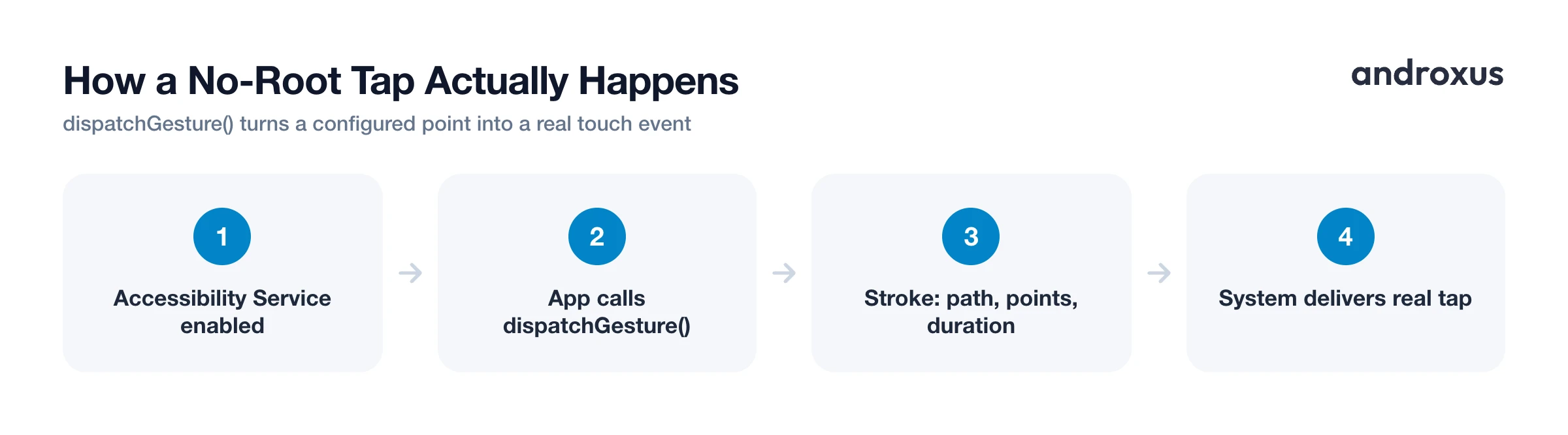
Since Android 7.0 (API level 24), accessibility services can call a method named dispatchGesture(), which synthesizes real touch input: taps, long presses, swipes, and multi-finger sequences. A gesture is built from one or more "strokes," each defined by a path, a start point, an end point, and a duration in milliseconds. That's the building block behind single-touch, multi-touch, tap-and-hold, and swipe actions alike.
Here's the part that matters most for understanding why this works so reliably: the system delivers these synthetic touches the same way it delivers a real finger touch. The app underneath just receives a normal tap event, not some special flag marking it as automated. This is an official, documented Android capability, not an exploit or a loophole, which is exactly why root was never necessary for basic auto-tapping in the first place.
What Enabling It Actually Involves
Turning on Accessibility Service for an app happens in Settings > Accessibility > [App Name] > Use Service. The exact wording and navigation path shifts slightly between Android versions and phone manufacturers, but the location is consistent.
Before the service switches on, Android shows a standard, fairly blunt warning: it can "observe your actions, retrieve window content, and perform actions on your behalf." That same warning appears for every accessibility app, screen readers included, because it's one shared API covering a wide range of use cases, not language written specifically for auto clickers.
There's no way for an app to flip this toggle on itself from code. The user has to do it manually, tapping through the settings screen and the warning dialog by hand. That manual step is Android's built-in guard against an app silently granting itself this kind of access.
Apps that use a floating control panel, a common feature in no-root clickers, also need a separate permission: "Display over other apps" (SYSTEM_ALERT_WINDOW). Many Play Store apps get this granted automatically, but on some devices it requires a manual toggle in Settings > Apps > Special app access > Display over other apps.
Root vs. No-Root Auto Clickers
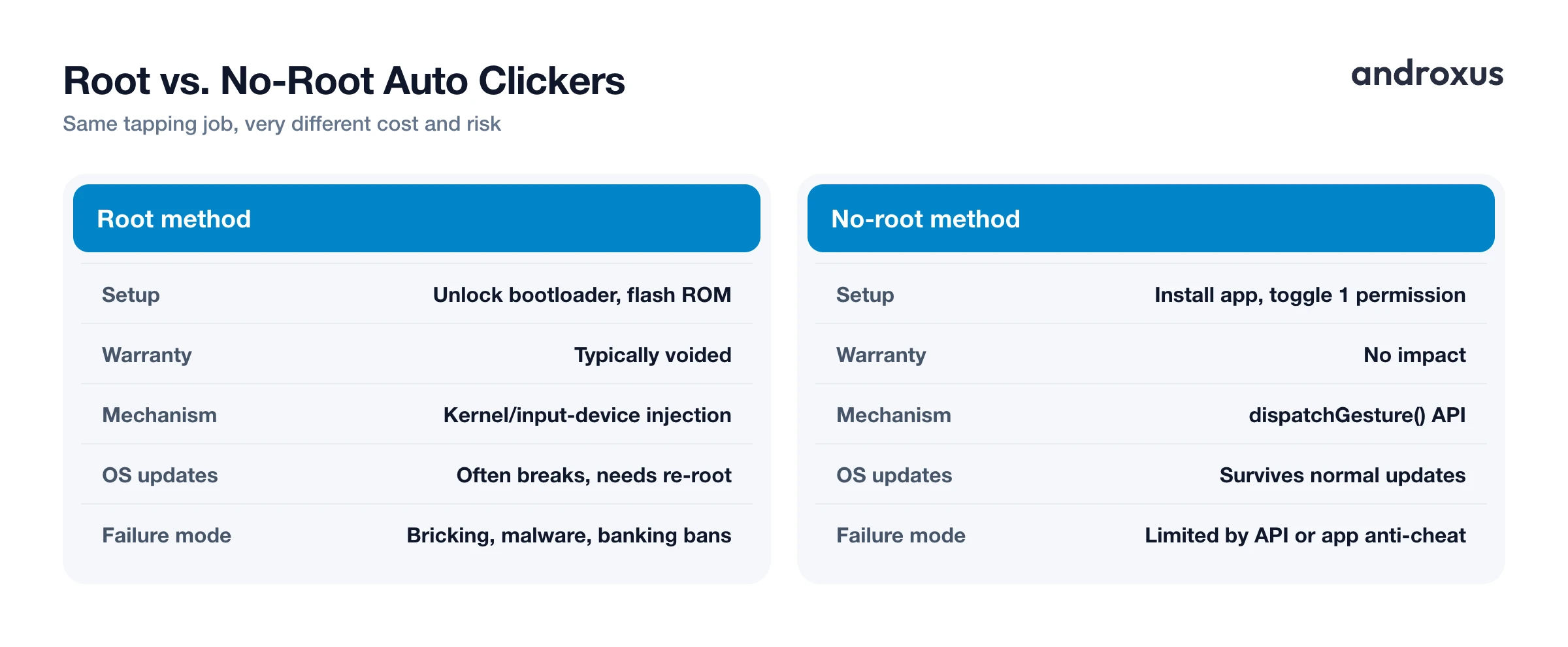
| Root method | No-root method | |
|---|---|---|
| Setup effort | Unlock bootloader, flash custom recovery/ROM | Install from Play Store, toggle one permission |
| Warranty and security | Typically voids warranty, higher malware exposure | No warranty impact, no elevated system access |
| Underlying mechanism | Input injection at kernel/input-device level | dispatchGesture() via the AccessibilityService API |
| Gesture capability | Full multi-touch and timing control | Full multi-touch, swipe, and hold via GestureDescription |
| Survives OS updates | Often breaks after updates, needs re-rooting | Survives normal updates, since it's a supported API |
| Typical failure mode | Bricked device, malware, banking apps refusing to run | Limited to what the API allows or what an app's own anti-automation detection flags |
The table makes the trade-off pretty clear. Rooting buys you deeper system access than an auto clicker actually needs for its job, at a real cost in setup effort and risk. For repeated taps and swipes at set points and intervals, which is what an auto clicker is actually doing, the Accessibility Service already covers the ground root would.
Where No-Root Clicking Has Limits, and Using It Responsibly
Because synthetic taps are delivered the same way real touches are, a no-root clicker generally works across most apps and games. But that doesn't mean it works everywhere, unconditionally. An individual app can still layer its own pattern-based automation or anti-cheat detection on top, watching for suspiciously regular tap timing rather than detecting the accessibility flag itself. Some secure screens, like password entry fields or apps using the FLAG_SECURE window flag, can also block or interfere with floating overlays even though the underlying gesture API isn't affected.
There's also a rules question separate from the technical one. Many games and online services explicitly prohibit macros or automation in their terms of service. Using any auto clicker, rooted or not, in a competitive or online multiplayer title can risk an account penalty even though the tool itself is perfectly legal to install and run. That's a policy decision made by the game or service, not a limitation of the technology.
Google Play's Developer Program Policies require any app that requests the Accessibility API to declare a specific, permitted use case for it and to limit what the service actually does to that declared purpose, rather than bury a broader agenda inside a legitimate-sounding permission. A user-configured auto clicker that only dispatches the taps and gestures you set up fits comfortably inside that model. Apps caught using the API for something undeclared, like harvesting data unrelated to accessibility, risk removal from the Play Store.
Flow Auto Clicker is built around that declared, limited use case: it simulates the taps and swipes you configure, at the locations and intervals you set, and it doesn't read screen content to make decisions or collect personal data. Still, it's worth a quick check of any specific game's or app's rules before automating inside it, since the technology being allowed and a particular app permitting it are two different things.
How to Set Up an Auto Clicker Without Root
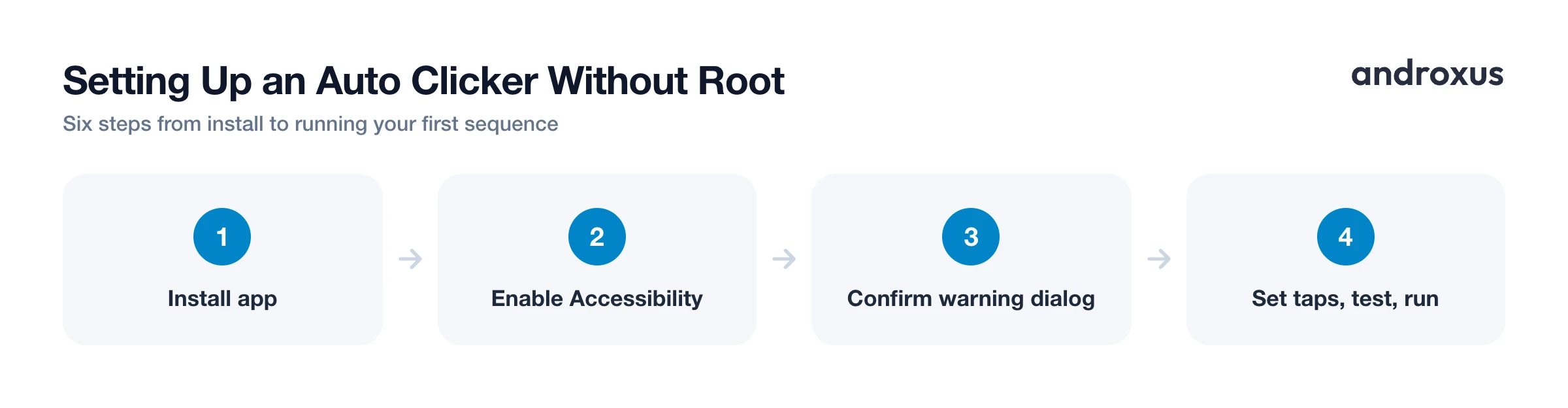
- Install a no-root auto clicker. Download an auto clicker app like Auto Clicker from the Play Store that lists "no root required" and Accessibility Service as its method.
- Enable the Accessibility Service. Open the app and tap its "enable" prompt, or go to Settings > Accessibility, find the app in the Downloaded or Installed apps list, and turn on Use Service.
- Confirm the system warning. Android shows a standard dialog warning that the service can observe your actions and perform actions on your behalf. Confirm it to finish enabling the service; this step can't be automated and must be done manually each fresh install.
- Allow the floating overlay if used. If the app uses an on-screen control panel, grant "Display over other apps" when prompted, or enable it manually in Settings > Apps > Special app access > Display over other apps.
- Set your tap points and interval. Return to the app, mark the coordinates you want tapped, or record a sequence of taps and swipes, and set the interval, repeat count, or duration.
- Test, then run. Start with a short test run in a low-stakes screen to confirm the timing and location are correct, then start the full sequence. Use the floating panel to pause or stop it at any time.
Key takeaways
- An auto clicker without root works on any standard, unmodified Android 7.0+ device because dispatchGesture() is a public, official API, not a workaround.
- Rooting adds real cost, voided warranty, bricking risk, malware exposure, for capability an auto clicker doesn't actually need.
- Enabling Accessibility Service always requires a manual toggle and a confirmed warning dialog; no app can turn this on for itself.
- The technology is allowed under Google's Accessibility API policy for user-defined automation, but individual apps and games can still ban automation in their own terms.
- Check timing, permissions, and a target app's rules before relying on automation for anything competitive or account-sensitive.
Frequently asked questions
Do I really not need root for an auto clicker on Android?
Correct. Since Android 7.0 (API level 24), apps can use the AccessibilityService API's dispatchGesture() method to generate real taps, holds, and swipes without any system-level access. This is an official Android API, not a workaround, so root was never required for basic auto-tapping.
Why does a no-root auto clicker ask for the Accessibility permission?
Accessibility Service is the only public Android API that lets an app synthesize touch input on your behalf. Android shows the same broad warning, that it can observe your actions and perform actions on your behalf, for every app that requests it, whether it's a screen reader or a clicker, because it's one shared API covering many use cases.
Is using a no-root auto clicker safe and legal?
The Accessibility Service API is a standard, Google-documented Android feature, so installing and using a no-root auto clicker is legal and doesn't expose your device the way rooting can. That said, some games and apps ban automation in their own terms of service, so you can still risk an account penalty in a specific app even though the tool itself is safe.
Will a no-root auto clicker work in every app or game?
Mostly, since the synthetic taps are delivered the same way real touches are. But individual apps can still add their own automation or anti-cheat detection that looks for tap patterns rather than the accessibility flag itself, and some secure screens can interfere with floating overlays.
Do I need root for multi-touch or precise gesture timing?
No. dispatchGesture() supports multiple simultaneous strokes with defined start points, end points, and durations, which covers multi-touch taps, swipes, and tap-and-hold sequences without root.
Can Google remove auto clicker apps from the Play Store for using Accessibility?
Yes, if they misuse it. Google Play requires apps that request the Accessibility API to declare a specific, permitted use case and to limit the service to that stated purpose. A standard auto clicker that only dispatches the taps and gestures you configure fits that model, but an app using the same permission for something undeclared risks removal from the Play Store.
