What Is an Auto Clicker Android App and How to Use One
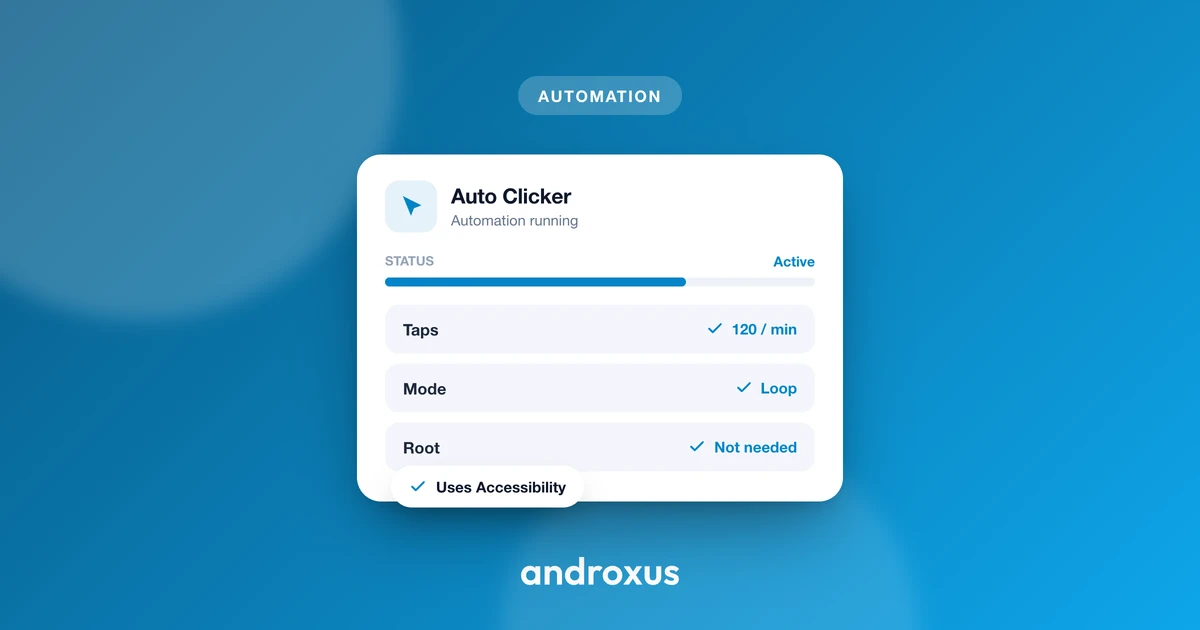
Tapping the same spot on your screen fifty times a minute gets old fast, whether it's a clicker game or a repetitive task in an app. An auto clicker android app takes that repetition off your hands by tapping or swiping for you, at the exact points and timing you set.
Quick answer: An auto clicker android app is software that simulates repeated taps, clicks, or swipes at a location and interval you set, so you don't have to tap manually over and over. On Android, this works through the system's Accessibility Service, which dispatches the gestures without needing root access. It repeats the action you already defined; it does not play the game or make decisions on your behalf.
What you'll learn
- What an auto clicker actually does, and what it doesn't do
- How Android auto clicker apps work under the hood, without root
- The permissions involved and why each one is needed
- Key features to look for, like multi-touch and tap-and-hold
- Whether using one is safe and allowed in the apps you use
- The exact steps to set one up
What Is an Auto Clicker?
An auto clicker is software that simulates repeated taps, clicks, or swipes at a location and interval you set, so you don't have to tap manually over and over. The core distinction worth remembering: it repeats an action you already defined, it does not play the game or make decisions for you. You choose where it taps, how often, and for how long; the app just executes that pattern reliably.
Common uses include clicker and idle mobile games where tapping earns in-game currency, repetitive app testing, keeping a screen active that needs periodic taps, and automating tedious multi-step tap sequences you'd otherwise do by hand.
It's worth noting that desktop auto clickers on Windows or Mac work a bit differently, simulating mouse clicks at the cursor's position. This piece focuses on Android, where there's no literal cursor, so taps and swipes are simulated through a system service instead.
How Auto Clickers Work on Android
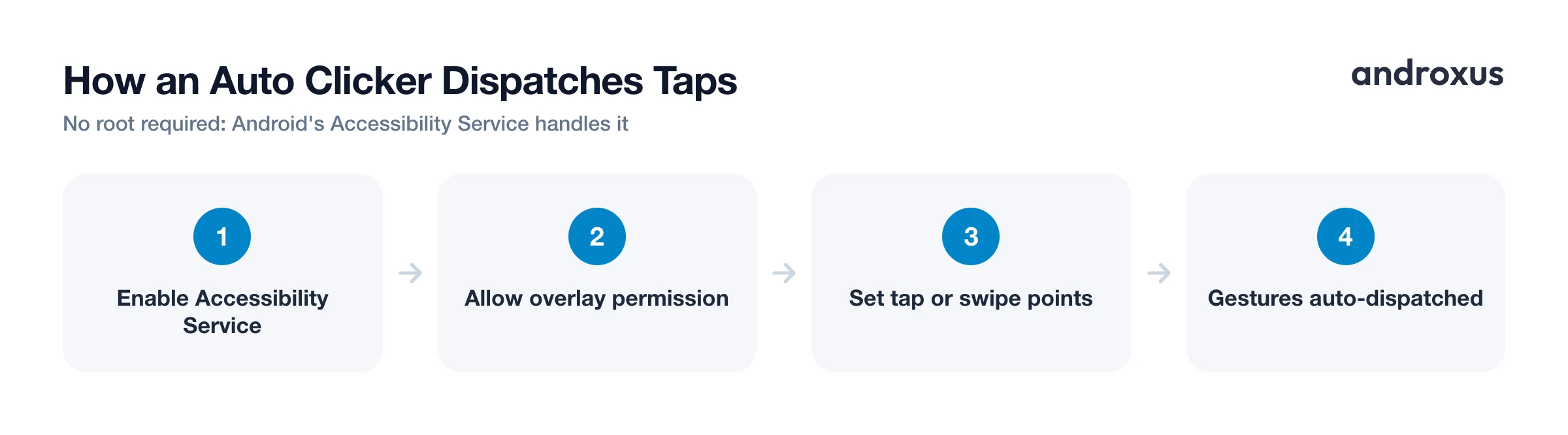
Android auto clicker apps use the Accessibility Service API to programmatically dispatch tap and swipe gestures to the screen. This is the standard, supported mechanism third-party apps use for this kind of automation, since normal apps don't have access to root-level input injection.
That's a meaningful point for anyone weighing whether to try one: no root access is required. The Accessibility Service lets an app perform these actions on an unmodified, non-rooted device running standard Android.
Two permissions are typically involved:
| Permission | What it lets the app do | Privacy and safety note |
|---|---|---|
| Accessibility Service | Dispatches the tap and swipe gestures you configure | Should be used only to send the gestures you set up, not to collect personal data |
| Display over other apps (SYSTEM_ALERT_WINDOW) | Shows a floating control panel on top of other apps | Purely visual overlay, lets you start, pause, or stop the automation without leaving the app you're using |
Accessibility Service is a sensitive Android permission because it's powerful. It's the same category of permission used by screen readers, since it can also read screen content in some implementations. A trustworthy auto clicker uses it only to dispatch the taps and swipes you configure, and should state plainly that it does not collect personal data through it.
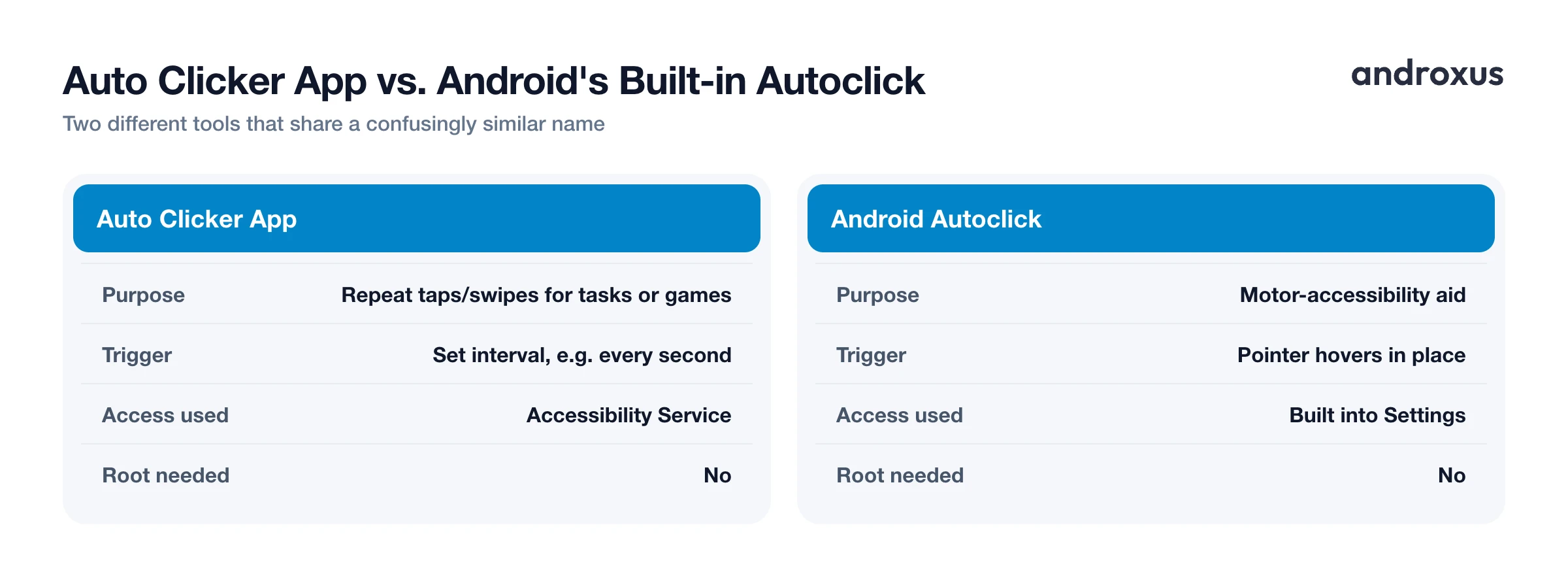
It's also worth clearing up a naming mix-up. Android has its own, unrelated built-in accessibility feature called Autoclick, found in Settings, Accessibility, which triggers a single click automatically after the pointer or cursor hovers in place for a moment. That's a motor-accessibility aid for people who have difficulty pressing a button, not a tool for automating repeated in-app actions. If you're looking to automate repeated taps in a game or app, that's a different category of tool from Android's Autoclick setting.
Key Features to Look For
Not every auto clicker app offers the same feature set. A few distinctions matter depending on what you're trying to automate:
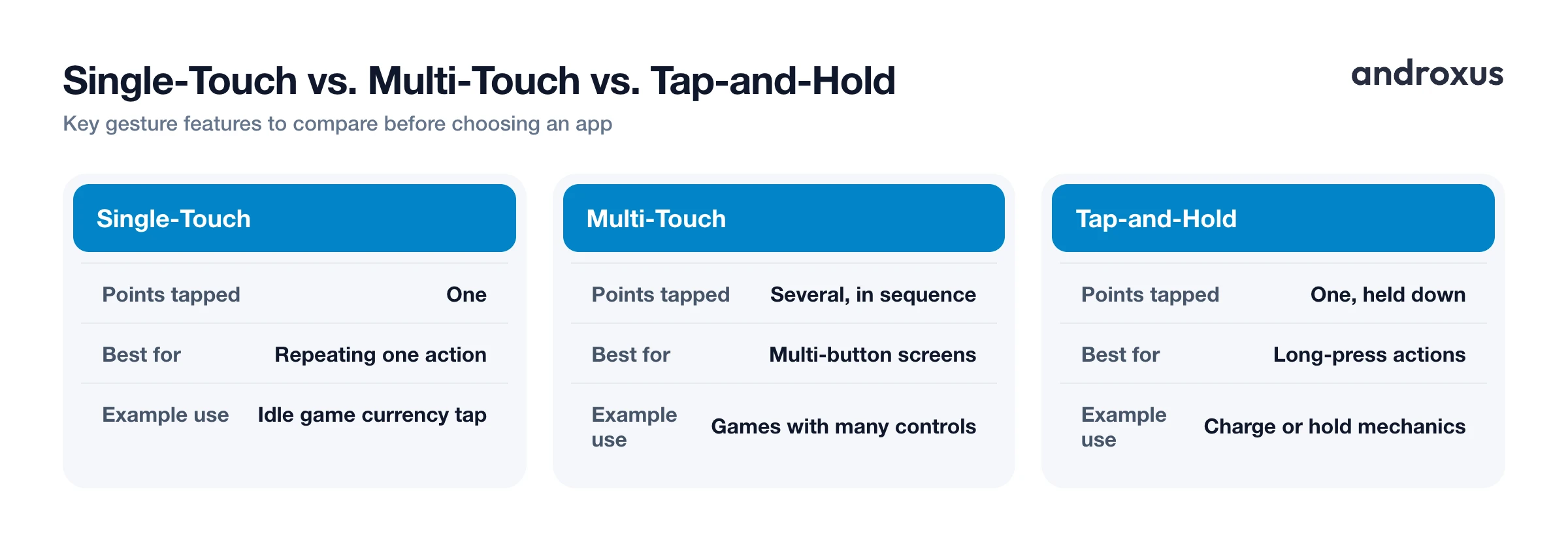
- Single-touch vs. multi-touch: Single-touch taps one point repeatedly. Multi-touch taps several points, which is useful for games with multiple on-screen buttons that all need pressing.
- Single-swipe vs. multi-swipe: This automates one dragging gesture, or several in sequence, useful for scrolling feeds or swipe-based game mechanics.
- Tap-and-hold (long press): Holds a point for a set duration rather than firing a quick tap, needed for actions that require a press-and-hold gesture.
- Adjustable interval and duration: How often a tap fires and how long it's held, usually configurable down to milliseconds.
- Script import and export: Lets a saved sequence of tap points and timings be reused or shared across sessions instead of rebuilding it every time.
- Floating control panel: A small on-screen widget to start, pause, or stop the automation without switching out of the app being automated.
Auto Clicker bundles most of these into one tool, single and multi-touch, single and multi-swipe, tap-and-hold, script import and export, and a floating panel, which is worth knowing if you want one app that covers several of these cases rather than juggling multiple tools.
Is Using an Auto Clicker Safe and Allowed?
There are two separate questions here: is it safe for your device, and is it allowed by the app or game you're using it in.
On the device side, since no root is required, the app doesn't need deep system access. A well-built auto clicker should only request the Accessibility Service and overlay permissions, and it should perform only the taps and swipes you configured, without collecting personal data.
On the rules side, the picture is mixed. Many online and mobile games explicitly prohibit bots, macros, and automation software in their terms of service. Supercell's terms, for example, bar "cheats, exploits, automation software, emulators, bots, hacks, mods." Violating those terms can lead to warnings or account bans. That's a policy risk coming from the game or service itself, not a device security issue.
At the same time, not every use runs afoul of any rules. Many idle and clicker games are designed around repetitive tapping and don't prohibit automating it. Non-game uses, like repetitive app tasks or testing, typically aren't covered by a game's anti-cheat terms at all.
The practical guidance: check the specific app or game's terms before automating anything competitive or multiplayer, and use automation only for actions within your own account or device, never to interfere with other users.
How to Set Up an Auto Clicker on Android
- Install a no-root auto clicker app. Download an auto clicker app from the Play Store, such as Flow Auto Clicker, which taps and swipes without requiring root access.
- Enable the Accessibility Service permission. Open the app and follow its prompt to Settings, Accessibility, find the app under the accessibility services list, and turn it on so it can dispatch the taps and swipes you configure.
- Allow "Display over other apps." Grant the overlay permission (Display over other apps or Appear on top, depending on device brand) so the app's floating control panel can sit on top of the app or game you want to automate.
- Set your tap or swipe points. Open the target app or game, then use the floating panel to place one or more tap points on screen, or define a swipe path, at the exact locations you want automated.
- Configure timing and gesture type. Set the interval between actions, choose single or multi-touch, add tap-and-hold where a long press is needed, and adjust duration to match what the task requires.
- Start, monitor, and stop as needed. Start the automation from the floating panel, keep an eye on it for the first few cycles to confirm it's hitting the right spots, and pause or stop it any time from the same panel.
Key takeaways
- An auto clicker android app repeats taps or swipes you've already defined; it doesn't play a game or decide anything for you.
- Android auto clickers work through the Accessibility Service, which means no root access is needed on a standard device.
- Expect two permissions: Accessibility Service for the gestures themselves, and Display over other apps for the floating control panel.
- Useful features to compare include multi-touch, multi-swipe, tap-and-hold, and script import and export.
- Automation is allowed in many idle and clicker games but banned in others, so check a game's terms before using one competitively.
Frequently asked questions
Does an Android auto clicker need root access?
No. Auto clicker apps on Android use the Accessibility Service to dispatch taps and swipes, which works on standard, non-rooted devices. Root was more commonly needed with older automation methods, not with accessibility-service-based apps.
What permissions does an auto clicker app ask for, and why?
Typically two: Accessibility Service, so the app can send the tap and swipe gestures you configure, and Display over other apps (also called overlay or SYSTEM_ALERT_WINDOW), so its floating control panel can appear on top of whatever app you're automating.
Is using an auto clicker against a game's rules?
It depends on the game. Many games' terms of service prohibit bots, macros, and automation software, and using one can risk a warning or ban, especially in competitive or multiplayer titles. Some idle and clicker games are built around repetitive tapping and don't restrict it. Always check the specific game's terms first.
Can an auto clicker tap more than one spot on the screen?
Yes, apps with multi-touch support can tap multiple points in sequence or pattern, which is useful for games or interfaces with several on-screen buttons that need pressing repeatedly.
Does an auto clicker app collect my personal data through the Accessibility Service?
A properly built auto clicker uses the Accessibility Service only to dispatch the taps and swipes you set up, not to read or transmit personal data. Because Accessibility Service is a sensitive permission, it's worth confirming an app's privacy practices before granting it.
Is Android's built-in 'Autoclick' feature the same as an auto clicker app?
No. Android's Autoclick (dwell timing), found in Settings, Accessibility, is a motor-accessibility feature that fires one click automatically after your pointer hovers in place. It's not designed for repeating taps at set intervals for tasks or games, which is what dedicated auto clicker apps do.
