What Is a Blue Light Filter and Does It Help Sleep?
Scrolling in bed with the lights off makes any screen feel glaringly bright, so it is no surprise that "blue light filter" is one of the most searched fixes for restless nights. But what does a blue light filter actually change on your phone, and does it really move the needle on sleep?
Quick answer: A blue light filter is a software color adjustment that shifts your screen's white point from a cool blue-white toward a warmer, orange-tinted light. It does this by overlaying a color filter on the display output, not by altering the hardware. It may modestly help with the light-driven part of sleep disruption, since blue-heavy light in the evening is known to suppress melatonin, but current research on filtering apps and glasses shows inconsistent real-world sleep benefits, so it is best treated as one small habit among several, not a guaranteed fix.
What you'll learn
- What a blue light filter changes on your screen, and what it leaves untouched
- What sleep research actually shows about blue light and melatonin
- Why the eye strain claims around blue light are weaker than most people assume
- How Android's built-in Night Light compares to third-party filter and dimming apps
- A practical routine for setting up a filter without wrecking color accuracy
What a blue light filter actually does to your screen
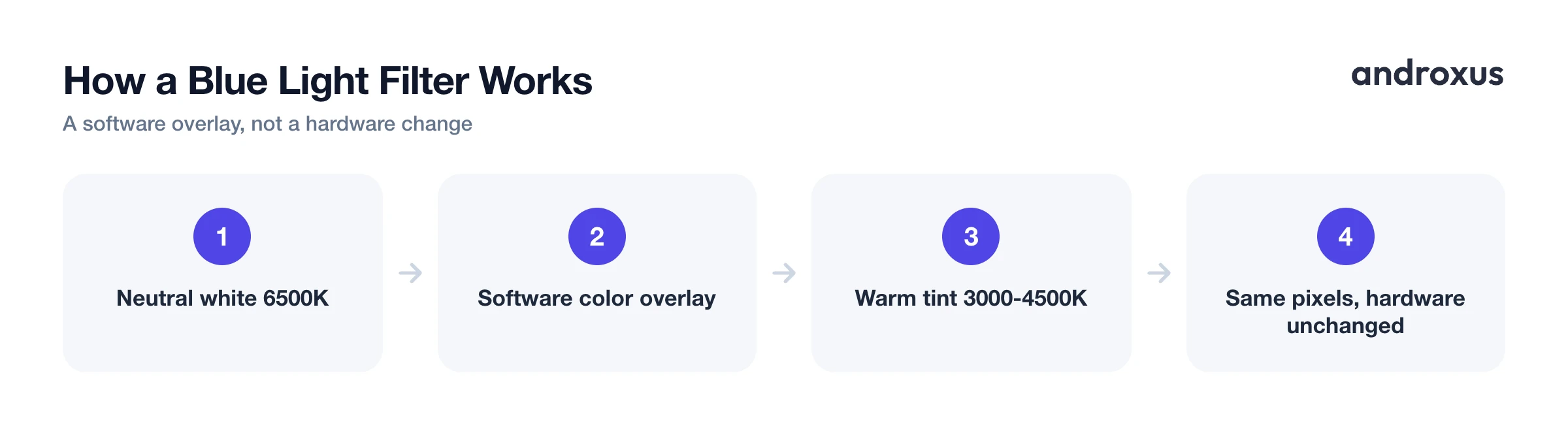
A blue light filter shifts your screen's color temperature from a neutral white, around 6500K, toward warmer tones, roughly 3000K to 4500K, similar to candlelight or a sunset. On Android this is a software color overlay applied to the display output. It is not a change to the physical screen hardware or the panel itself; the pixels are still capable of producing the full color range, the software is just telling them to render everything with less blue mixed in.
Android has shipped a built-in version of this since Android 7.1.1, called Night Light, found at Settings, Display, Night Light. It supports manual on and off, a custom schedule, or an automatic sunset-to-sunrise schedule, with a default custom window of 10:30 p.m. to 6:30 a.m. Samsung's equivalent is now usually labeled Eye Comfort Shield, previously called Blue Light Filter on older One UI versions, and it adjusts on a similar schedule-driven basis.
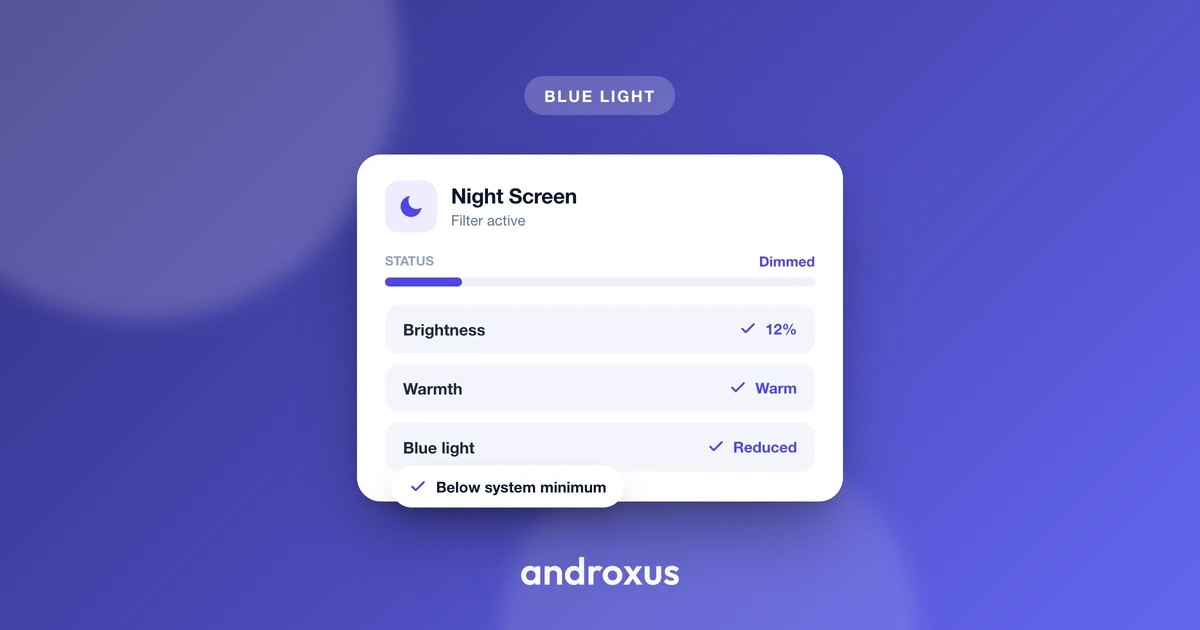
Some apps go a step further and add screen dimming on top of color filtering. This works by drawing a semi-transparent dark overlay on the display, which can make the screen appear dimmer than the hardware's minimum brightness allows, without actually lowering the backlight. Night Screen uses this approach: its dim light and blue-light filter modes are visual overlays layered on top of what the display is already producing, not a change to the physical brightness hardware. Drawing that overlay requires the "display over other apps" permission, the same one Android flags as sensitive since it is also used by overlay-based scams, so it is worth granting only to a reputable app for a purpose you understand.
What the sleep research actually shows
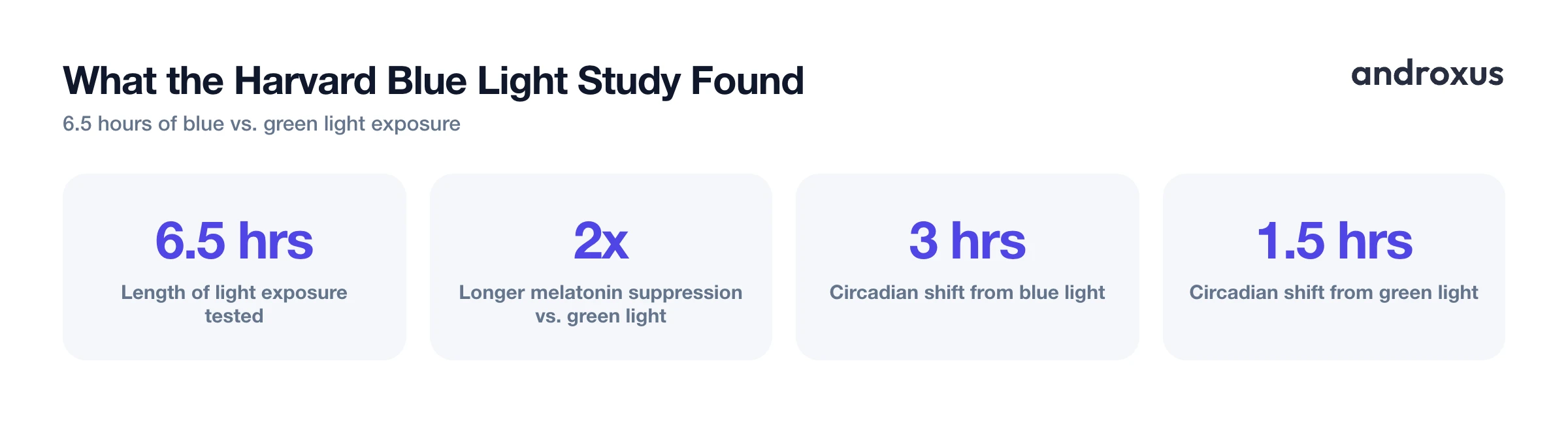
The strongest evidence behind blue light filtering comes from a well-known Harvard-affiliated experiment, which found that 6.5 hours of blue light exposure suppressed melatonin about twice as long as equally bright green light, and shifted circadian rhythm roughly twice as much, about 3 hours versus 1.5 hours. That result supports a general principle: light exposure in the evening, and blue-heavy light specifically, can delay melatonin release and push your natural sleep timing later.
Where the evidence gets shakier is whether blue-light filter apps or glasses translate that biology into a measurable improvement in real-world sleep. A 2024 observational study of smartphone users found no sustained positive effect across all sleep quality parameters from long-term use of blue light filtering apps. A 2025 systematic review and meta-analysis of blue-light blocking glasses similarly found mixed effects on objective sleep outcomes measured by actigraphy, often not explained by any change in melatonin secretion, with small sample sizes and inconsistent study designs limiting how much weight the findings can carry.
The honest takeaway: reducing blue light before bed is a low-cost, biologically plausible precaution, not a proven or guaranteed way to sleep better on its own.
Blue light filters and eye strain: a separate, weaker claim
Blue light filters are often marketed as an eye strain remedy too, but this claim rests on thinner ground than the sleep one. The American Academy of Ophthalmology states there is no scientific evidence that light from digital screens damages the eyes, and it does not recommend special eyewear for computer use. Multiple studies cited by ophthalmology groups found that blue-light blocking glasses did not measurably reduce digital eye strain symptoms compared with regular lenses.
What is typically behind digital eye strain is a reduced blink rate and sustained close-focus during screen use, not the blue wavelengths themselves. That said, a dimmer, warmer screen can still feel subjectively more comfortable in a dark room at night. That is a legitimate reason to use a filter, it is just not evidence that it is preventing eye damage.
Night Light vs. third-party apps vs. screen dimming apps
Android's built-in Night Light only shifts color temperature; it does not add extra brightness reduction beyond the system's normal minimum. Third-party apps build on that foundation with features like custom RGB filter colors instead of a fixed warm tone, gradual auto-schedules tied to sunset and morning, and overlay-based dimming that goes further than the hardware's minimum brightness.
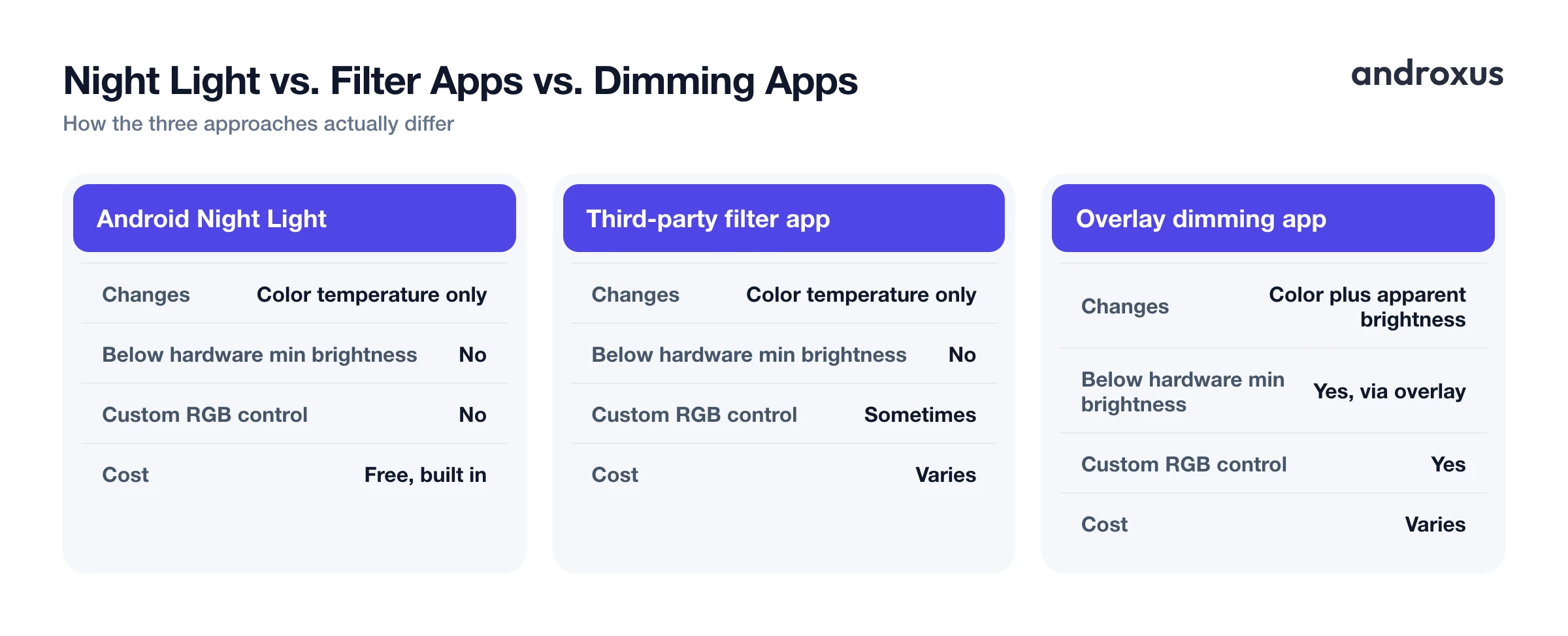
Any overlay-based dimming approach is a visual effect layered on the screen; it does not change the display panel's actual hardware brightness or the light output at the LED level. Here is how the main approaches compare:
| Feature | Android Night Light | Generic third-party filter app | Overlay dimming app (e.g. Night Screen) |
|---|---|---|---|
| What it changes | Color temperature only | Color temperature only | Color plus apparent brightness |
| Goes below hardware minimum brightness | No | No | Yes, via overlay |
| Scheduling | Custom or sunset-to-sunrise | Varies by app | Sunset-to-sunrise with gradual ramp |
| Custom RGB color control | No | Sometimes | Yes |
| Cost | Free, built in | Varies | Varies |
Night Screen, specifically, offers a dim light mode for extra-low apparent brightness, a blue-light filter reading mode, a custom RGB screen filter, and an auto-schedule that ramps on at sunset and off in the morning. All of it works through the same overlay mechanism described above, layered on top of, not replacing, your phone's actual display settings.
How to set up a blue light filter and dimming routine on Android
- Turn on Android's built-in Night Light. Go to Settings, Display, Night Light. Tap it on manually, or set a schedule, Custom or Sunset to sunrise, so it activates automatically in the evening.
- Adjust the intensity. Use the tint seekbar to control how far the color temperature shifts toward warm orange tones. A lighter tint keeps colors closer to normal; a stronger tint filters more blue but shifts colors further.
- Pick a schedule that matches your evening. Sunset to sunrise adjusts automatically with your location and the season. A custom schedule, for example 9 p.m. to 7 a.m., is more predictable if your bedtime is fixed.
- Add screen dimming for the last stretch before bed. If the display still feels too bright at its lowest hardware setting, an overlay-based dimming app such as Night Screen can add an extra layer of darkness for reading in bed, on top of or instead of a color filter.
- Turn the filter off for color-sensitive tasks. Disable Night Light or any overlay filter when editing photos, watching color-graded video, or during the day, since the warm tint changes how colors and skin tones actually look.
- Treat it as one part of a wind-down routine. Pair dimmer, warmer screens with the basics that have stronger evidence for sleep: a consistent bedtime, a dark room, and limiting screen use in the final 30 to 60 minutes before sleep.
Key takeaways
- A blue light filter is a color overlay that warms your screen's tone; it does not alter the physical display hardware.
- Blue light does suppress melatonin in controlled lab conditions, but real-world studies on filter apps and glasses show inconsistent sleep benefits, so treat it as a modest precaution, not a fix.
- Claims that blue light filters prevent eye damage or eye strain are not well supported; the American Academy of Ophthalmology finds no evidence of screen-related eye damage.
- Overlay-based dimming, the approach apps like Night Screen use, can make a screen look dimmer than the hardware's minimum, but it is a visual layer, not a hardware brightness change.
- The biggest tradeoff with any blue light filter is color accuracy, so turn it off for photo editing or video work and lean on it mainly in the evening.
Frequently asked questions
Does a blue light filter actually help you fall asleep faster?
It may help a little, but evidence is mixed. Blue light in the evening measurably suppresses melatonin, so reducing it before bed is a reasonable precaution. Randomized trials of blue-light filtering apps and glasses show inconsistent results on actual sleep quality, and a 2024 study found no sustained benefit across all sleep measures. Filters are one small piece of a wind-down routine, not a fix on their own.
Do blue light filters reduce eye strain?
Not clearly. The American Academy of Ophthalmology says there is no scientific evidence that screen light damages eyes, and several studies find blue light glasses do not improve digital eye strain symptoms. What actually causes eye strain is usually reduced blinking and prolonged close-up focus, not the blue wavelengths themselves. A warmer, dimmer screen can still feel more comfortable at night, even if the mechanism isn't blue light exposure.
What's the difference between Night Light and a blue-light filter app?
They're the same basic idea. Android's built-in Night Light (Settings, Display, Night Light) shifts the screen's color temperature warmer and can run on a sunset-to-sunrise schedule. Third-party apps like Night Screen offer similar tinting, sometimes paired with extra brightness reduction, custom color controls, or scheduling options the stock feature doesn't include.
Can a screen filter make my phone dimmer than the lowest system brightness?
A true hardware backlight has a minimum floor that Android's brightness slider can't go below. Apps that promise a screen dimmer than that minimum are doing it by drawing a semi-transparent dark overlay on top of the display, not by lowering the actual backlight. Night Screen works this way: it darkens what you see using an overlay, it does not change the physical hardware brightness.
Should I use a blue light filter every night or only sometimes?
There's no established rule, since the evidence for benefit is modest. Many people set an automatic schedule for the evening hours, for example from sunset until morning, so warmer, dimmer light happens by default before bed, without deciding it every night. Turning it off during the day maintains normal color accuracy while you don't need it.
Are blue light filters bad for color accuracy or photo editing?
Yes, that's a real tradeoff. Any blue light filter, whether it's Android's Night Light or a third-party overlay, shifts colors toward orange and reduces contrast. That's fine for reading or browsing before bed, but it will noticeably distort colors for photo editing, video color grading, or anything where accurate color matters, so most people turn it off during that kind of work.
