Touch the Notch: Turn Your Camera Cutout Into a Button
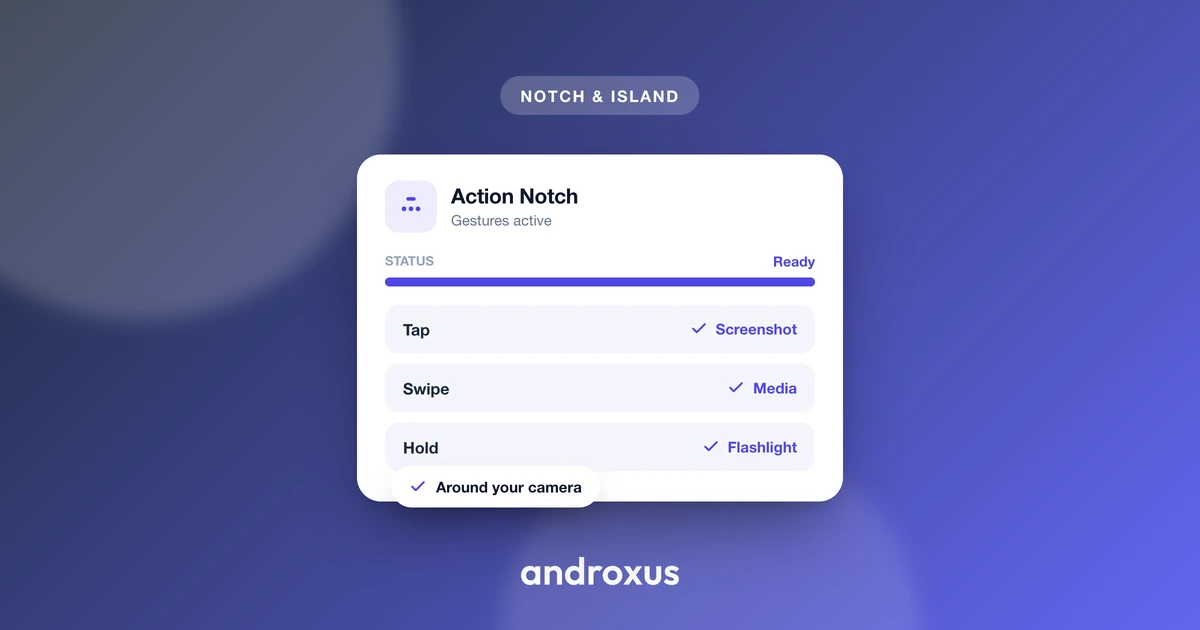
Every phone with a notch or punch-hole camera carries a small patch of screen that does nothing. It shows the clock and a battery icon, but tap it and nothing happens, which is a strange waste on a device where every other pixel is put to work. Touch the notch is the idea of reclaiming that exact patch: making it register taps, swipes, and long-presses like any other control.
Quick answer: You can touch the notch by installing an overlay app that positions an invisible, tappable window over your phone's camera cutout using Android's DisplayCutout API, then maps gestures there to real actions. A single tap might toggle the flashlight, a double-tap could snap a screenshot, a swipe can skip a media track, and a long-press can launch an app. It needs Display over other apps as its base permission, plus Accessibility and Notification access for specific features, no root required. This works on both notch and punch-hole phones running Android 9 or later.
What you'll learn
- Why the cutout area is dead space by default, and since when Android has exposed its exact shape to apps
- The technical mechanism: overlay windows, the DisplayCutout API, and which action needs which permission
- What gestures and actions make sense to map, and what happens if a mapped action looks grayed out
- The honest limits: what this does not do, and where OEM battery managers can interfere
- Step-by-step setup, in the order permissions actually need to be granted
The cutout is dead space, until software claims it
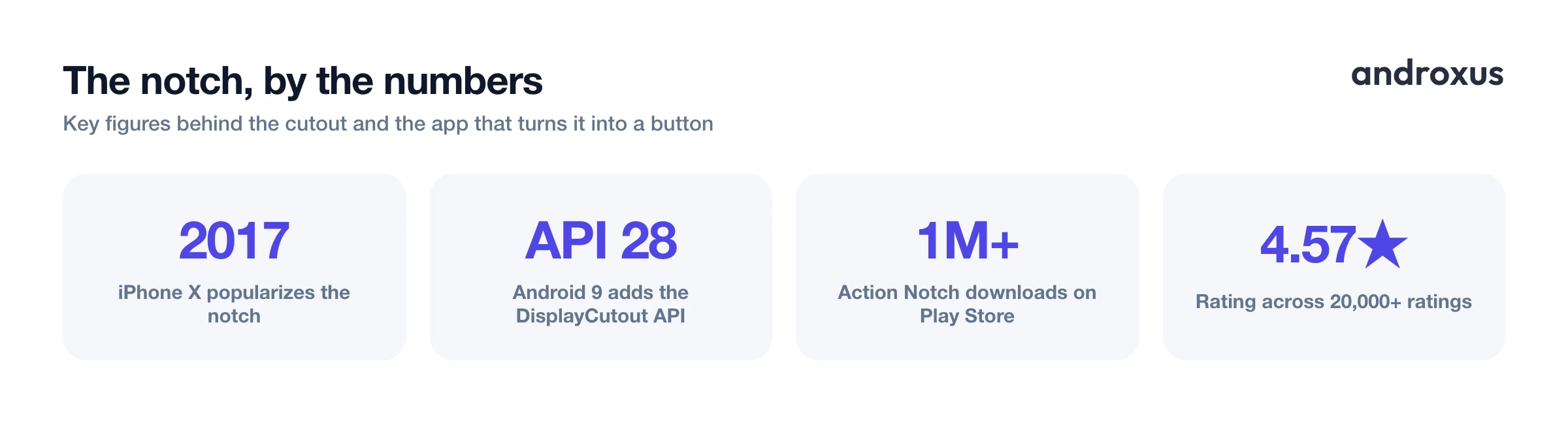
The notch, popularized by the iPhone X in 2017, and the punch-hole camera cutout that followed both exist for the same reason: manufacturers needed to fit a front camera into an otherwise edge-to-edge screen. By roughly 2019 to 2020, punch-hole cutouts had overtaken notches as the dominant design on Android flagships and mid-rangers, though people still commonly say notch for either shape. That habit is exactly why touch the notch and notch button remain the terms people search for, even on a phone that technically has a punch-hole.
On a stock phone, that cutout area is reserved screen space occupied by the status bar clock, battery icon, and signal indicators, with no touch interaction of its own. Since Android 9 (API level 28), Android has exposed the precise geometry of that cutout to developers through the DisplayCutout API, which returns safe insets and a bounding rectangle for each cutout edge. In modern apps that's accessed via WindowInsetsCompat.getDisplayCutout(). That API is the technical foundation for any app that claims to make a notch interactive: it lets an overlay align to a phone's specific cutout shape with precision instead of guessing at pixel coordinates.
How an overlay app makes a camera cutout button work
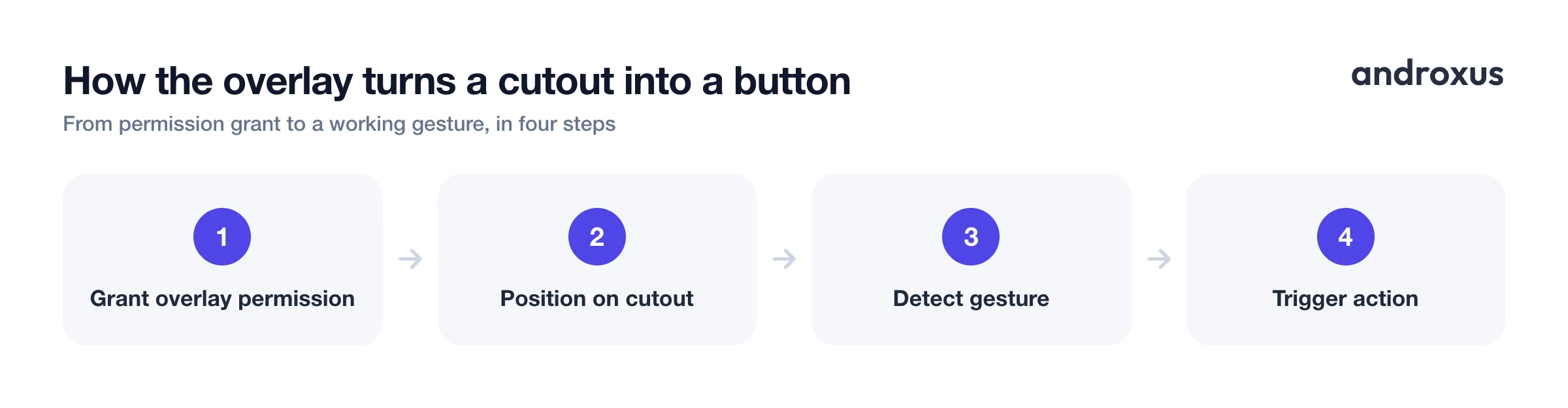
The mechanism is a screen overlay, not a system or hardware modification. The app requests Display over other apps, Android's SYSTEM_ALERT_WINDOW permission, which lets it draw a TYPE_APPLICATION_OVERLAY window on top of whatever else is on screen. Using the DisplayCutout bounding rectangles, the app positions that overlay directly at the cutout, often setting layoutInDisplayCutoutMode to ALWAYS so the window is permitted to extend into the cutout area itself.
From there, the overlay listens for gestures, tap, double-tap, swipe, long-press, within that specific screen region and translates each one into a command. Different commands depend on different underlying permissions. Media play/pause and track skip use Android's standard media session controls. Opening an app is a plain Intent call needing no extra permission. Screenshot and expanding the notification shade require an enabled Accessibility service calling performGlobalAction(), a call whose GLOBAL_ACTION_TAKE_SCREENSHOT constant was added in Android 9 and whose GLOBAL_ACTION_NOTIFICATIONS constant opens the shade. Toggling the flashlight uses the separate CameraManager.setTorchMode() torch API, not Accessibility at all.
Action Notch, whose tagline is literally Touch the Notch, is a working example of this exact pattern on the Play Store, with more than 1 million downloads and a 4.57 star rating across 20,000-plus ratings.
What you can map to each gesture
A typical setup pairs each gesture with one action: single tap for a quick toggle such as expanding the notification shade, double-tap for a screenshot, swipe for media track skip forward or back, and long-press to launch a chosen app. Each mapped action only works once its underlying permission is granted, so an action that appears grayed out in the app's settings usually means Accessibility or Notification access hasn't been enabled yet, not that the phone is incompatible.
Showing live notification content, sender name and message preview, around the cutout needs a NotificationListenerService specifically, which requires the user to grant Notification access, a toggle that's separate from both the overlay permission and Accessibility. Because the touch target is only as large as the physical cutout, some apps extend the interactive zone slightly beyond the cutout's actual edges so gestures land more reliably. That's a UI choice made for usability, not a change to the cutout's real size.
Real limits: what making a notch interactive does not mean
It's worth being direct about the boundaries, since touch the notch can sound like it implies a hardware upgrade. It doesn't.
- This is a software overlay, not a hardware feature. It does not modify the phone's cutout, screen, or camera, and it cannot add capability the display hardware doesn't already have.
- It does not improve performance or battery life. An always-on overlay, and an Accessibility service if one is enabled, consume a small amount of background resources rather than none.
- No root access is required or used anywhere in this process; everything runs through standard Android permissions granted in Settings.
- Aggressive battery managers on some OEM skins, notably Xiaomi's MIUI, Oppo's ColorOS, and vivo's Funtouch OS, are known for killing background services and overlays unless the app is manually exempted from battery optimization. That can make mapped gestures stop responding intermittently, which is a known OEM behavior rather than a bug in the overlay app itself.
- Accessibility service permission is sensitive and reviewed closely by the Play Store, so any app requesting it should explain clearly why, since only screenshot and other global system actions actually need it.
- This is not Apple's Dynamic Island. It's a software emulation of that interaction style layered on Android's existing display cutout, and it only works on hardware that reports cutout geometry in the first place; a phone with a full bezel, a pop-up camera, or an under-display camera has no DisplayCutout data for an overlay to attach to.
How this compares to OEM punch-hole features already built in
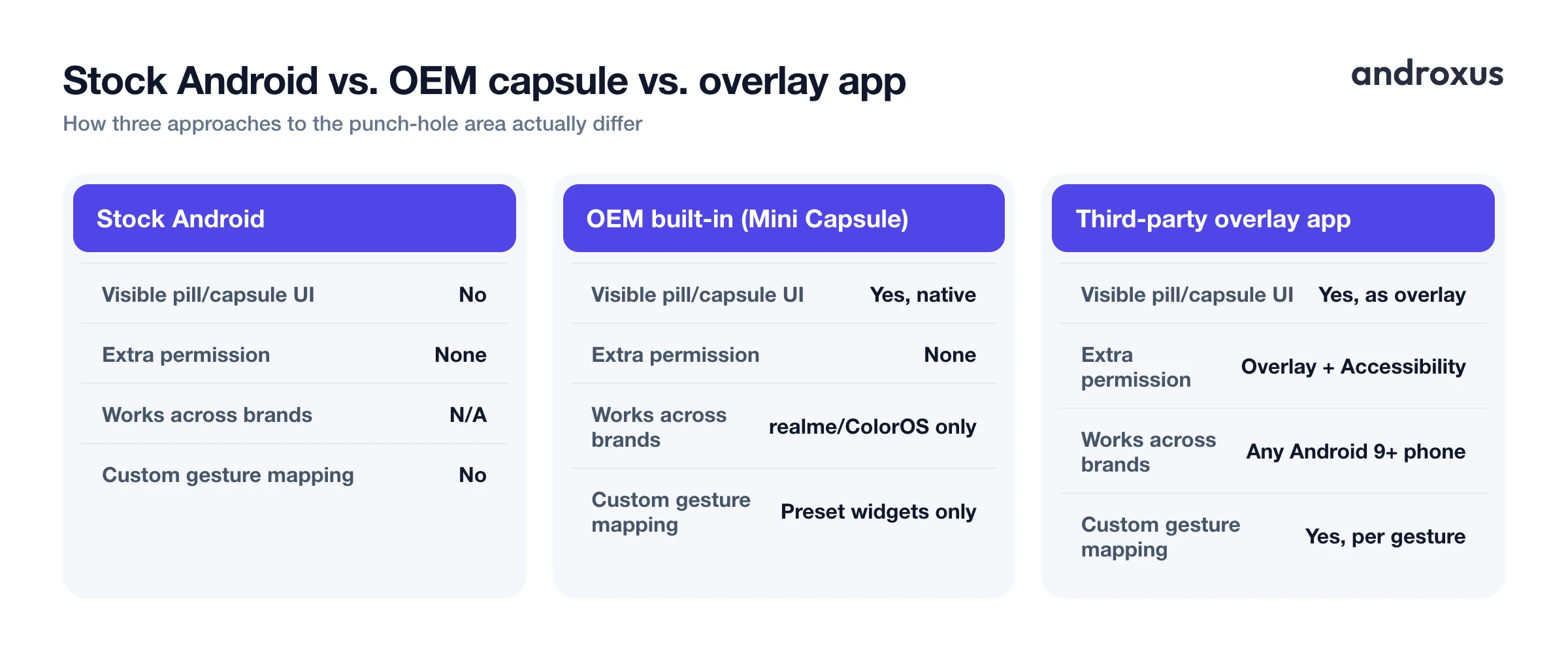
Some Android manufacturers ship similar pill or capsule interactions directly in their firmware, rather than as a separate download. realme's Mini Capsule, introduced with the Realme C55 in 2023, is a real, shipped example: a software UI that wraps a pill shape around the phone's punch-hole camera to show battery and charging status, data usage, and step count. It's built-in OEM software tied to realme and related ColorOS devices, not a downloadable app, and its behavior is preset by the manufacturer rather than configurable gesture by gesture.
Third-party overlay apps work differently: they run across any Android 9 or later phone with a cutout regardless of brand, and they let the user assign the specific gesture-to-action mapping instead of relying on a manufacturer's fixed set of widgets. Here's how the two approaches, plus stock Android with nothing installed, actually compare.
| Capability | Stock Android (no extra app) | OEM built-in feature (realme Mini Capsule) | Third-party overlay app (Action Notch) |
|---|---|---|---|
| Turns the cutout into a visible pill or capsule UI | No | Yes, native to the firmware | Yes, drawn as a screen overlay |
| Extra permission required | None | None, built into ColorOS | Display over other apps; Accessibility and/or Notification access depending on the mapped action |
| Works across phone brands | N/A | No, limited to realme/OPPO-family ColorOS devices | Yes, any Android 9+ phone with a reported display cutout |
| Tap, double-tap, swipe, long-press custom mapping | No | Limited to the OEM's preset widgets (battery, data usage, steps) | Yes, user-configurable per gesture |
| Requires root | No | No | No |
| Modifies phone hardware or the physical cutout | No | No | No |
| Improves battery life or performance | No | No | No |
How to touch the notch and turn your camera cutout into a button
- Grant the overlay permission. Enable Display over other apps for the app in system settings (Settings, Apps, Special app access, Display over other apps on most phones). This grants SYSTEM_ALERT_WINDOW and lets the app draw its interactive layer over the cutout.
- Enable Accessibility access for system actions. If you want gestures to trigger a screenshot or expand the notification shade, turn on the app's Accessibility service. These actions route through Android's performGlobalAction() call and will not work without it.
- Turn on Notification access for notification previews. Grant Notification access separately (Settings, Notification access) if you want sender and message previews to appear around the cutout. This uses a NotificationListenerService and is independent of the overlay and Accessibility permissions.
- Open the gesture mapping screen. Assign a distinct action to each supported gesture, tap, double-tap, swipe, and long-press, from the app's settings.
- Test each gesture directly over the cutout. Confirm each mapped action fires reliably within the cutout zone and does not conflict with system gestures like pulling down the status bar from the same area.
- Exempt the app from battery optimization if gestures stop responding. On OEM skins known for aggressive background app killing (MIUI, ColorOS, Funtouch OS), whitelist the app in battery settings so its overlay and Accessibility service keep running in the background.
Key takeaways
- Touch the notch means turning the dead space around a camera cutout into a tappable zone using an overlay window positioned with Android's DisplayCutout API, available since Android 9.
- Different mapped actions need different permissions: the overlay itself needs Display over other apps, screenshot and shade actions need Accessibility, and notification previews need Notification access, granted separately.
- It works on both notches and punch-holes since both report the same cutout geometry, but it has nothing to attach to on a full-bezel, pop-up camera, or under-display camera phone.
- No root is needed, and it honestly does not improve battery life or performance, it's a small always-on overlay, not a system optimization.
- OEM firmware features like realme's Mini Capsule offer a preset version of this idea, while a configurable overlay app works across brands and lets you choose exactly which gesture triggers which action.
Frequently asked questions
Does turning my notch into a button require root access?
No. Making a notch or punch-hole interactive relies on standard Android permissions: Display over other apps (SYSTEM_ALERT_WINDOW), an optional Accessibility service for system-level actions, and an optional Notification access grant for showing notification previews. None of this requires rooting the phone.
Is this the same thing as the iPhone's Dynamic Island?
No. Dynamic Island is Apple's combined hardware and software feature built into iPhone 14 Pro and later models. Making an Android notch or punch-hole area interactive is a software overlay that imitates that interaction style using Android's existing display cutout. It does not add new hardware capability or replicate Apple's exact feature.
What is the minimum permission needed to make the cutout tappable at all?
Display over other apps, which is Android's SYSTEM_ALERT_WINDOW permission. That alone lets an app draw an overlay window positioned at the cutout and detect taps, swipes, and long-presses on it. Actions like taking a screenshot or expanding the notification shade additionally require the Accessibility permission, since they call performGlobalAction().
Does this work on punch-hole phones, or only on phones with an actual notch?
Both. Android's DisplayCutout API, available since Android 9 (API level 28), reports the bounding shape of notches and punch-hole camera cutouts using the same method, so an overlay app can position itself against either type of cutout.
Will making the cutout interactive drain my battery or slow down my phone?
It does not improve performance or battery life, and it should not be expected to. A persistent overlay window, and an active Accessibility service if one is enabled, use a small amount of background resources, so any real-world effect is a minor, not negative, battery draw rather than any speed or efficiency gain.
What happens if my phone doesn't have a notch or punch-hole cutout?
The DisplayCutout API has nothing to report on a phone with a full bezel, a pop-up camera, or an under-display camera, so there is no cutout geometry for an overlay to attach to. The specific effect of interacting with the cutout itself won't apply on that hardware, though a floating shortcut placed elsewhere on screen still could.
