How to Create a Scrolling Text Banner for Events
A scrolling text banner on a phone screen is one of the fastest ways to add a bit of signage energy to a party, wedding, or pop-up shop without printing anything or renting real LED hardware. Get the message, size, and speed right, and it reads clearly across a table; get them wrong, and it turns into an illegible blur.
Quick answer: A readable scrolling text banner for an event needs a short, chunked phrase (roughly three lines of five words), a scroll speed around 10 to 15 characters per second, and bright text on a dark background for contrast. Because phone screens are small, treat the banner as close-range signage readable within about 10 to 15 feet, not a room-spanning sign, and position it somewhere guests will pass closely, like a reception desk or photo backdrop.
What you'll learn
- Why moving text grabs attention at events and when to use it instead of a static sign
- How to write and format a message so it stays readable while scrolling
- Which colors, contrast, and effects work best in a dark venue
- How far away a phone-screen banner can realistically be read
- How to keep the screen on and safe for the length of the event
Why scrolling text still grabs attention at events
Legibility for any sign, phone-based or physical, comes down to letter height and viewing distance more than color or motion alone. Sign designers use a long-standing rule of thumb: about 1 inch of letter height for every 10 feet of readable distance. That rule matters here because it sets honest expectations for what a phone screen can and can't do.
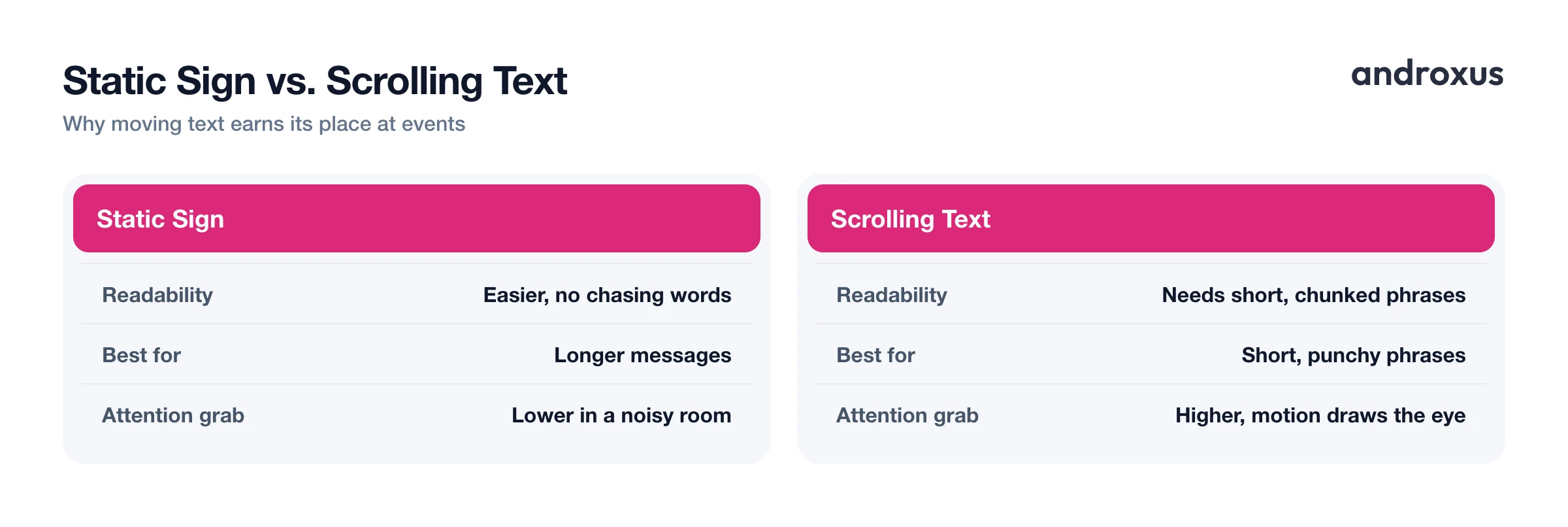
Static messages are generally easier to read and remember than scrolling ones, since the eye doesn't have to chase the words, so scrolling text works best for short, punchy phrases rather than long paragraphs. What scrolling text does uniquely well is catch the eye in a crowded, noisy room. Motion is a natural attention magnet, which is why moving text shows up so often at concerts, parties, and promotions for things like name reveals, hashtags, countdowns, or shoutouts.
A phone-based scrolling banner app like LED Flow makes this easy to set up in minutes for a pop-up event where a printed sign or a physical LED display isn't practical, whether that's a birthday table, a small vendor booth, or a photo backdrop.
How to write a message people can actually read while it scrolls
A common rule of thumb for horizontally scrolling LED signage is that roughly 10 to 15 characters per second is the readable sweet spot. Push noticeably faster than that and viewers start missing words, since they only get a brief window to catch each word as it crosses the screen.
Professional sign designers lean on what's sometimes called a 3x5 rule to keep messages short and chunked: three lines of about five words each, or five lines of about three words each. A few practical habits that follow from this:
- Cut the message down to the essential phrase, not a full sentence.
- Use a bold, simple, sans-serif-style font rather than a thin or decorative script, since bold shapes read faster at a glance and at speed.
- Front-load the important word, a name, a time, or "FREE", since many viewers only catch part of a scrolling line before it moves on.
- Repeat the message in a loop rather than trying to cram everything into one long pass.
Colors, contrast, and effects that cut through a dark room
Color combination and contrast matter almost as much as raw size for how far away the text stays legible. Bright text, white or a neon tone, against a true dark or black background gives the strongest contrast. That's the same principle behind why text appears to glow on an OLED or AMOLED phone screen: the black pixels around it are actually switched off, which deepens the contrast further.
In LED Flow, the background and LED dot pattern controls (dot size and gap) let you tune the look of the banner, from a chunky retro signboard feel to a tighter, cleaner matrix. Optional blink and neon glow effects can help too, but they work best used sparingly, on one accent word or emoji rather than the whole line, so the core message stays the easiest part to read. High-Quality Mode is worth trying if you want the display to look closer to a real LED matrix rather than flat text on a screen.
How far away can people read it? Sizing your phone-screen sign
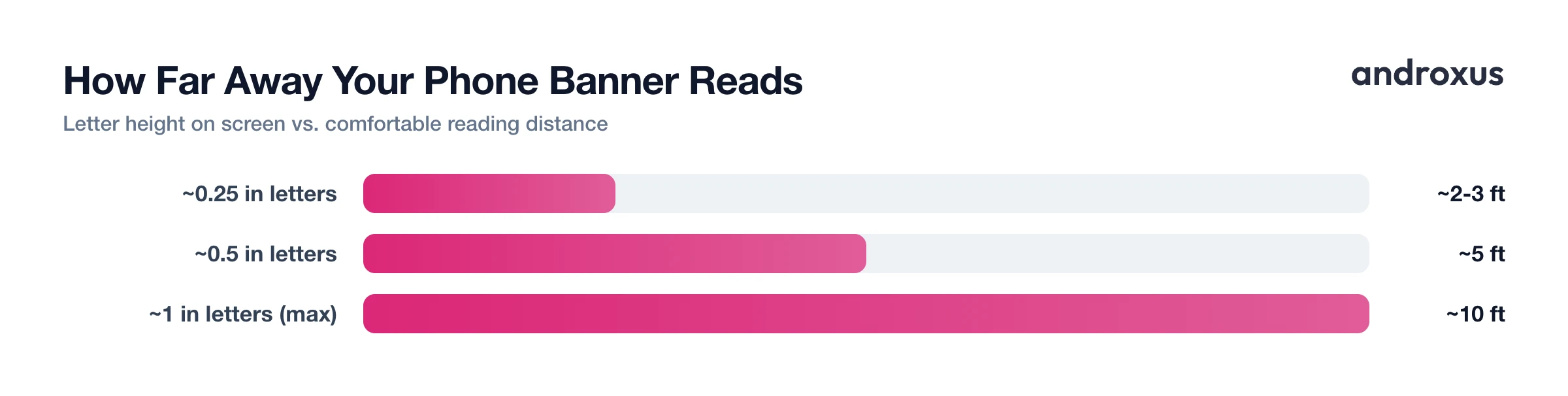
Applying the 1-inch-per-10-feet rule to phone-sized text explains why a phone screen is inherently a close-range medium. Even the largest comfortable font on a phone produces letters roughly an inch tall or less, which caps easy readability at around 10 to 15 feet. That's very different from commercial LED signage, which can use letters many inches or feet tall to be read across a parking lot or a stadium.
Because of that scale difference, a phone-screen scrolling banner fits placements where guests walk past closely rather than spots meant to be seen across a large hall.
| Approx. letter height on screen | Comfortable reading distance | Good event placement |
|---|---|---|
| ~0.25 in | ~2 to 3 ft | Table centerpiece or place-card holder |
| ~0.5 in | ~5 ft | Reception desk or gift table |
| ~1 in (largest comfortable phone font) | ~10 ft | DJ booth, entrance, or photo backdrop |
Setting expectations this way avoids the most common letdown: propping a phone up expecting it to work like a storefront LED sign, then being surprised when it only reads clearly up close.
Keeping the screen on (and safe) for the whole event
Android phones lock and dim the screen by default, which will cut a banner off mid-event if you don't plan for it. Extend the timeout at Settings > Display > Screen timeout, or go a step further and enable Stay awake under Settings > System > Developer options, which keeps the screen on continuously while the phone is charging. If Developer options isn't visible yet, unlock it by tapping Build number seven times in Settings > About phone.
On the burn-in question: OLED burn-in comes from the same static pixels being lit at a fixed brightness for very long stretches, generally only a real concern after many hours or days of a truly unmoving image, not a few hours at a party. Because scrolling text is inherently moving rather than static, it carries much lower burn-in risk than a fixed logo left up for days. LED Flow's OLED burn-in protection setting adds an extra safeguard for longer or stationary marquee sessions. It's also worth keeping the phone plugged in, since a bright, always-on screen drains the battery quickly.
How to set up a scrolling text banner for an event
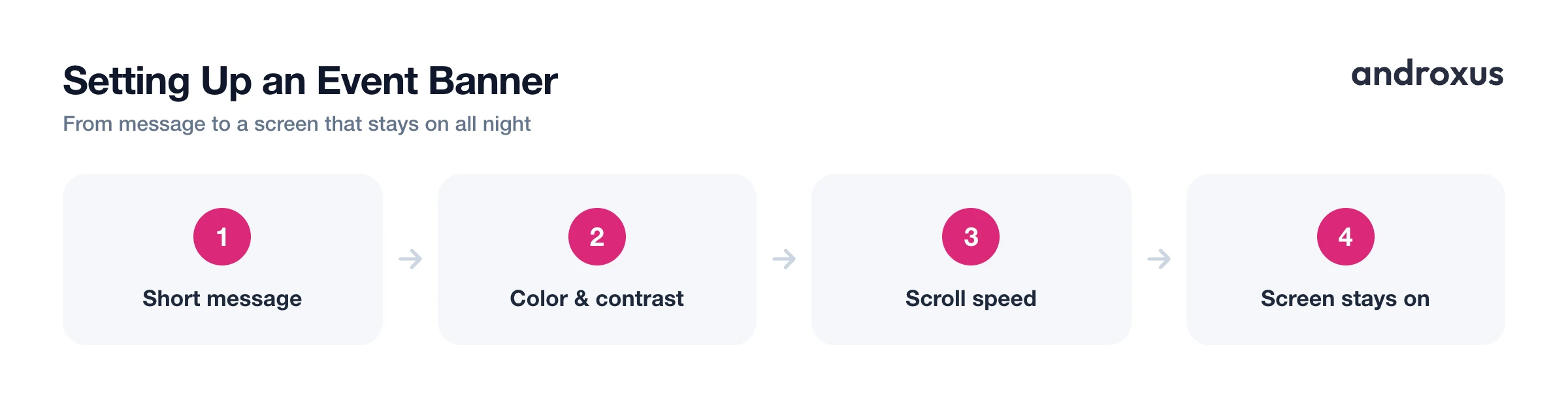
- Write a short, chunked message. Trim your message to a short phrase rather than a full sentence. Use a 3x5 rule, three lines of about five words or five lines of about three words, and front-load the important word (the name, the time, FREE) since scrolling text is often read in glances.
- Set the font, size, and color. Choose a bold, simple font and size it as large as the phrase allows. Pick a bright text color, white or a neon tone, that contrasts strongly against a dark background.
- Pick a background and LED dot pattern. Choose a dark background and adjust the LED dot size and gap to match the look you want, from a chunky retro signboard to a tighter, cleaner matrix.
- Choose scroll direction and speed. Set the text to scroll left-to-right, right-to-left, or stay as a stationary marquee. Aim for a moderate speed, roughly in the 10 to 15 characters per second comfort range, and slow it down further for longer phrases.
- Add blink or glow sparingly. Use the blink or neon glow effect on an accent word or emoji rather than the whole line, so the main message stays easy to read. Try High-Quality Mode if you want the display to look closer to a real LED matrix.
- Turn up brightness and stop the screen from locking. Raise phone brightness for visibility, then extend Settings > Display > Screen timeout or enable Stay awake in Developer options so the screen doesn't lock mid-event. Keep the phone plugged in, since a bright always-on screen drains the battery quickly.
- Position the phone within reading distance. Prop the phone on a stand at a spot guests will pass close to, a reception desk, DJ booth, entrance table, or photo backdrop, since a phone-screen banner is a close-range sign rather than a room-spanning one. Double-tap the screen to exit when the event wraps up.
Key takeaways
- Keep the message short and chunked, roughly three lines of five words, and front-load the key word so it reads clearly while scrolling.
- Aim for a moderate scroll speed around 10 to 15 characters per second; faster speeds cut comprehension noticeably.
- Bright text on a dark background gives the strongest contrast, especially on an OLED screen where black pixels are switched off.
- Treat a phone-screen banner as close-range signage, readable within roughly 10 to 15 feet, and place it where guests pass by closely.
- Extend the screen timeout or enable Stay awake so the display doesn't lock mid-event, and keep the phone plugged in since moving text is lower burn-in risk than a static image but brightness still drains the battery.
Frequently asked questions
How far away can people actually read a scrolling message on a phone screen?
Sign-industry research uses a rough rule of thumb of about 1 inch of letter height per 10 feet of clear readability. A phone screen can only fit letters a fraction of that size, so treat it as close-range signage, comfortably readable within roughly 10 to 15 feet, not across a large hall.
What's the best scroll speed for an event message?
A common rule of thumb for scrolling LED signage is about 10 to 15 characters per second as a comfortable comprehension speed. Push noticeably faster than that and viewers start missing words before the phrase finishes crossing the screen, so it's better to start slower and only speed up if the phrase is short.
Can LED Flow control a real LED sign or physical hardware?
No. LED Flow displays a simulated LED banner on the phone's own screen. It is not a controller for external or physical LED hardware or signage.
Will running a scrolling message all night damage my phone's screen?
Real OLED burn-in typically takes many hours or days of a truly static, unmoving image at high brightness. Moving, scrolling text is inherently lower risk than a fixed static logo left up for days, and LED Flow also includes an OLED burn-in protection setting as an extra safeguard for longer or stationary sessions.
What colors read best for a nighttime party or dark venue?
Bright text such as white or neon colors against a dark or black background gives the strongest contrast, the same reason text appears to glow on an OLED phone screen where black pixels are actually switched off. Getting that color pairing right can noticeably extend how far away the text stays legible, even before you change size or speed.
Should I stop my phone's screen from locking during the event?
Yes. Extend the timeout at Settings > Display > Screen timeout, or enable Stay awake under Settings > System > Developer options, which keeps the screen on while charging. If Developer options isn't visible yet, unlock it by tapping Build number seven times in Settings > About phone.
