Punch Hole vs Notch vs Dynamic Island: The Difference
Every phone screen made in the last few years has some kind of cutout for the front camera, but "notch," "punch-hole," and "Dynamic Island" don't all mean the same thing. Two of those are hardware shapes and one is a software feature, and mixing them up makes it hard to know what your own phone actually has, or what you're shopping for. Here's the punch hole vs notch vs Dynamic Island breakdown, in plain terms.
Quick answer: A notch and a punch-hole are both physical holes cut into the display, a notch is a wider shape that historically housed extra sensors, while a punch-hole is a small circle or pill that fits just the camera lens and preserves more screen space. Dynamic Island is not a new cutout shape at all, it's Apple's software feature, introduced on the iPhone 14 Pro, that animates content around the iPhone's existing pill-and-circle sensor cutout. In short: notch and punch-hole describe hardware, Dynamic Island describes software running on top of specific hardware.
What you'll learn
- What actually distinguishes a notch, a punch-hole, and Dynamic Island
- How punch-hole and notch compare on screen space and where each still shows up
- How Dynamic Island works as a software layer, not a new cutout shape
- What Android offers as an alternative to Dynamic Island
- How to make any cutout, notch or punch-hole, more useful as a shortcut
What Each Cutout Actually Is
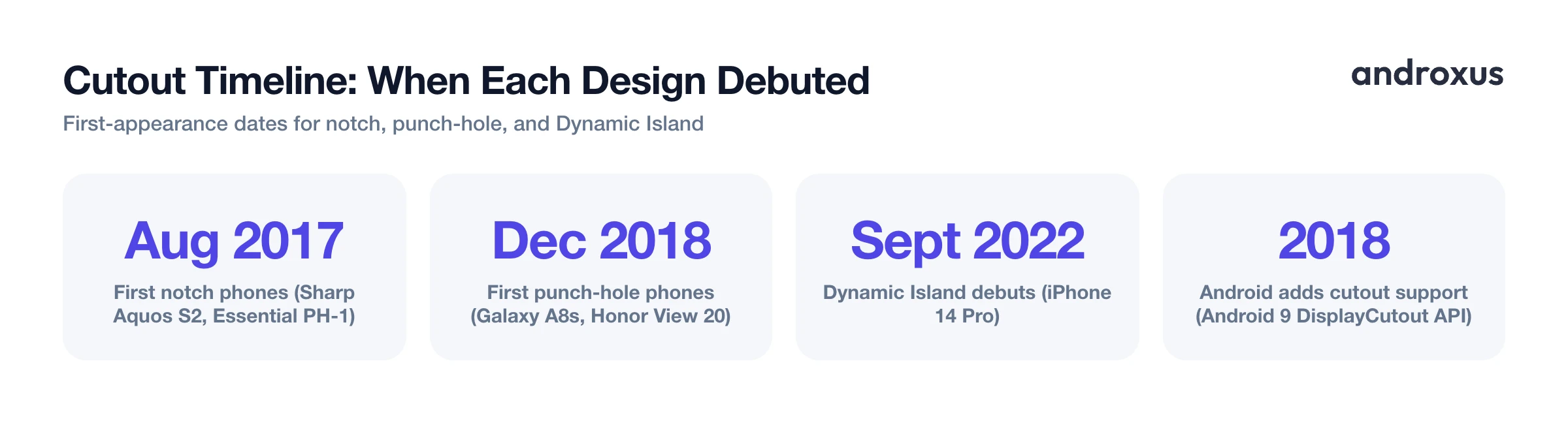
A notch is a wide hardware carve-out at the top of the screen. The first notch phones were the Sharp Aquos S2 and the Essential Phone PH-1, both launched in August 2017, though it was Apple's iPhone X later that year that made the design mainstream and gave it the "notch" name in everyday use.
A punch-hole, sometimes called hole-punch, is a smaller circular or pill-shaped hole drilled directly into the display panel for just the front camera lens, with no room for extra sensors. The first punch-hole phones were the Samsung Galaxy A8s and the Honor View 20, both launched in December 2018, arriving within days of each other.
Dynamic Island is not a new cutout shape at all. It's Apple's software layer, introduced with the iPhone 14 Pro in September 2022, that animates content around the iPhone's camera and Face ID cutout. That's the core distinction worth remembering: notch and punch-hole describe physical hardware shapes cut into a display, while Dynamic Island describes an interactive software UI built on top of one particular hardware layout.
Punch-Hole vs Notch: The Hardware Comparison
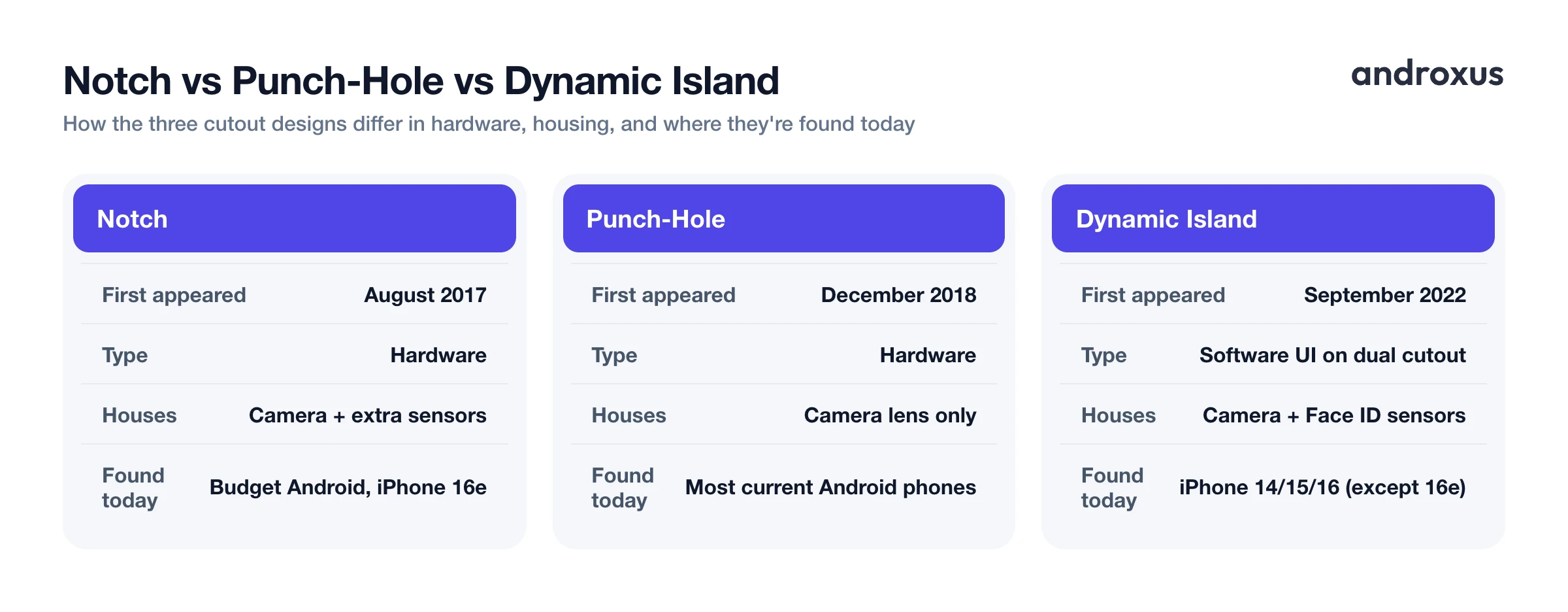
Notches are wider because early designs, like the iPhone X's TrueDepth camera array, needed room for multiple sensors, an earpiece speaker, and sometimes an infrared emitter for face-mapping, not just a single camera. Punch-holes only need to fit one front camera lens, so they recover noticeably more usable screen area than a notch does.
Because of that space advantage, punch-hole became the dominant Android front-camera design starting around 2019 to 2020, and it has stayed dominant since. Notches persist mainly on budget or lower-cost Android devices, and even Apple's cheaper iPhone 16e uses a notch instead of Dynamic Island, likely to keep manufacturing costs down.
On the software side, Android has supported cutouts of any shape since Android P (Android 9) in 2018, through the DisplayCutout API. This lets apps query the size of a cutout and use layoutInDisplayCutoutMode to decide whether their content should render around the cutout or avoid it entirely, which is part of why both notch and punch-hole phones can run the same apps without broken layouts.
Dynamic Island: Apple's Software Layer Explained
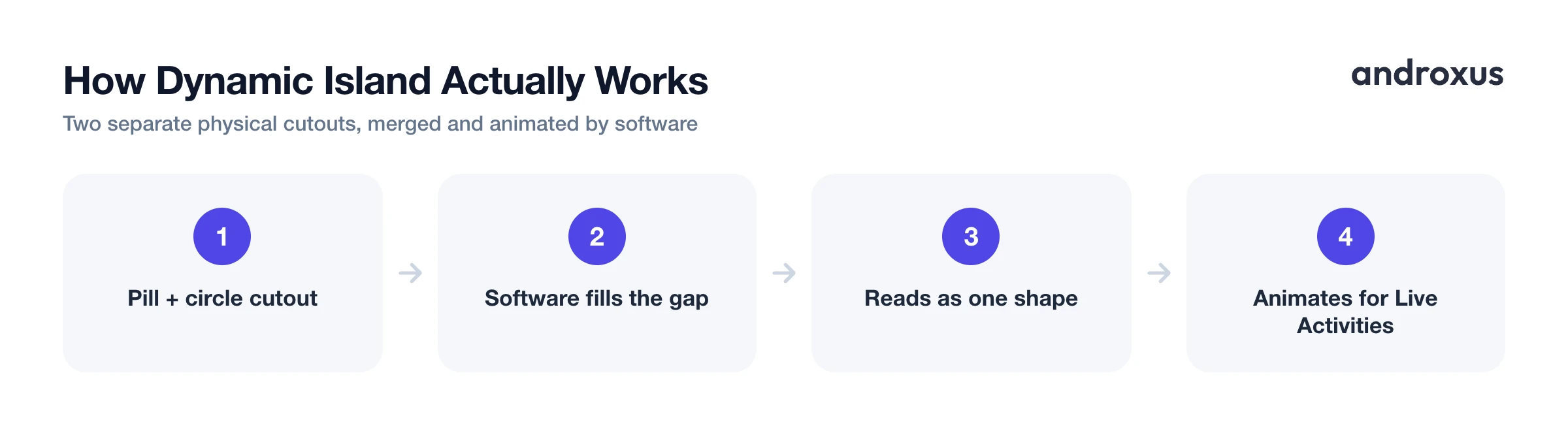
Here's the part that surprises a lot of people: physically, the iPhone 14 Pro didn't keep a single notch, it replaced it with two separate cutouts, a pill-shaped one for the TrueDepth and Face ID sensors, and a circular one for the camera. Apple's software then renders black space between and around those two cutouts so they visually read as one continuous pill. That combined, animated shape is what Apple branded Dynamic Island.
Because the two cutouts are physically separate, Dynamic Island can split into two independent info bubbles at once, showing a timer counting down on one side and music controls on the other, for example. It's used to surface Live Activities: incoming calls, the Face ID confirmation animation, timers, sports scores, turn-by-turn navigation, AirPods connection status, and music playback controls, all expanding and contracting with animation as you interact.
Dynamic Island shipped first on the iPhone 14 Pro and Pro Max, then expanded to every iPhone 15 model, and now covers most iPhone 16 models, with the budget iPhone 16e as the exception that kept a traditional notch.
Does Android Have Anything Like It?
There's no identical Android equivalent, since Dynamic Island is proprietary Apple software tied to specific iPhone hardware. But Android has built its own software approximations on top of existing punch-hole and notch cutouts.
Google introduced Live Updates in Android 16: an animated status-bar chip that expands from the notification shade, also visible on the Always-On Display on supporting devices, aimed at ongoing activities like deliveries, rideshares, and navigation. Early rollouts of Live Updates were limited, notably lacking support for media playback and timers from third-party apps at launch, a gap that OEMs and third-party apps have been working to fill.
OEM skins had already built their own versions before that. OPPO's ColorOS 14 and OnePlus's OxygenOS 14 introduced an animated capsule called Fluid Cloud, which OnePlus later renamed Live Alerts on its own devices, that wraps around the front camera cutout for notifications and ongoing activities. Realme, which shares BBK Electronics' parent company with OPPO and OnePlus, ships a similar feature called Mini Capsule on Realme UI. These are all software UI layers running on top of a phone's existing punch-hole or notch hardware, not a new physical cutout technology.
| Cutout Type | First Appeared | Hardware or Software | What It Physically Houses | Where You'll Find It Today |
|---|---|---|---|---|
| Notch | August 2017 | Hardware | Camera plus extra sensors | Budget Android phones, iPhone 16e |
| Punch-hole | December 2018 | Hardware | Camera lens only | Most current Android phones |
| Dynamic Island | September 2022 | Software UI on a dual pill+circle cutout | Camera plus Face ID sensors | iPhone 14 Pro, 15, and 16 series (except 16e) |
| Live Updates / OEM capsule | 2023 to 2026 | Software UI on an existing punch-hole | Camera lens only | Android 16 devices, OnePlus/OPPO phones with Live Alerts or Fluid Cloud, Realme phones with Mini Capsule |
Making Any Cutout More Useful With a Shortcut Overlay
Most Android phones ship with either a plain notch or a plain punch-hole and no built-in animated software layer around it. That leaves the area right around the cutout as dead space most of the day.
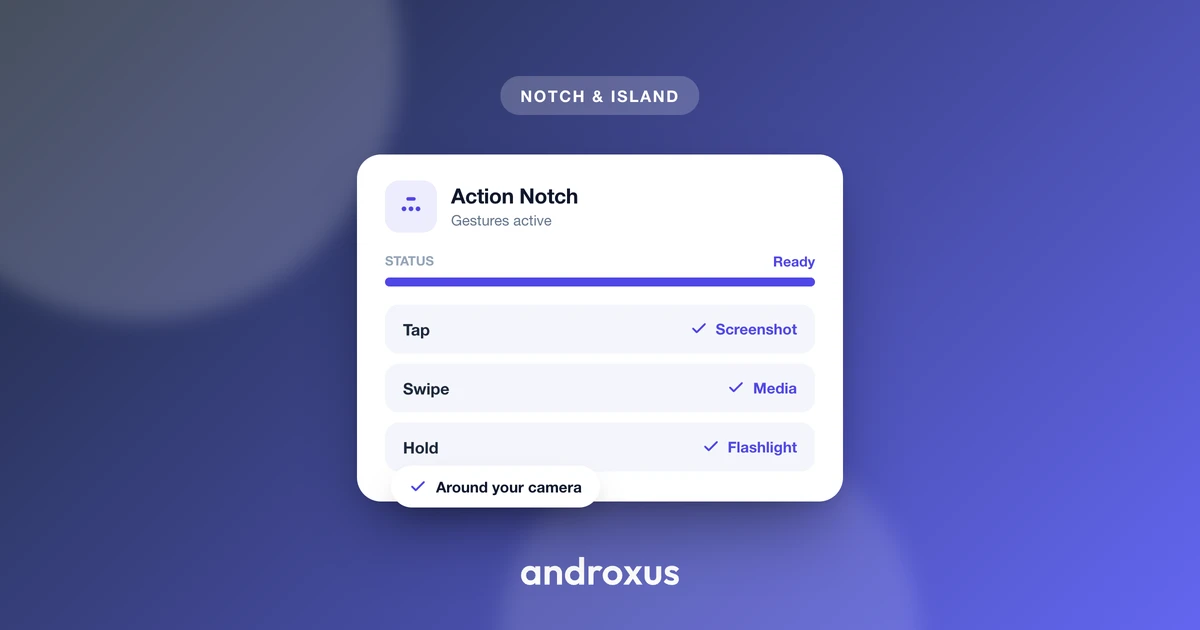
Accessibility Service based apps can place an invisible, tappable overlay zone around whatever cutout a phone already has, without altering the physical screen or adding real hardware. Action Notch is one example: it uses Android's Accessibility Service to turn the existing camera cutout into a shortcut button that responds to tap, double-tap, long-press, and swipe, triggering actions like flashlight, screenshot, front or back camera recording, Do Not Disturb, or launching a favorite app. It's explicitly a shortcut and overlay tool, it doesn't modify hardware, doesn't create a true Dynamic Island, and the accessibility service doesn't collect user data.
This kind of app is most useful for anyone whose phone has a notch or punch-hole but no OEM-provided animated capsule feature, giving that cutout area a practical function instead of leaving it unused.
How to Identify and Get More Out of Your Phone's Cutout
- Identify your phone's cutout type. Look at the top of your screen. A wide black shape cutting into the status bar is a notch; a small circle or pill sitting inside the status bar is a punch-hole; an animated black pill that grows and shrinks with notifications, on an iPhone 14 Pro or newer that isn't the 16e, is Dynamic Island.
- Check what your phone's software already offers. On recent iPhones with Dynamic Island, activities appear automatically and there's nothing to install. On Android 16 devices, check Settings for Live Updates support with apps like delivery or navigation. On OnePlus or OPPO devices, look for Live Alerts or Fluid Cloud, and on Realme devices, look for Mini Capsule, in system settings.
- Install a cutout-shortcut app if you want more control. If your Android phone has a plain notch or punch-hole with no built-in animated UI, an app like Action Notch can turn that existing cutout into an interactive shortcut zone.
- Grant the Accessibility Service permission. Enable the app's Accessibility Service when prompted so it can draw the invisible overlay button around the cutout. This permission is what lets the overlay detect taps without needing to modify system files.
- Assign gestures to actions. In the app, map tap, double-tap, long-press, and swipe to the shortcuts you use most, such as flashlight, screenshot, screen off, or launching a favorite app, then test each gesture around the cutout.
Key takeaways
- Notch and punch-hole are both physical hardware cutouts; Dynamic Island is a software feature layered on top of a specific dual-cutout iPhone design.
- Punch-hole recovers more screen space than a notch and has been the dominant Android design since around 2019, while notches now mostly appear on budget devices.
- Dynamic Island debuted on the iPhone 14 Pro in September 2022 and now covers most current iPhones except the notch-equipped iPhone 16e.
- Android's closest answers are Google's Live Updates in Android 16 and OEM features like OnePlus/OPPO's Live Alerts, both of which are software UI wrapped around an existing punch-hole.
- Whatever cutout your phone has, apps like Action Notch can turn it into a tappable shortcut using Android's Accessibility Service, without changing the physical screen.
Frequently asked questions
Is Dynamic Island just a fancy name for a notch?
No. Physically, the iPhone 14 Pro and later Pro models actually moved away from a single notch to two separate cutouts, a pill for the Face ID sensors and a circle for the camera. Dynamic Island is the software layer that visually merges those two cutouts and animates content around them. A notch, by contrast, is just a hardware shape with no built-in interactive behavior.
Which is better for screen space, punch-hole or notch?
Punch-hole wins on usable screen area because it is a small circle or pill drilled only for the camera lens, versus a notch that is wider and historically carried extra hardware like an earpiece or infrared sensors. That is why punch-hole became the default on most Android phones after 2019, while notches now mostly survive on budget devices.
Can Android phones get a real Dynamic Island?
Not an identical one, since Dynamic Island is Apple's proprietary iOS feature tied to the iPhone 14 Pro's specific dual-cutout hardware. But Android has software answers: Google's Live Updates in Android 16 shows a status-bar pill for ongoing activities, and OEM skins like OnePlus's Live Alerts (formerly Fluid Cloud), OPPO's Fluid Cloud, and Realme's Mini Capsule wrap animated pills around the front camera cutout.
Do all iPhones have Dynamic Island?
No. It debuted on the iPhone 14 Pro and Pro Max in September 2022, expanded to every iPhone 15 model, and covers most iPhone 16 models, but the budget iPhone 16e still uses a traditional notch instead.
What was the first phone with a punch-hole camera?
The Samsung Galaxy A8s and Honor View 20 both launched in December 2018 with hole-punch displays, arriving within days of each other and beating the notch-based design to what would become the dominant Android cutout style.
Can I turn my phone's notch or punch-hole into a shortcut button?
Yes. Apps like Action Notch use Android's Accessibility Service to place an invisible, tappable overlay zone around the existing camera cutout, letting tap, double-tap, long-press, and swipe gestures trigger actions such as flashlight, screenshot, or app shortcuts. This does not change the physical screen or add real hardware, it is a software shortcut layered on top of whatever cutout the phone already has.
