How to Play Music From Website Background on Android
You hit play on a song from a website, lock your phone to save the screen, and the music just stops. It is one of the most common small frustrations on Android, and it happens because of how browsers and the operating system manage power, not because anything is broken. Here is why it happens and what actually fixes it.
Quick answer: To play music from a website in the background on Android, first set your browser's battery usage to Unrestricted in Settings > Apps > [Browser] > Battery, since Optimized mode is what freezes tabs when the screen locks. Use sites that support the Media Session API for lock screen controls, and use picture-in-picture (Android 8.0+) for video. If your browser still kills audio inconsistently, a dedicated background-play app like Playback can stream the same web content with the screen off without those interruptions.
What you'll learn
- Why mobile browsers pause or kill audio the moment you lock your screen
- How Android's Doze mode and battery optimization affect background playback
- The exact settings to change to let a browser run in the background
- How lock screen media controls and picture-in-picture actually work
- When a dedicated background-play app is worth using instead
Why web audio stops when you lock your phone
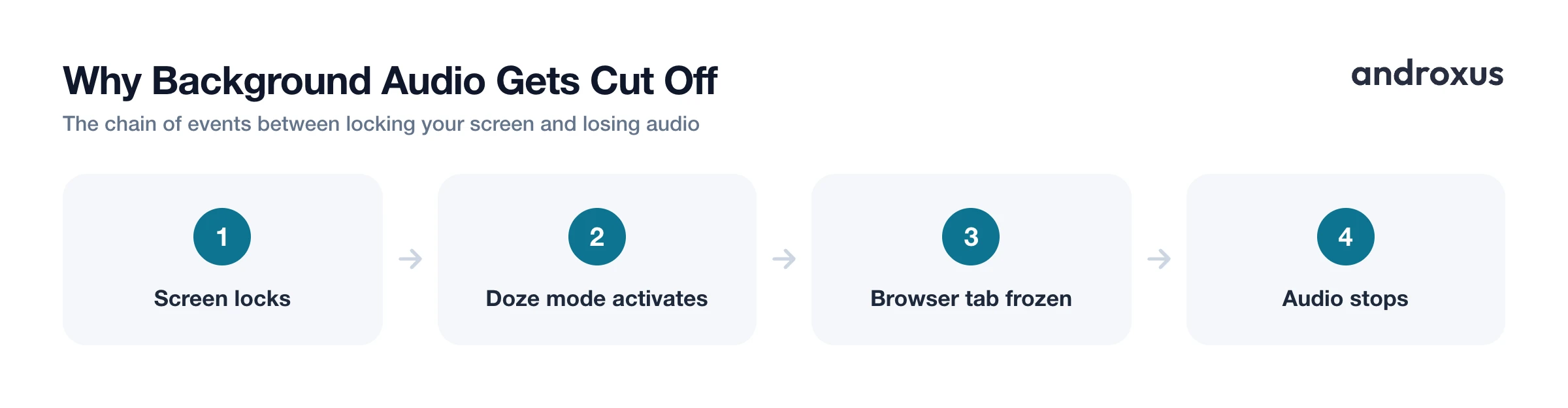
Mobile browsers, including Chrome on Android, commonly pause audio and video, or freeze the entire tab, once the screen turns off, the browser is backgrounded, or the device is locked. This is deliberate: it is a power and memory saving behavior built into both Android and the browser itself, not a website malfunction.
Android's Doze mode is a big part of this. Once a device has been stationary and idle with the screen off for a while, Doze defers background network and CPU activity, including HTTP requests, WebSocket connections, and sync jobs, only allowing periodic maintenance windows for apps to catch up. Apps that are actively playing media through a foreground service, the kind that shows a persistent notification, are generally exempt from the heaviest Doze restrictions. That exemption is exactly why a dedicated music or podcast app keeps playing through a lock screen while a random browser tab often does not: the browser tab usually is not running as that kind of protected foreground service.
Allow background usage in your browser's battery settings
Background playback for a browser tab is largely controlled by Android's per-app battery permission, not a setting buried inside the browser itself. The fix is at the system level.
On stock Android and Pixel devices: go to Settings > Apps > [Browser] > Battery > App battery usage, then switch it from Optimized to Unrestricted. On Samsung devices running One UI: Settings > Apps > [Browser] > Battery, then select Unrestricted. The exact menu wording varies by manufacturer and Android version, but the underlying choice between Optimized and Unrestricted is consistent across devices.
Switching to Unrestricted lets the browser keep background processes alive instead of getting frozen, at the cost of somewhat higher battery use than the default optimized state. For most people that tradeoff is worth it if uninterrupted background audio matters.
How lock screen media controls work
The play, pause, and skip buttons you sometimes see on the lock screen while browsing come from the Media Session API, a browser standard that lets a webpage share metadata (title, artist, artwork) and register handlers for play, pause, and seek actions. The point of the API is to let you see what is playing and control it without reopening the page, through the notification shade, lock screen, and even hardware media buttons on headphones.
Support depends entirely on whether the specific website implements Media Session. Most modern music, radio, and podcast sites do, but plenty of smaller or older sites do not, which is why lock screen controls can feel inconsistent from one page to the next even when audio is technically still playing.
Picture-in-picture for background video
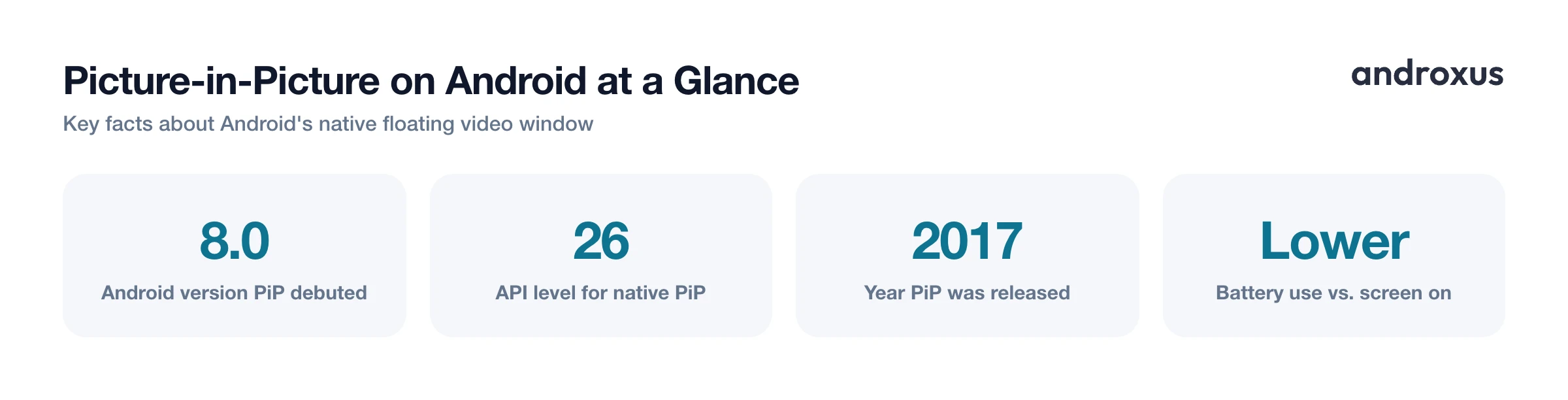
Android has supported native picture-in-picture (PiP) mode since Android 8.0 (API level 26, released in 2017), letting video keep playing in a small, floating, resizable window on top of other apps. It is the same mechanism used for video calls and navigation apps that need to stay visible while you do something else.
Not every browser triggers PiP automatically for an arbitrary website. Support, and the exact way it is triggered, a button, a gesture, or automatically when you background the tab, varies by browser and depends on whether the site opts in. This inconsistency is one of the main reasons people look for a browser built specifically around floating playback rather than relying on default PiP support.
When a dedicated background-play app helps
Even after switching a browser to Unrestricted, some tabs still get suspended inconsistently across devices, since manufacturers customize battery management differently on top of stock Android. If you have adjusted the settings above and audio still cuts out, a purpose-built app is the more reliable option.
Playback is a floating browser and player built specifically to keep streaming web audio and video going with the screen off or locked, and to display video in a floating picture-in-picture window while you multitask. It also supports search, bookmarks, sharing, playlists, podcasts, and playing media shared in from other apps. Playback streams content you already have access to; it is not a downloader and does not download tracks or videos, remove ads, or unlock paid content.
Background web audio: your options
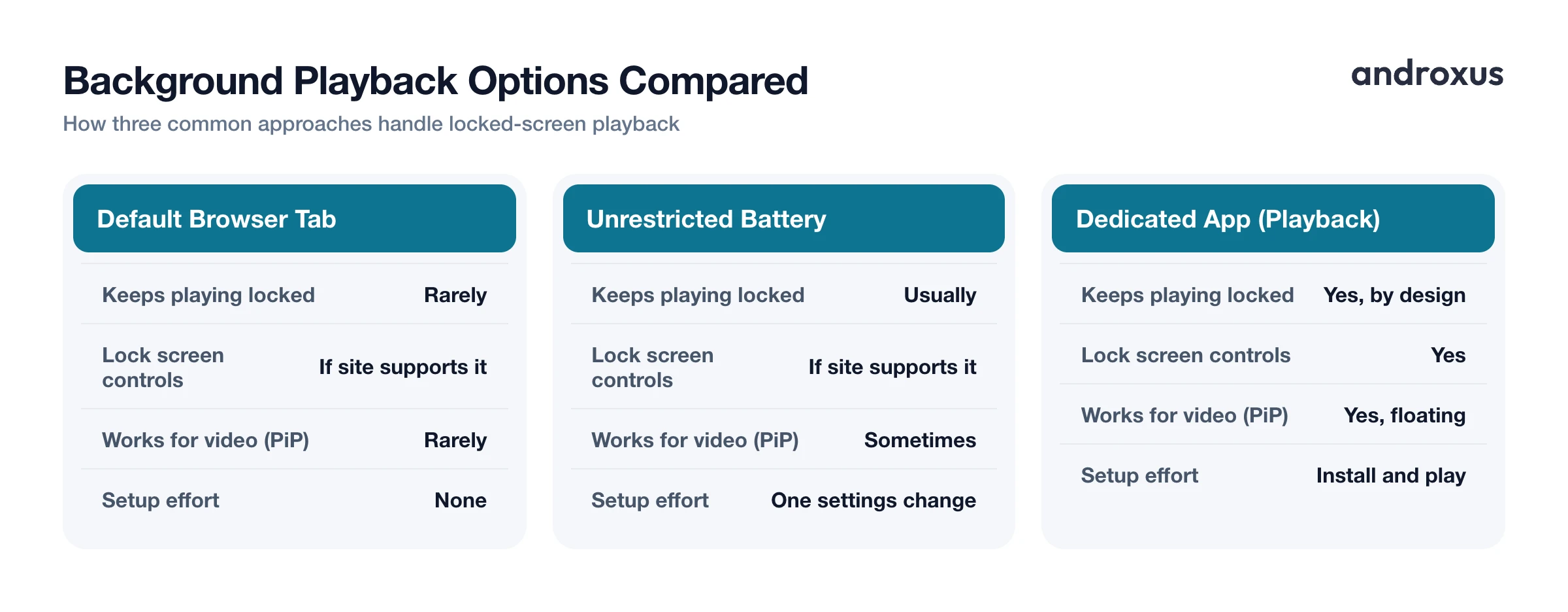
| Option | Keeps playing when locked | Lock screen controls | Works for video (PiP) | Setup effort | Battery vs. screen on |
|---|---|---|---|---|---|
| Default browser tab | Rarely | Only if site supports Media Session | Rarely | None | Lower, when it works |
| Browser set to Unrestricted battery | Usually | Only if site supports Media Session | Sometimes | Low, one settings change | Lower |
| Native app PiP (Android 8.0+) | Yes, for video | Depends on app | Yes | None to low | Lower than screen on |
| Dedicated background-play app (e.g., Playback) | Yes, by design | Yes | Yes, floating PiP | Low, install and play | Lower |
How to play music from website background
- Understand why playback stops. Browsers and Android pause or throttle background tabs by default once the screen locks or you switch apps, mainly to save battery and memory. Knowing this is the starting point before you change anything.
- Allow your browser to run unrestricted in the background. Open Settings > Apps, select your browser, tap Battery or App battery usage, then switch it from Optimized to Unrestricted.
- Test with a real page. Open a site that plays audio or video with Media Session support, start playback, then lock the screen or switch apps to confirm audio continues and lock screen controls appear.
- Use lock screen media controls. Check the lock screen or notification shade for play, pause, and skip controls, which appear on sites that implement the Media Session API.
- Try picture-in-picture for video. Look for a PiP or floating window option, supported from Android 8.0 onward, so video keeps playing in a small window while you use other apps.
- Use a dedicated background-play app if tabs still get killed. If your browser still stops audio inconsistently, use a browser built for continuous background playback and floating PiP, such as Playback, to stream the same content without keeping the screen on.
Key takeaways
- Background audio stopping on lock is expected Android and browser behavior, driven by battery and memory optimization, not a bug in the website.
- Switching your browser's battery setting from Optimized to Unrestricted (Settings > Apps > Battery) is the single most effective fix for most tabs.
- Lock screen controls only appear on sites that implement the Media Session API, so results vary by website.
- Picture-in-picture for video has been a native Android feature since version 8.0, though browser support for triggering it varies.
- If inconsistent background playback persists, a dedicated app like Playback streams the same web content in the background or in floating PiP, without downloading, ad removal, or unlocking paid content.
Frequently asked questions
Why does music stop playing when I lock my phone in Chrome?
Android and most mobile browsers pause media, throttle, or freeze background tabs to save battery and memory once the screen turns off or you switch apps. This is default behavior, not a bug, and it affects nearly every regular browser tab unless the site or app is specifically allowed to keep running in the background.
Does Chrome have a setting to allow background audio?
Chrome does not have a dedicated in-app background audio toggle. Instead, background playback depends on Android's per-app battery settings: go to Settings > Apps > Chrome > Battery (or App battery usage) and switch it from Optimized to Unrestricted, which allows Chrome more freedom to keep running when the screen is off.
What is Doze mode and does it affect background audio?
Doze is an Android power saving state that defers background network and CPU activity when a device has been stationary and unused for a while with the screen off. Apps actively playing media through a foreground service with a visible notification are generally exempt, which is why most legitimate music and podcast playback keeps working even when Doze is active.
Can I get picture-in-picture (PiP) from a website on Android?
Yes, on Android 8.0 (Oreo) and later, apps and some browsers can present video in a small floating window using Android's native picture-in-picture mode, letting a video keep playing on top of other apps. Support for triggering PiP from a random website varies by browser; dedicated floating-browser apps offer this more consistently.
Does background playback use significantly more battery than watching with the screen on?
No, it typically uses less. Keeping a screen lit is one of the largest battery drains on a phone, so playing audio, or even video in a small floating window, with the screen off or locked generally saves battery compared to leaving the display on the whole time.
Will an app like Playback let me download the music or video I'm streaming?
No. Playback is a streaming player and floating browser: it plays audio and video you already have access to in the background or in picture-in-picture, but it does not download tracks or videos, remove ads, or unlock paid or restricted content.
