How to Get YouTube Background Play on Android
You lock your phone mid-video and the sound cuts out, or you switch to another app and the picture just freezes. YouTube background play on Android used to have a well-known free workaround, but that changed in 2026, and it's worth understanding exactly what still works, what now costs money, and what your actual options are.
Quick answer: As of mid-2026, reliable YouTube background play on Android (screen off or locked, audio and video keep going) requires either full YouTube Premium at $15.99 a month or YouTube Premium Lite at about $8.99 a month, since Google closed the free browser workaround server-side in late January 2026. Free native picture-in-picture still works, but only while you're actively multitasking with the screen on, not after locking the phone.
What you'll learn
- Why YouTube pauses the moment you leave the app or lock the screen
- What YouTube Premium and Premium Lite each actually include for background play
- How native picture-in-picture differs from true background play
- What happened to the free browser trick and why it stopped working
- How YouTube Music's background play compares to the main YouTube app
- Practical steps to set up whatever level of background play fits your situation
Why YouTube pauses when you leave the app or lock the screen
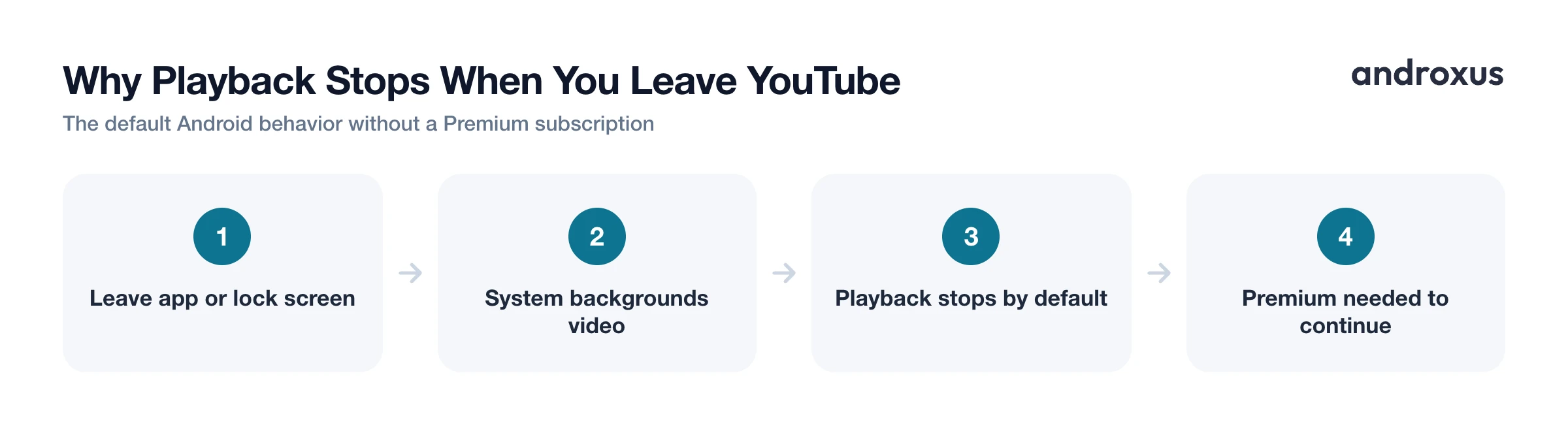
By default, both the YouTube app and mobile browsers stop video, and often audio too, the moment the app moves to the background or the screen locks. That's standard Android behavior, not a bug specific to your phone. YouTube designed it this way deliberately, historically gating full, uninterrupted background play behind a Premium subscription.
It's worth separating two things people often lump together. Android's system-level picture-in-picture (PiP) is a feature that floats a small video window over whatever else you're doing, but it's a different mechanism from background play, and it comes with a different set of limits, covered in detail below.
YouTube Premium and Premium Lite: the official background play options
YouTube's own subscriptions are the most dependable way to get background play, since they're the intended, supported path rather than a workaround.
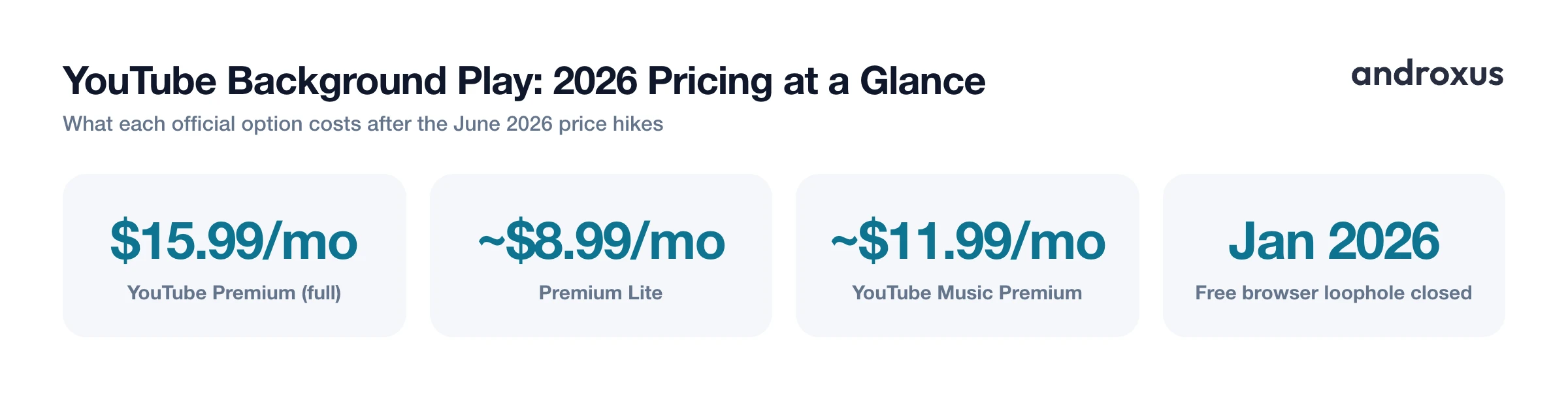
Full YouTube Premium, about $15.99 a month for an individual plan in the US after a June 2026 price increase from $13.99, includes uninterrupted background play alongside ad-free viewing, offline downloads, and extras like a play queue and continue-watching across devices. Background play here works comprehensively, screen off, phone locked, video and audio state preserved.
YouTube Premium Lite is the newer, cheaper option. It didn't originally include background play, but a rollout that started in late February 2026 added it, along with offline downloads, for most non-music videos. Two carve-outs matter: music videos and Shorts are excluded from Premium Lite's background play and still show ads. Premium Lite's price also went up by about a dollar in the same June 2026 round of increases, landing at roughly $8.99 a month in the US, still meaningfully cheaper than full Premium.
Native picture-in-picture: free, but not full background play
Android has supported system-level picture-in-picture since Android 8.0 Oreo, so the underlying OS capability isn't new. In the YouTube app, you turn it on under Settings, General (or Playback and performance on some devices), Picture-in-picture, and it's free where YouTube has enabled it.
That "where enabled" caveat matters. PiP availability is regional, YouTube hasn't turned it on in its official app in every country, and in some countries it's tied to having a Premium subscription rather than being free everywhere.
Even where PiP is free, it solves a narrower problem than background play. PiP keeps a small floating window running while you actively use other apps with the screen on. It's not the same as playing with the screen off or the phone locked, and playback commonly doesn't continue reliably once the screen actually turns off.
The browser desktop-site trick: what changed in 2026
For years, a well-known free workaround let people request the desktop version of a site in a mobile browser (the Desktop site option in Chrome's menu, or the aA menu in Safari), start a YouTube video, then switch apps or lock the screen to keep the audio going.
In late January 2026, Google confirmed it had closed this loophole, and it did so server-side rather than in a specific browser's code. That's the detail that made the fix so broad: it blocked background play for non-Premium accounts across third-party mobile browsers at once, including Samsung Internet, Brave, Vivaldi, and Microsoft Edge, rather than being something you could dodge by switching browsers.
Since then, some unofficial workarounds have surfaced, such as spoofing a browser's user agent string to make YouTube treat the request differently. These aren't supported by Google, may violate YouTube's terms of service, and there's no guarantee they'll keep working, since Google can adjust server-side enforcement at any time without notice.
YouTube Music for audio-only background listening
If what you actually want is just the audio, YouTube Music is a separate app with its own tiers, and it's worth checking on its own terms rather than assuming it behaves like the main YouTube app.
The free tier of YouTube Music shows ads and doesn't support background play on mobile, the app generally needs to stay open and on screen while a song plays. YouTube Music Premium, about $11.99 a month for an individual plan after an April 2026 price update, adds ad-free listening, background play, and offline downloads within the YouTube Music app. It's a distinct subscription from YouTube Premium and Premium Lite, though full YouTube Premium subscribers get YouTube Music Premium's benefits included at no extra cost.
Comparing your options at a glance
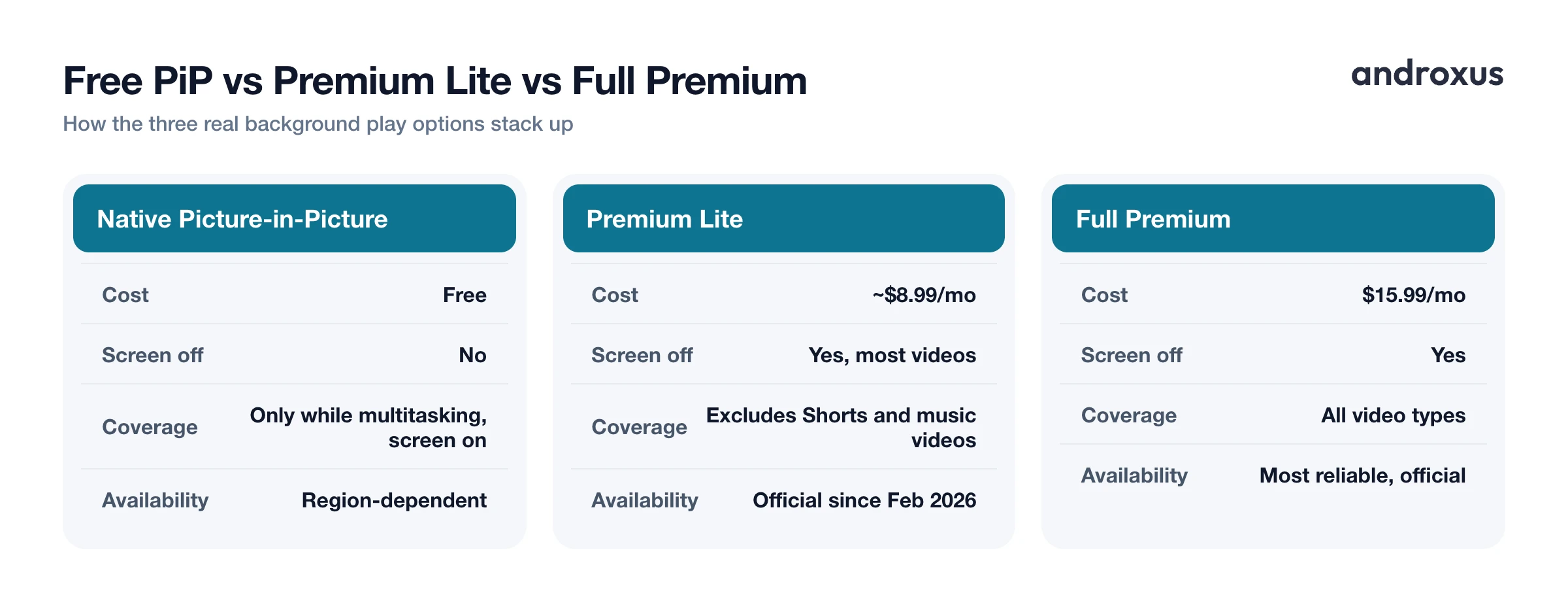
| Method | Cost | Works with screen fully off | Notes |
|---|---|---|---|
| YouTube Premium | $15.99/mo | Yes | Official, most reliable, covers all video types |
| YouTube Premium Lite | ~$8.99/mo | Yes, for most non-music videos | Excludes Shorts and music videos; official since Feb 2026 |
| Native picture-in-picture | Free | No, only while multitasking with screen on | Availability is region-dependent |
| Browser desktop-site trick | Free | Largely blocked since Jan 2026 | Unreliable, no longer works for most accounts |
| YouTube Music Premium | ~$11.99/mo | Yes, for audio | Official, separate subscription from YouTube Premium |
| Floating player/browser apps (e.g. Playback) | Free/varies | Yes, for general web audio/video | Not a guaranteed fix specifically for YouTube given 2026 restrictions |
Where a floating player app fits in
Beyond YouTube specifically, a broader category of Android apps is built to keep web audio and video playing in the background, screen off or locked, or in a floating picture-in-picture window while you use other apps. Playback is one of these: a floating browser and background player with search, bookmarks, sharing, playlists, podcasts, and support for media shared in from other apps, and it saves battery compared to leaving the screen on the whole time.
These apps are honest general-purpose tools, not a YouTube-specific bypass. Playback streams content you already have access to, it doesn't download tracks or videos, remove ads, or unlock paid content. Given how actively YouTube enforces its 2026 restrictions against third-party browsers, results specifically on YouTube pages inside any floating browser can be inconsistent, even when the same app works well for other streaming sites, podcasts, and shared audio or video.
How to set up YouTube background play on Android
- Update the YouTube app. Make sure you're running the latest version from the Play Store. Feature availability for Premium Lite background play and picture-in-picture has changed several times in 2026, and older app versions may not reflect current behavior.
- Turn on native picture-in-picture. Open the YouTube app, tap your profile icon, go to Settings, then General (or Playback and performance on some devices), and toggle Picture-in-picture on. This is free but availability varies by region and device.
- Test PiP by switching apps. Start playing a video, then press the Home button or swipe to another app. A small floating video window should appear and keep playing while you use other apps. This only works with the screen on, not after locking the phone.
- Check your Premium status. In the YouTube app, go to Settings and look for a Premium or membership section. Full Premium at $15.99 a month and Premium Lite at about $8.99 a month both now offer background play with the screen off, with Lite excluding music videos and Shorts.
- For audio-only listening, check YouTube Music separately. YouTube Music has its own free and Premium tiers. The free tier requires the screen on and shows ads; YouTube Music Premium, about $11.99 a month individually, adds ad-free background audio and downloads within that app.
- For general web audio and video beyond YouTube, use a floating player app. Apps like Playback run as a floating browser and background player, letting you keep audio or video from many websites, podcasts, and shared links running with the screen off or in a floating window, which also saves battery compared to leaving the screen on. It streams content you already have access to and does not download media or unlock paid content.
Key takeaways
- Reliable YouTube background play on Android now requires a subscription: full Premium at $15.99 a month or Premium Lite at about $8.99 a month, both of which support screen-off playback.
- Free native picture-in-picture still exists but only works while you're actively multitasking with the screen on, not after the phone locks.
- The free browser desktop-site trick was blocked server-side in late January 2026 and no longer works reliably for non-Premium accounts.
- YouTube Music runs on its own subscription track, with YouTube Music Premium at about $11.99 a month needed for ad-free background audio.
- For general web audio and video beyond YouTube itself, a floating browser and background player like Playback can keep other streaming sites, podcasts, and shared media playing in the background, though it's not a guaranteed workaround for YouTube's own restrictions.
Frequently asked questions
Does YouTube Premium let videos keep playing with the screen off?
Yes. Uninterrupted background play (audio keeps going after you lock the phone or switch apps) is a core YouTube Premium feature, alongside ad-free viewing and offline downloads. Full Premium runs $15.99 a month for an individual plan in the US after a June 2026 price increase.
Can I get YouTube background play on Android for free?
Not reliably as of mid-2026. Google closed the mobile browser loophole server-side in late January 2026, so third-party browsers like Samsung Internet, Brave, Vivaldi, and Edge no longer keep YouTube playing once you background the browser or lock the screen unless you're a Premium subscriber. Native picture-in-picture is still free, but it only works while you're actively using another app with the screen on, not with the screen off.
What's the difference between picture-in-picture and background play?
Picture-in-picture (PiP) shrinks the video into a small floating window that stays on screen while you use other apps. Background play keeps the audio, and for video the ability to return to it, running even after the screen turns off or locks. YouTube's free PiP mode does the first; only Premium, Premium Lite, or YouTube Music Premium reliably deliver the second.
Does YouTube Premium Lite include background play?
Yes, since a rollout that started in late February 2026. Premium Lite, about $8.99 a month in the US after a June 2026 price increase, added background play and offline downloads for most non-music videos. Music videos and Shorts are excluded and still show ads without background play.
Will the old browser trick for background play come back?
Unclear. Google enforced the block on the server side, not just in individual browser versions, so it affects any mobile browser trying to play YouTube in the background without a Premium account. Unofficial workarounds like spoofing a browser's user agent have surfaced, but they're unofficial, can violate YouTube's terms, and may stop working at any time without notice.
Can a floating player app play YouTube in the background?
Floating player and floating browser apps are built to keep web audio and video going in a background or floating window, which helps generally with streaming sites, podcasts, and shared media. Because YouTube specifically enforces its 2026 background play restrictions against third-party browsers, results on YouTube pages may vary even inside a floating browser, so it's not a guaranteed workaround for that one site.
