How to Boost Bass on Android Safely
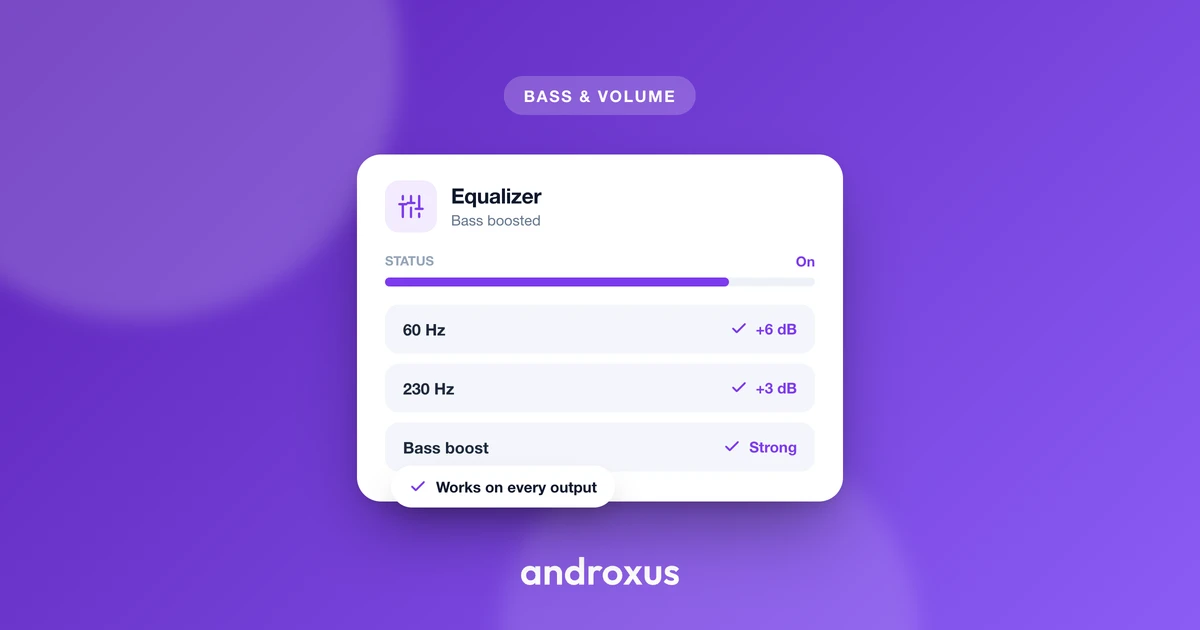
Phone speakers and small earbuds rarely deliver the deep, satisfying low end that music and movies were mixed for, so it is no surprise that "how to boost bass on Android" is one of the most common audio questions people search. The good news is that boosting bass safely is straightforward once you understand where distortion comes from and how to avoid it.
Quick answer: To boost bass on Android safely, check your phone's Settings for a built-in sound enhancer first, then install a dedicated equalizer app like Flow Equalizer if you need consistent bass across every app. Raise the bass gradually, keep an anti-distortion limiter turned on, and pair it with a genre-matched preset instead of maxing out a single slider. Keep overall volume moderate, since a well-tuned bass boost at a reasonable volume protects both your hearing and your speakers better than raw volume alone.
What you'll learn
- Why phone audio often sounds thin or bass-light to begin with
- How bass boosting technically works on Android, and what it can and cannot do
- Why pushing bass too far causes crackling and distortion, and how a limiter prevents it
- How bass boost behaves differently on Bluetooth, wired, and speaker output
- Safe volume guidelines to follow while you tune your sound
- A step-by-step process for boosting bass without wrecking the audio
Why phone audio can sound thin or bass-light in the first place
Phone speakers use very small drivers with limited excursion, meaning the diaphragm cannot move far enough to physically push the amount of air needed to reproduce deep low frequencies the way a larger speaker can. That physical limitation, not a flaw in the recording, is the root cause of thin-sounding audio when you play music straight from a phone's speaker.
Headphones and earbuds add another layer of variability. Driver size and tuning differ widely between models, so the exact same track can sound bass-light on one pair and boomy on another even though the source audio never changed. Because of this, many listeners reach for a bass boost or equalizer to compensate for their hardware, not because the recording itself is missing low end.
How bass boosting actually works on Android
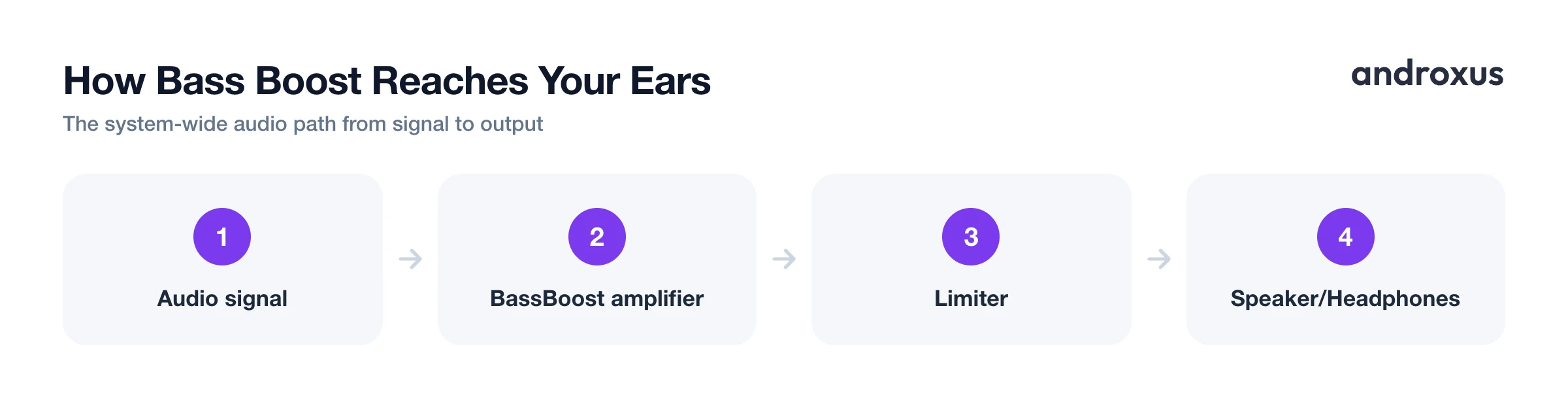
Android's audio framework includes a built-in BassBoost audio effect, which is essentially a single-band amplifier for low frequencies, similar to a simplified one-band EQ rather than a full multi-band equalizer. However, plain stock Android (AOSP) does not expose a system-wide equalizer or bass booster in Settings by default. Some phone makers layer their own version on top, so what you see depends heavily on your brand and model.
It is worth understanding what a bass booster is actually doing under the hood: it amplifies the low-frequency content that is already present in the audio signal. It does not synthesize or add new bass that was never in the original recording. That distinction matters because it explains both what the effect can achieve and why cranking it too far runs into hardware limits rather than unlocking more bass out of thin air.
To affect every app on the phone at once, rather than just one media player's internal EQ, an app has to hook into the system audio output stage instead of a single app's audio session. That is why dedicated system-wide equalizer apps exist as their own category, separate from the EQ built into individual streaming or music apps.
The real risk: distortion from clipping, not the bass itself
The thing that actually ruins boosted bass is not the boost itself, it is clipping. Clipping happens when a boosted signal's peaks exceed the maximum amplitude the output can reproduce cleanly, flattening what should be a smooth waveform into a distorted, near-square shape. Audibly, that shows up as crackling, harshness, or a muddy, boomy low end that loses definition instead of sounding fuller.
Excessive, unchecked bass boost is one of the most common causes of this kind of distortion, because low-frequency content carries a disproportionate amount of signal energy compared to mids and highs. Sustained clipping can also stress a speaker's physical components over time, generating extra heat, which is more of a concern for small built-in phone speakers than for most headphones.
A limiter mitigates this problem directly. It automatically reduces gain right before the signal would clip, which lets you run a stronger bass boost without the crackle. This is one of the more practical reasons to choose an equalizer app that includes an anti-distortion limiter alongside its bass control, rather than a bare slider with no safety net.
Bluetooth, wired, and speaker output all behave a little differently
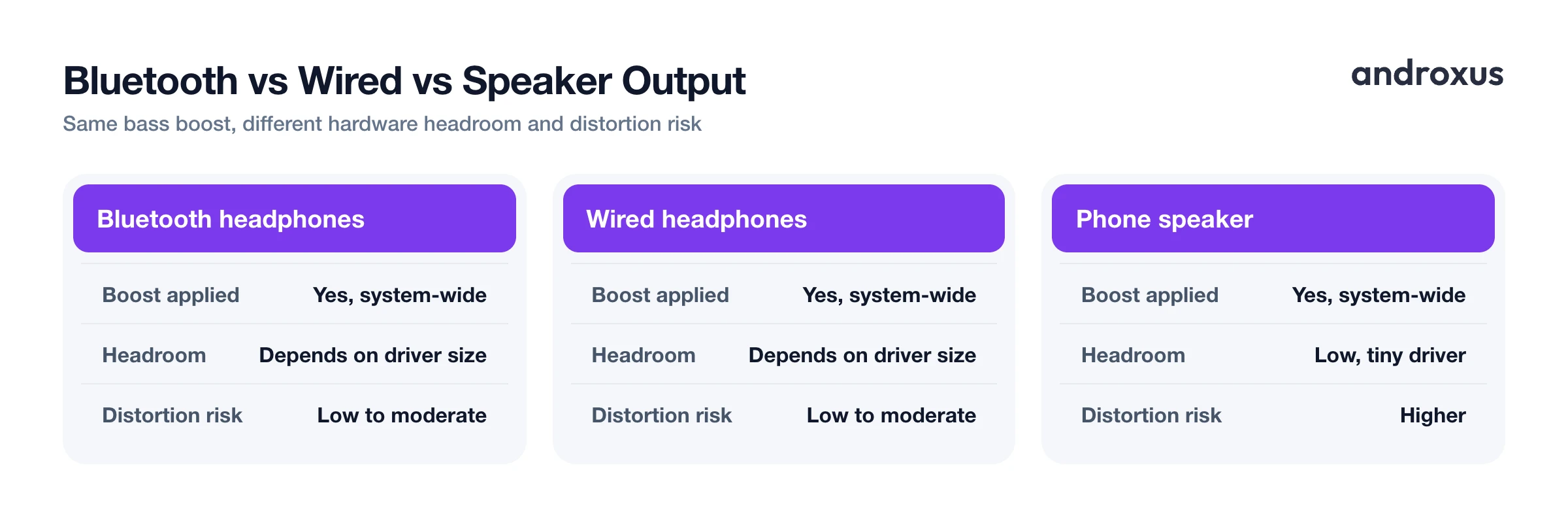
A system-wide bass boost is applied in the phone's audio output pipeline, so it still affects sound sent over Bluetooth, wired headphones, or the built-in speaker. In other words, the boost is not tied to one connection type.
The audible payoff still depends heavily on the playback hardware, though. Small earbud drivers and phone speakers have less low-frequency headroom than larger over-ear headphones, so the exact same boost level can sound noticeably different from one device to the next. Because ideal settings differ by output, it helps to save separate profiles for headphones versus speaker listening, and to let the setting auto-apply when headphones connect so you are not manually retuning every time you switch between them.
Protecting your hearing while you tune the bass
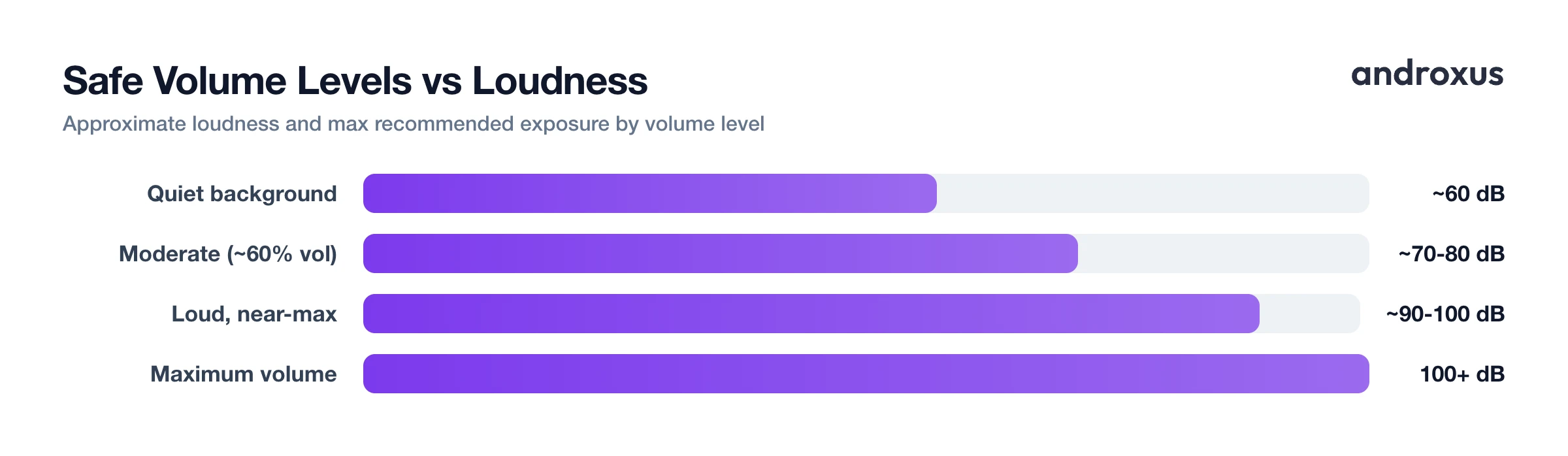
Bass that sounds punchy and clear is only a win if the overall volume stays reasonable. A commonly cited guideline, the 60/60 rule, suggests keeping volume at or below 60 percent of maximum and limiting continuous listening sessions to about 60 minutes before taking a break. The table below lines that guideline up against decibel-based reference points from safe-listening research.
| Volume level | Approximate loudness | Max recommended exposure |
|---|---|---|
| Quiet background sound | ~60 dB | No strict limit |
| Moderate, comfortable listening (roughly 60% volume) | ~70 to 80 dB | Up to ~40 hours per week |
| Loud, near-max volume | ~90 to 100 dB | Minutes at a time |
| Maximum volume on many phones/headphones | 100+ dB | Avoid sustained exposure |
Many phones and headphones are capable of well over 100 dB, loud enough to cause hearing damage with prolonged exposure, so raw volume matters just as much as how the bass is shaped. A bass boost that sounds full and clear at a moderate volume is a genuinely safer outcome than maxing out both volume and bass boost at the same time.
How to boost bass on Android safely
- Check for a built-in sound enhancer first. Open Settings, then Sound and vibration (wording varies by brand), and look for an equalizer, sound enhancement, or Dolby/adaptive sound menu. Some OEM skins include a basic bass or EQ slider here, though plain Android has none by default.
- Install a system-wide EQ and bass booster app if you need one. If your phone lacks a built-in option, or you want consistent bass across every app rather than just one media player, install an equalizer app with a dedicated Bass Booster toggle, such as Flow Equalizer, and grant the audio effects permission it requests so it can process the system output. That permission lets the app shape audio system-wide; it does not give it access to your files or microphone.
- Raise bass gradually instead of maxing it out. Start from a small increase and add more only while it still sounds clean. Since bass boost amplifies existing content rather than adding new bass, pushing it far past what the track and hardware can handle is what triggers distortion.
- Turn on the limiter if the app has one. An anti-distortion limiter automatically reins in gain right before the signal would clip, giving you more punch without crackling. Leave it on whenever bass boost is active.
- Pick a matching genre preset or fine-tune bands manually. Presets tuned for bass-heavy genres like hip-hop, EDM, or pop usually pair a low-end lift with a slight dip in muddy low-mids, which reads as fuller bass without mud, generally more effective than boosting bass alone.
- Save separate profiles for speaker and headphone listening. Bass that sounds right on headphones can overwhelm a phone's small internal speaker, and vice versa. Save a profile per output, and let it auto-apply when headphones connect if the app supports it.
Key takeaways
- Stock Android has no built-in system-wide bass booster, so consistent results across every app usually require a dedicated equalizer app.
- Bass boost amplifies existing low-frequency content, it does not add bass that was never recorded, which is why pushing it too far causes clipping instead of "more bass."
- An anti-distortion limiter is what lets you run a stronger, punchier bass boost without crackling or harshness.
- Bass boosting works over Bluetooth, wired, and speaker output alike, but the audible result depends on the driver size of whatever you are listening on.
- Moderate volume paired with well-tuned bass is safer for your hearing and your speakers than pushing both volume and bass to their limits.
Frequently asked questions
Does Android have a built-in bass booster?
Not in stock (AOSP) Android, there is no native system-wide EQ or bass booster. Some phone makers add their own sound-enhancement menu under Settings, Sound, but availability and depth vary a lot by brand and model. This is why most people who want consistent bass boosting across all apps use a dedicated equalizer app such as Flow Equalizer, which applies system-wide.
Why does boosting the bass make my audio crackle or distort?
Every audio output has a maximum amplitude it can reproduce cleanly. When a bass boost pushes the low-frequency signal past that ceiling, the peaks get cut off, a phenomenon called clipping, which turns clean sine waves into distorted square-ish waves. The result is a muddy, crackly, or harsh sound. A limiter helps by automatically reducing gain before the signal hits that ceiling.
Does a bass booster work with Bluetooth headphones and earbuds?
Yes. A system-wide bass booster processes the audio in the phone's output pipeline before it is sent to the Bluetooth codec, so the boosted signal reaches your headphones. That said, the audible result still depends on your headphone's driver size and the Bluetooth codec in use, small drivers can only move so much air regardless of how much low end is fed to them.
What counts as a safe volume level for headphones?
A widely cited guideline is the 60/60 rule: keep the volume at or below 60 percent of maximum and listen for no more than 60 minutes at a stretch before taking a break. The World Health Organization also notes that sound at or below roughly 60 dB is safe with no real time limit, while louder levels around 80 dB should be limited to about 40 hours cumulative per week.
Can a bass booster damage my phone's speakers?
Pushed too far without a limiter, yes, sustained clipping and excessive low-end gain can stress a small speaker driver, causing overheating or audible distortion over time. This is more of a risk on tiny built-in phone speakers than on headphones, which is why a moderate boost plus an anti-distortion limiter is the safer approach.
What is the difference between bass boost and a full equalizer?
Bass boost is typically a single control that amplifies one low-frequency band, similar to a one-band EQ. A full equalizer, usually 5 to 12 bands on capable apps, lets you shape multiple frequency ranges independently, so you can add low-end warmth while also taming or lifting mids and highs instead of just cranking one dial.
