What Are the Best Equalizer Settings for Bass?
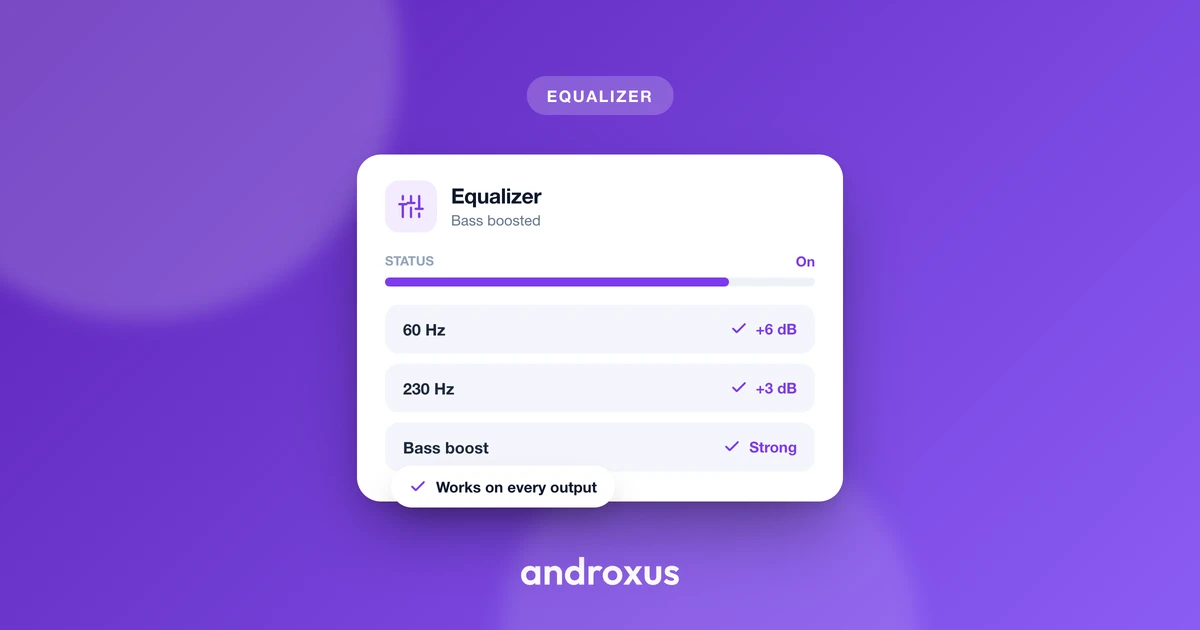
Bass is the part of an equalizer people fiddle with the most, and also the part most likely to go wrong. Push the wrong band too far and music turns into a boomy, indistinct rumble instead of sounding fuller. Getting the best equalizer settings for bass is less about finding one magic number and more about understanding which frequencies do what.
Quick answer: The best equalizer settings for bass usually mean a gentle, staggered boost across two or three low bands, a small lift around 30-40 Hz, a slightly larger lift around 60-80 Hz, and a small lift around 120-150 Hz, rather than one big spike on a single slider. Leave the band around 250-400 Hz flat or slightly reduced, since that range is the usual cause of muddy or boxy sound. On headphones, sub-bass boosts are clearly audible; on a phone's built-in speaker, a moderate mid-bass boost around 100-200 Hz does more of the audible work because the driver can't reproduce true sub-bass.
What you'll learn
- The difference between sub-bass, mid-bass, and low-mids, and why that distinction matters for EQ
- Which bands to raise for deeper, punchier bass without losing clarity
- The single most common cause of muddy bass, and how to avoid it
- Why bass boosts sound different on headphones versus a phone speaker
- How to raise bass without pushing your device into distortion, and how to protect your hearing while you do it
Understanding the Bass Range: Sub-Bass vs. Mid-Bass
Not all "bass" is the same frequency range, and treating it as one block is the fastest way to end up with a muddy mix.
Sub-bass sits roughly between 20 and 60 Hz. You feel it more than you clearly hear it: it's the rumble in a movie explosion or the chest-thump under an electronic drop, and it gives low end its sense of depth.
Bass proper, often called mid-bass, runs roughly 60 to 250 Hz. Most bass instrument fundamentals and kick drum weight live here, commonly strongest around 90 to 200 Hz. This is where punch, warmth, and body come from, and it's the range most listeners actually mean when they say a track "hits."
The low-mid range, roughly 250 to 500 Hz, is technically outside what most people call bass, but it directly affects how clean your bass sounds. Too much energy in this narrow band is the usual cause of audio that sounds boxy or muddy rather than punchy.
Because each of these ranges changes a different quality of the sound, raising sub-bass changes felt depth and rumble, raising mid-bass changes punch and warmth, and leaving the low-mids alone is what preserves clarity. Knowing which band controls which effect is the whole trick to dialing in bass on purpose instead of by accident.
Which Bands to Raise for Deeper Bass
The instinct with any equalizer is to grab the lowest slider and push it up until the bass feels "enough." That approach usually backfires. A single large spike on one band, say pushing a 60-80 Hz slider up 6 dB on its own, tends to sound boomy and one-note. A broader, gentler curve spread across two or three neighboring bands sounds far more natural.
A commonly recommended, natural-sounding approach looks like this: a small boost around 30-40 Hz, a slightly larger boost around 60-80 Hz, and a small boost around 120-150 Hz, rather than one aggressive spike on a single band. This staggered shape gives you both the felt depth of sub-bass and the audible punch of mid-bass, without either one dominating.
On an app with a 5 to 12 band equalizer, like Flow Equalizer, more bands mean finer control over exactly where the boost sits. A 5-band EQ has less precision, so it's worth keeping individual boosts modest and leaning on a dedicated bass booster toggle and limiter, rather than pushing any single slider to its maximum.
The general rule holds regardless of how many bands you have: moderate, stacked boosts across adjacent low bands preserve clarity better than one extreme boost on a single band.
The Move That Prevents Muddiness
If there's one adjustment that matters more than any bass boost itself, it's what you do to the band just above the bass range.
Muddiness is typically a low-mid problem, not a bass problem. Excess buildup around 200 to 400 Hz is the most common cause of a boxy, unclear low end, even when the bass bands themselves are set reasonably. Leaving the 250-400 Hz band flat, or nudging it down slightly, while boosting the bands below it, creates separation between deep bass and the vocals or instruments that sit above it.
Audio engineers use a simple technique to find exactly where mud is hiding: sweep a narrow boost through the 200-500 Hz range and listen for the point where the sound turns boxy or resonant. That's the frequency worth easing back on your own EQ.
It also helps to keep your boosts narrow rather than wide. Wide, low-Q boosts spread energy into the low-mids by accident, even when you only meant to boost bass. Narrower boosts targeted specifically at the bass bands keep the added energy where you actually want it.
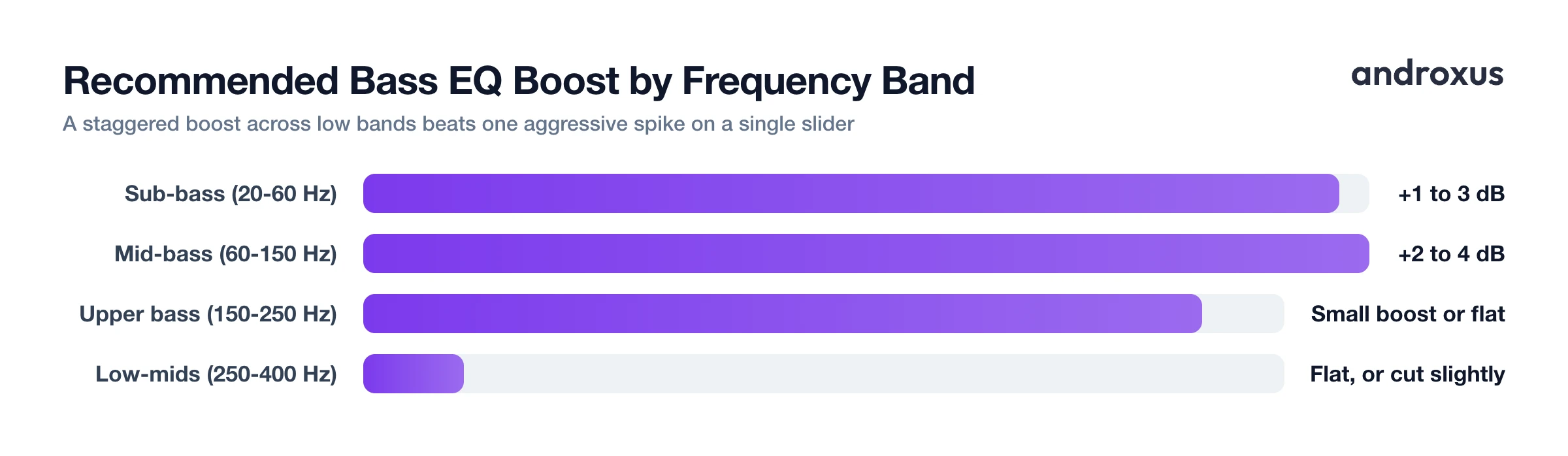
| Frequency Range | Common Name | What It Adds | EQ Tip |
|---|---|---|---|
| 20-60 Hz | Sub-bass | Felt rumble, depth | Boost gently, about 1-3 dB |
| 60-150 Hz | Bass / mid-bass | Punch, warmth | Boost about 2-4 dB for the main effect |
| 150-250 Hz | Upper bass | Fullness, body | Small boost, or leave flat |
| 250-400 Hz | Low-mids | Can cause muddiness | Leave flat, or cut slightly |
Bass on Phone Speakers vs. Headphones
The exact same EQ curve can sound completely different depending on what you're listening through, and this is where a lot of bass settings quietly fail.
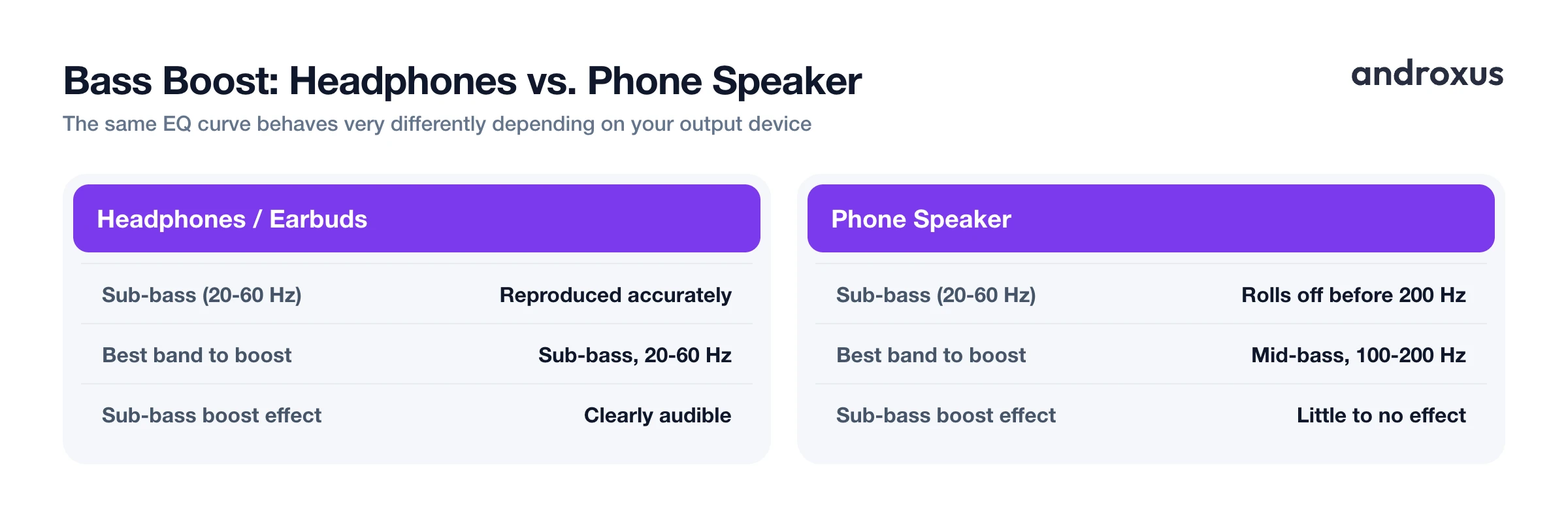
Small phone speakers are physically limited. Most begin rolling off well before 200 Hz, and many can't reproduce much below 100 Hz, simply because the driver is too small to move enough air for those long, low sound waves. Boosting the 20-60 Hz sub-bass band on a phone speaker mostly asks the hardware for something it can't deliver.
Headphones and earbuds, especially closed-back or in-ear designs, can typically reproduce true sub-bass much closer to that full 20-60 Hz range, so a sub-bass boost is far more audible there than it ever will be on a phone's built-in speaker.
There's a psychoacoustic reason bass still feels present on small speakers even without true sub-bass: an effect called the "missing fundamental." Listeners can perceive a sense of low bass on small speakers as long as the harmonics of a bass note, roughly 250-700 Hz, are present, even when the fundamental frequency itself isn't reproduced.
The practical takeaway: on phone-speaker playback, a moderate mid-bass boost around 100-200 Hz does more audible work than pushing sub-bass the hardware can't reproduce. On headphones, sub-bass boosts are far more worthwhile. That's a good reason to keep separate profiles for separate outputs. A feature like auto-apply on headphone connect, which Flow Equalizer includes, exists precisely because the right curve for earbuds usually isn't the right curve for a phone speaker.
Avoiding Distortion and Protecting Your Hearing
Boosting bass increases the loudness of that specific range within a system that has a hardware ceiling. Push it too far and the waveform clips and distorts instead of simply sounding bigger.
A limiter, sometimes labeled anti-distortion protection, reduces overall gain automatically when a boosted signal would otherwise clip, letting you raise bass bands further before distortion becomes audible. It's worth being clear about what a limiter actually does: it manages existing headroom so a boosted mix stays clean, it doesn't create extra loudness beyond what the hardware and output can handle.
Bass-heavy boosts also tend to feel louder than they measure, which makes it easy to push the overall volume higher than you intended without noticing. It's a good habit to check your overall volume level again after adjusting bass bands, rather than assuming it hasn't changed.
This matters for your ears as much as your speakers. A commonly cited safe-listening guideline, in line with World Health Organization safe-listening guidance, is the "60/60 rule": roughly 60 percent of maximum volume for up to about 60 minutes at a stretch, since sustained exposure above roughly 85 dB raises the risk of hearing damage over time. Heavy bass boosting can quietly nudge you past that threshold, so keep an eye on overall level, not just how the bass sounds.
How to Set an Equalizer for Bass Without Muddiness
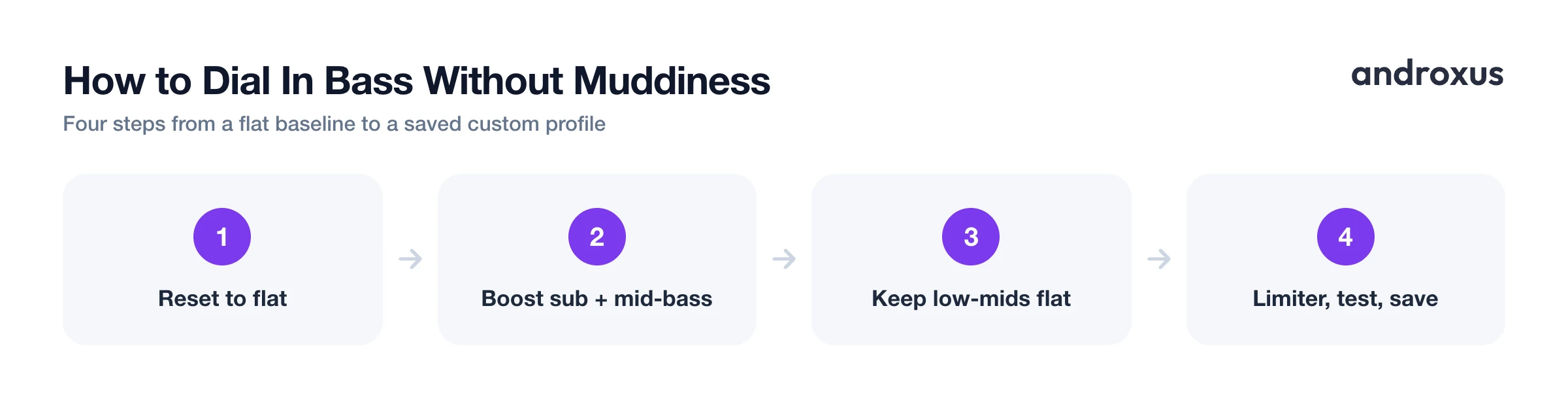
- Reset to a flat baseline and note your device. Set all EQ bands to zero, and check whether you're on headphones, earbuds, or the phone's built-in speaker, since each responds differently to the same curve.
- Lightly raise the sub-bass band. On headphones, nudge the lowest band (around 20-60 Hz) up by 1-3 dB for felt depth. On a phone speaker this band does little audibly, so skip it or keep it minimal.
- Raise the mid-bass band for punch. Boost the band around 60-150 Hz by roughly 2-4 dB. This range gives audible warmth and thump on nearly any device, including phone speakers.
- Leave the low-mid band alone. Keep the 250-400 Hz band flat, or reduce it slightly, so the added bass energy doesn't blur into muddiness.
- Turn on the limiter and check for distortion. If your app has an anti-distortion limiter, enable it, then raise the bass bands until you hear any harshness or clipping and back off a step from there.
- Test across a few songs and save the profile. Bass-heavy and vocal-heavy tracks respond differently to the same curve. Fine-tune by ear across a couple of songs, then save the result as a custom profile so you don't have to redo it every session.
Key takeaways
- The best equalizer settings for bass come from a gentle, staggered boost across two or three adjacent low bands, not one aggressive spike on a single slider.
- Keep the 250-400 Hz band flat or slightly reduced. That range, not the bass bands themselves, is the usual cause of muddy or boxy sound.
- Sub-bass boosts matter most on headphones and earbuds; on a phone's built-in speaker, a moderate mid-bass boost around 100-200 Hz is what actually gets heard.
- A limiter helps you push bass bands further before distortion appears, but it manages existing headroom rather than adding loudness beyond what your hardware can handle.
- Start from a genre preset for a reasonable baseline, then fine-tune by ear for your specific device and save it as a custom profile, keeping overall volume in check as you go.
Frequently asked questions
What is the best equalizer setting for bass?
Rather than one big spike, boost two or three adjacent low bands by modest amounts: a small lift around 30-40 Hz, a slightly bigger lift around 60-80 Hz, and a small lift around 120-150 Hz, while leaving 250-400 Hz flat. This gives deeper, punchier bass without the boxiness a single aggressive boost causes.
Which EQ band should I raise for deeper bass?
For felt depth and rumble, raise the sub-bass band, roughly 20-60 Hz. For punch and warmth you can actually hear on most devices, raise the band around 60-150 Hz. Which matters more depends on your output device, since sub-bass is far more audible on headphones than on a phone's built-in speaker.
Why does boosting bass make my music sound muddy?
Muddiness usually comes from too much energy building up around 200-400 Hz, not from the bass bands themselves. If you boost bass and also leave or raise the low-mid band, the two ranges blur together. Keeping 250-400 Hz flat or slightly reduced while boosting the lower bands keeps the sound cleaner.
Does bass boost actually work on phone speakers?
It's limited by hardware. Most phone speakers roll off well before 200 Hz and can't physically reproduce much below 100 Hz, so boosting deep sub-bass has little audible effect there. A moderate boost in the 100-200 Hz range the speaker can still reproduce, along with the harmonics up to around 700 Hz, is what actually makes bass sound fuller through a phone speaker.
How much bass boost is too much?
Once a boosted band pushes the signal past what the output hardware can cleanly handle, it clips and distorts instead of sounding bigger. A limiter helps hold that back, but it manages existing headroom rather than adding loudness beyond hardware limits, so it's still worth backing off a band the moment it starts to sound harsh rather than relying on the limiter alone.
Should I use a genre preset or set bass bands manually?
A genre preset is a reasonable starting curve, especially for bass-forward genres, but headphones, earbuds, and phone speakers all respond differently to the same curve. Start from a preset, then nudge the bass bands by ear for your specific device and save the result as a custom profile.
