Bass Booster vs Equalizer: What's the Real Difference?
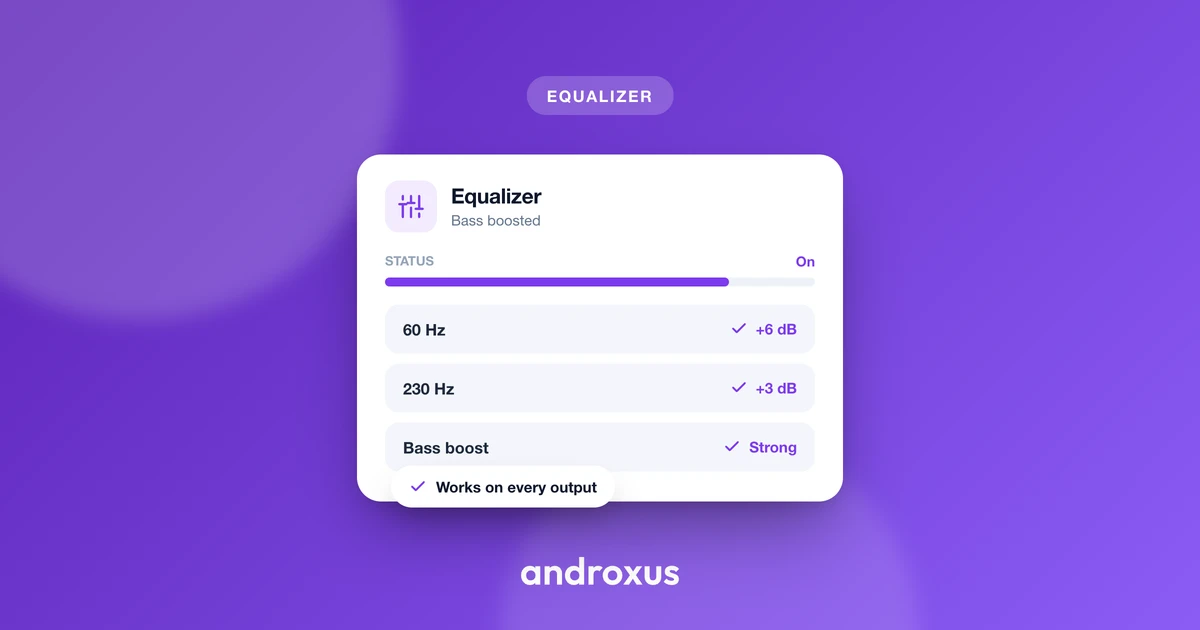
Open almost any audio app and you will find both a bass boost switch and a multi-band equalizer, and it is not always clear why you would need both. They sound like they do the same job: make the low end hit harder. In practice they work in noticeably different ways, and knowing which one to reach for saves you from either muddy, thumpy audio or thin, tinny audio.
Quick answer: An equalizer shapes the entire frequency spectrum by letting you raise or lower multiple bands independently, from deep bass through mids to treble. A bass booster is a single, dedicated control that strengthens only the low-frequency range. Use the equalizer to fix overall tonal balance and use bass boost when the rest of the mix sounds fine but the low end feels flat. They are complementary tools, not substitutes for each other, and both are limited by what your speaker or headphones can physically reproduce.
What you'll learn
- What an equalizer actually changes in your audio, and how it differs from adding volume
- What a bass booster does under the hood, and why it is narrower than an EQ band
- A side-by-side comparison of the two, including how Android implements each one
- When to reach for an equalizer, when to reach for bass boost, and when to use both
- How to safely dial in bass and EQ settings without damaging your hearing or your speaker
What an equalizer actually does
An equalizer divides the audio spectrum into frequency bands, commonly ranging from around 5 bands up to 10 or 12 or more on advanced apps, and lets you raise or lower the gain of each band independently. Instead of one blanket adjustment, you get separate control over deep bass, low-mids, mids, upper-mids, and treble.
On Android, the standard system audio effect framework (android.media.audiofx.Equalizer) exposes a defined number of bands and preset curves per device, implemented under the hood to match the OpenSL ES SLEqualizerItf specification. Presets like Pop, Rock, Jazz, Movie, Bass, or Vocal are simply pre-set band curves that approximate what a listener might want for that content type, and they can usually be adjusted further from there.
The key point: an equalizer reshapes the balance of frequencies that already exist in the source. It does not add sound that was not there, it redistributes emphasis across what is already present. That makes it the right tool for correcting muddiness, harsh or tinny treble, buried vocals, or an overall unbalanced mix, not just for weak bass.
What a bass booster actually does
Android's BassBoost audio effect is described in Android's own documentation as comparable to a simple equalizer, but limited to a single band of amplification in the low-frequency range. It maps to the SLBassBoostItf OpenSL ES specification, separate from the multi-band equalizer effect.
In practical terms, a bass booster is a single-purpose low-frequency enhancement. It strengthens the low end without requiring you to manually locate and drag the right band or bands on a full EQ. Because it targets a narrower range with one dedicated control, bass boost is quicker to use when the goal is simply "more thump," though it offers less precision than adjusting individual low-frequency bands separately.
Bass frequencies also demand more driver excursion and power than higher frequencies, so pushed too far, they are the most likely range to cause audible distortion, rattling, or clipping, especially on small phone speakers. Responsible bass boosting relies on the gain being bounded by what the hardware can actually reproduce cleanly, with a limiter reducing distortion on peaks rather than pushing output beyond the speaker's or headphone's real capability.
Bass booster vs equalizer: the core difference
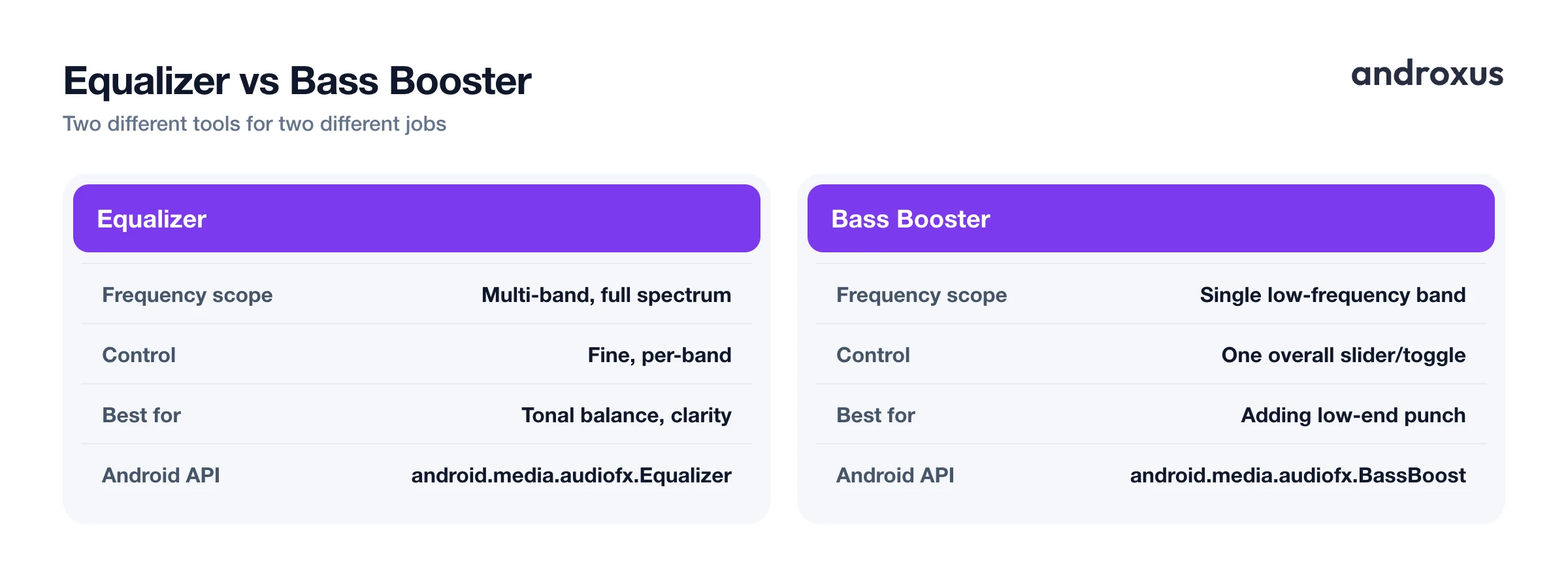
The clearest way to separate the two is scope and purpose.
| Aspect | Equalizer | Bass Booster |
|---|---|---|
| Frequency scope | Multi-band, spans the full spectrum | Single low-frequency band |
| Control granularity | Fine, per-band adjustment | One overall bass slider or toggle |
| Best for | Tonal balance, clarity, genre tuning | Adding low-end punch specifically |
| Typical Android implementation | android.media.audiofx.Equalizer, OpenSL ES SLEqualizerItf | android.media.audiofx.BassBoost, OpenSL ES SLBassBoostItf |
| Risk of overuse | Harsh treble or muddy mids | Speaker rattle or distortion |
| Works alongside | Volume booster, virtualizer, presets | Equalizer, limiter |
Scope is the biggest distinction: an equalizer controls multiple frequency bands across the whole spectrum, while a bass booster controls essentially one range, the low end. That also drives the precision-versus-simplicity tradeoff. EQ gives granular control, for example separately shaping 60 Hz sub-bass versus 250 Hz low-mids, while bass boost gives a single, simpler low-end lift.
They are complementary tools rather than competing ones. Many equalizer apps, Flow Equalizer included, expose bass boost as an independent toggle alongside the multi-band EQ instead of folding it into a single low band, precisely so you can use either one on its own or layer them together. Neither tool can exceed what your phone speaker or connected headphones can physically reproduce; both are shaping or boosting existing output, not generating new audio signal from nothing.
When to reach for each one
- Use the equalizer when vocals are buried, treble sounds harsh or tinny, the mix feels muddy, or you want a curve tailored to a specific genre or to podcast and audiobook clarity.
- Use bass boost when the overall balance is fine but low-end punch feels flat, which is common with small phone speakers or budget earbuds that naturally roll off bass.
- Use both together when you want a shaped EQ curve for tonal balance plus an extra layer of low-end reinforcement, useful for bass-heavy genres like EDM or hip-hop on limited hardware.
- Use a volume booster instead when the real problem is that everything, across all frequencies, is simply too quiet at max system volume. That is a different job from either EQ or bass boost.
On stock Android (AOSP), there is no system-wide EQ exposed in Settings, so tonal control across speaker, wired headphones, and Bluetooth typically requires a dedicated app. This is the gap apps like Flow Equalizer are built for, applying a 5 to 12 band EQ alongside an independent bass booster, volume booster, and 3D virtualizer to whichever supported player is currently active, instead of relying on each individual app to build its own EQ. Coverage still depends on the player: most mainstream music and video apps broadcast what they are playing so the effect can attach, but a handful of apps do not support this, so it is worth checking whether your regular player is supported before assuming full system-wide coverage.
Keeping bass boost and EQ gains safe
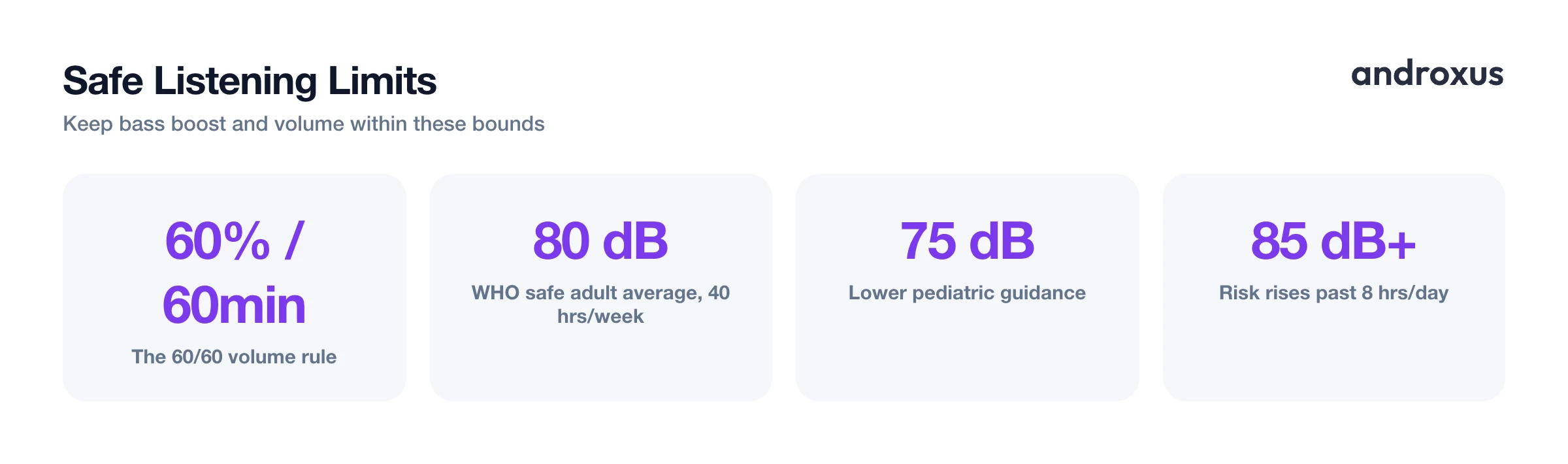
Loud bass and high overall volume both carry real hearing-health and hardware risk when pushed to extremes. A widely cited safe-listening guideline is the 60/60 rule: listening at no more than 60 percent of a device's maximum volume for no more than 60 minutes at a stretch. The World Health Organization frames safe adult listening as roughly 80 dB averaged over 40 hours a week, with lower pediatric guidance around 75 dB. Exposure at or above 85 dB for more than eight hours a day raises the risk of hearing damage, and louder levels shorten that safe exposure window further.
A limiter, an anti-distortion safeguard some equalizer apps include, can catch sudden peaks so boosted bass or volume does not clip harshly. It manages distortion, though, it does not create extra safe headroom beyond what the hardware can actually handle. If bass boost or volume boost introduces crackle, rattle, or a muddy blur, that is the hardware's ceiling. The practical fix is to dial the gain back a few steps rather than push through it.
How to balance bass boost and equalizer settings
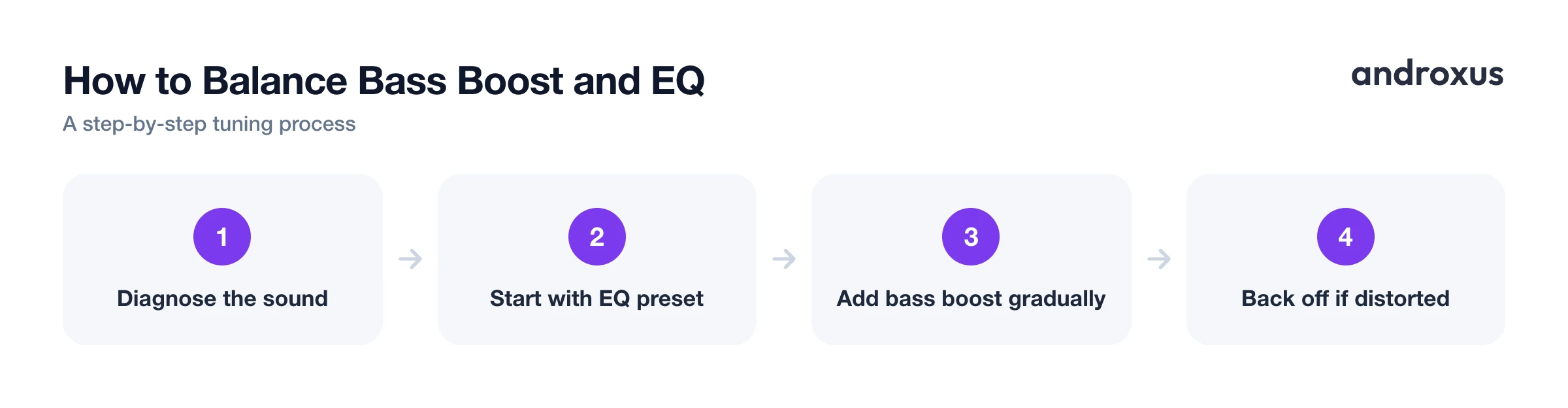
- Identify what's missing from your sound. Listen to a familiar track and note whether the issue is overall weak or thin sound (equalizer territory), specifically flat low-end punch (bass booster territory), or everything just too quiet (volume booster territory).
- Start with genre or preset EQ curves. Try a preset built for the music or content type, for example Bass, Pop, or Movie, before manually dragging bands. Presets give a reasonable starting balance across the frequency spectrum.
- Add bass boost separately and gradually. If low end still feels thin after EQ adjustments, enable bass boost as its own layer and raise it in small increments, listening for punch without rattling or crackling.
- Watch for distortion and back off. If bass or volume boosting introduces crackle, rattle, or muddiness, especially on a phone speaker, reduce the gain. A limiter can catch peaks, but it cannot invent headroom the hardware does not have.
- Save the combination as a custom profile. Once EQ bands, bass boost, and volume levels sound right for a given pair of headphones or speaker, save it as a profile so it can be recalled automatically, for example on headphone connect, instead of re-tuning every time.
Key takeaways
- An equalizer adjusts multiple frequency bands across the full spectrum, making it the right tool for overall tonal balance.
- A bass booster is a single, dedicated low-frequency control, faster to use for pure low-end punch but less precise than a full EQ.
- The two are complementary: use one, the other, or both, depending on whether the problem is balance, bass, or both.
- Neither tool can exceed what your hardware can physically reproduce; a limiter reduces distortion but cannot add headroom that is not there.
- Save distortion-free settings as a profile so you are not re-tuning bass and EQ levels every time you switch headphones.
Frequently asked questions
Is bass boost the same as turning up an equalizer's low band?
They accomplish something similar but are usually built differently. A dedicated bass booster applies a single, tuned low-frequency enhancement, often with its own protective limiting, while raising an equalizer's low band gives you finer control over exactly which bass frequencies (for example 60 Hz vs 150 Hz) get emphasized.
Do I need both a bass booster and an equalizer?
No, but they solve different problems. An equalizer alone can boost bass by raising low-frequency bands, and a bass booster alone can add low-end punch without touching other frequencies. Many apps, including Flow Equalizer, offer both as independent toggles so you can use one, the other, or combine them.
Why does boosting bass sometimes cause distortion or crackling?
Bass frequencies carry a lot of energy, and pushing them too far can exceed what the phone speaker or headphone driver can cleanly reproduce, causing clipping or crackling. This is a hardware limit, not something software can fully bypass, which is why apps use a limiter to hold peaks in check.
Can an equalizer make audio louder overall?
An equalizer reshapes the balance between frequencies rather than adding overall loudness. Raising every band at once can increase perceived volume somewhat, but that is different from a volume booster, which raises the whole signal after the phone's normal maximum.
Does Android have a built-in system-wide equalizer?
Stock Android (AOSP) does not expose a system-wide EQ in Settings. Some manufacturer skins bundle one, but coverage is inconsistent across devices, which is why most people rely on a dedicated equalizer app to shape audio across most music and video players and every output: speaker, wired headphones, or Bluetooth. App-by-app support still varies, since not every player broadcasts what it is playing to other apps.
Is it safe to max out bass boost and volume boost together?
It can strain hearing and hardware. Following general safe-listening guidance, such as the commonly cited 60/60 rule (60 percent volume, 60 minutes at a time), and easing bass gain back if you hear distortion, protects both your ears and your speaker or headphones.
