Does Your Phone Have a BMS? What Android Shows You
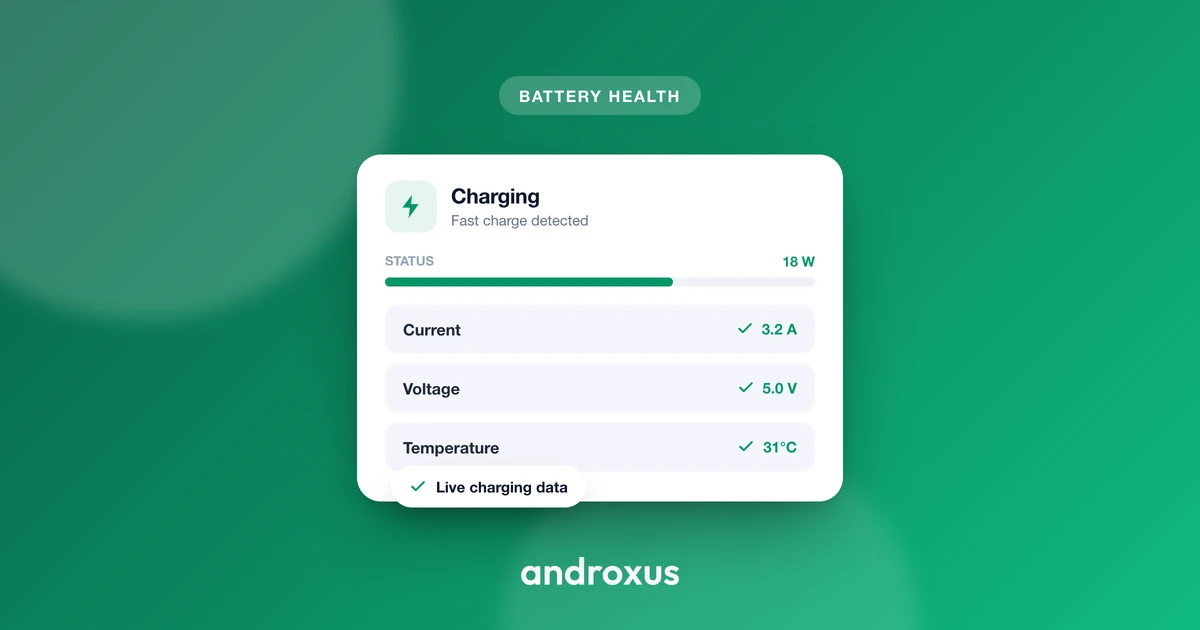
Open any spec sheet for your phone and you will not find a line item called "BMS." That absence makes people assume phones skip the battery management hardware that shows up in EV and e-bike marketing. They do not skip it, they just never show it to you, and Android only reveals part of what it measures.
Quick answer: Yes, every lithium-ion phone has a battery management system, a small protection circuit plus a fuel gauge IC built onto the battery's own circuit board. It silently handles overcharge protection, over-discharge cutoff, overcurrent protection, and temperature-based charge derating before Android ever sees a number. Android's public BatteryManager API then exposes a real but partial slice of what that hardware measures, current, charge counter, percentage, voltage, temperature, health flag, and charging status, all readable by any app with no special permission. What it deliberately hides, true state-of-health, manufacturing date, and the fuel gauge's raw registers, stays locked behind system-only permissions no regular app can request.
What you'll learn
- Where your phone's BMS physically lives, and what it does before Android sees any data
- What a fuel gauge IC is and why it, not Android, is the real source of your battery numbers
- Exactly which battery values every Android app can legally read, with units and constants
- Which battery data Android locks away from third-party apps, and why
- How Doze mode and background restrictions affect how continuously an app can watch that data
Yes, Your Phone Has a BMS, It Just Isn't Called That
Every lithium-ion or lithium-polymer phone battery ships with a battery management system built directly into the small circuit board attached to the cell. It is not a separate module you can remove or inspect, it is a few millimeters of silicon glued to the pack itself, working alongside the phone's power management IC (PMIC) to keep the cell inside safe limits.
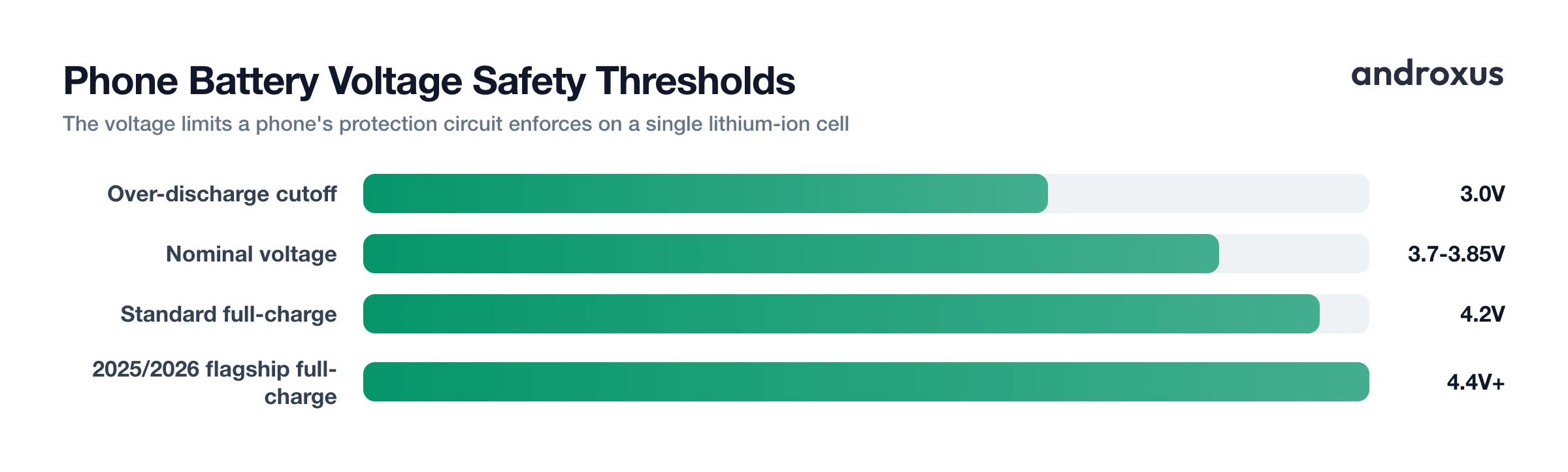
The core protective jobs are simple but essential. Overcharge protection stops the charging current once the cell reaches its rated full-charge voltage, typically 4.2V, though some 2025 and 2026 flagship phones using higher-density silicon-carbon chemistries are rated meaningfully higher, with some reported above 4.4V. Over-discharge cutoff shuts the cell off around 3.0V so it does not get damaged by draining too low. Overcurrent and short-circuit protection interrupt the circuit if current spikes past a safe threshold.
Temperature is handled by a separate industry standard called JEITA, published in 2007 by the Japan Electronics and Information Technology Industries Association together with the Japan Battery Association, and adopted across nearly the entire phone industry since. Under JEITA guidelines, charge current is cut roughly in half when the battery is between 0C and 10C (32F to 50F), and charge voltage is stepped down as the cell gets hot, capped near 4.15V between 45C and 50C and near 4.1V between 50C and 60C (113F to 140F), with charging stopped entirely above 60C, all to reduce stress on the cell.
One thing a phone BMS does not do is cell balancing. Phone batteries are a single cell, with a nominal voltage around 3.7V to 3.85V, so there is nothing to balance. Cell balancing only matters in packs built from multiple cells wired in series, the kind found in EVs, e-rickshaws, e-scooters, and power tools, a genuinely different BMS architecture solving a different problem. It is worth being clear here: an app that reads your phone's own battery data, including AmpereFlow, has no connection to or control over that separate class of hardware.
All of this protection circuitry runs silently at the hardware level, before Android or any app ever sees a number. No app can query it directly or override its thresholds. Every number an app eventually shows you is something Android read after the fact, from a different chip.
The Fuel Gauge IC: Where Android's Numbers Actually Come From
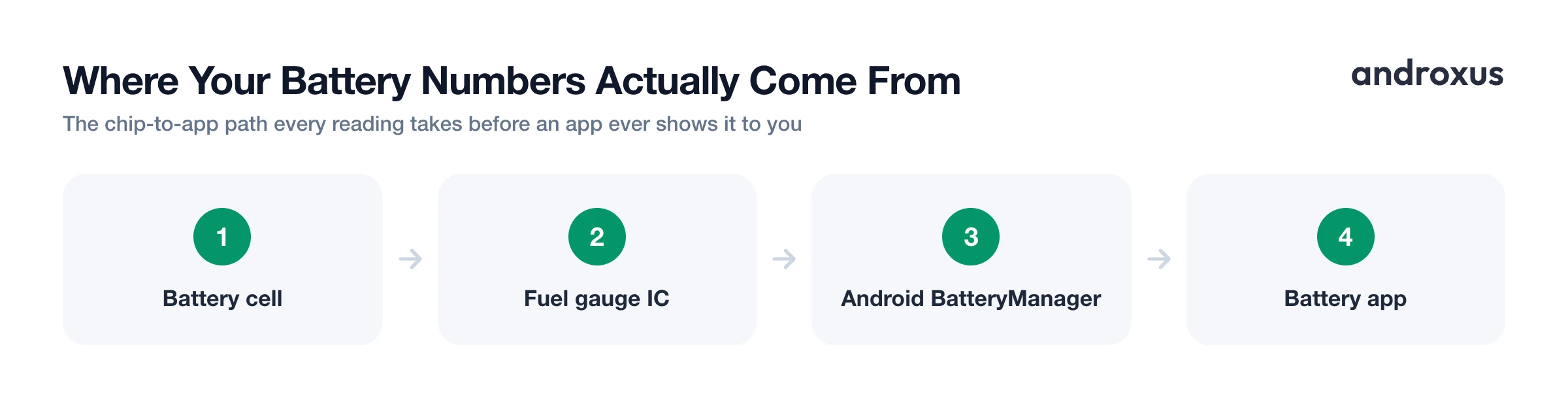
Sitting between the cell and the PMIC is a second, distinct chip called the fuel gauge IC. Its job is to measure current across a small sense resistor and integrate that current over time, a technique called coulomb counting, to track how much charge remains in the cell and estimate state of charge.
This chip, not Android and not the phone's operating system in any general sense, is the actual origin of the current, voltage, and charge figures that later show up in Android's battery APIs. Android is a messenger here. It reads registers the fuel gauge IC already populated and republishes them through its own framework.
Fuel gauge chips keep internal, non-volatile registers for data that persists across reboots and factory resets, including a learned full-charge capacity that adjusts as the battery ages, a manufacturing date, and a running charge cycle count. For most of Android's history, third-party apps had no path to that cycle count at all. Android 14 (API level 34) changed that by adding a public field, EXTRA_CYCLE_COUNT, letting ordinary apps read that specific fuel gauge register for the first time, a narrow crack in a door that was previously shut.
What BatteryManager Actually Exposes to Every App
The good news is that the slice Android does expose is genuinely useful, well documented, and requires no special permission or root access. It comes from two places: the android.os.BatteryManager class and the ACTION_BATTERY_CHANGED broadcast intent, both part of the standard public Android SDK.
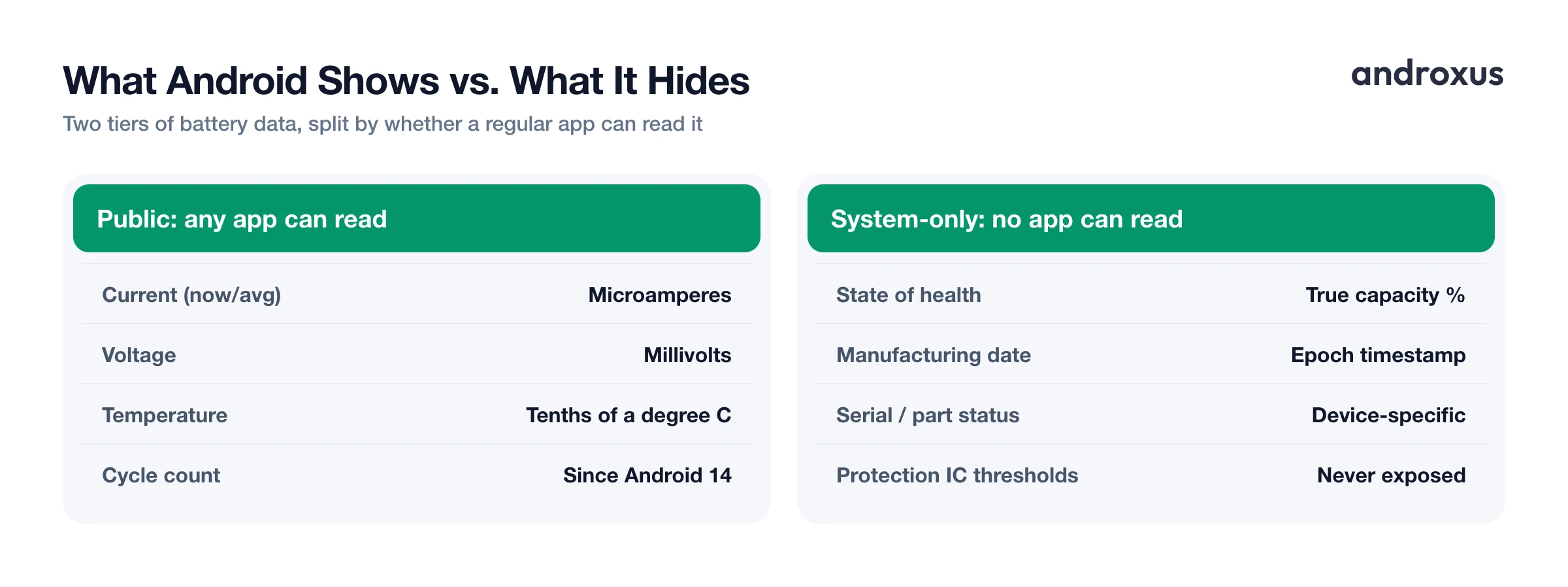
BatteryManager provides BATTERY_PROPERTY_CURRENT_NOW, the instantaneous current in microamperes, positive when charging and negative when discharging, along with BATTERY_PROPERTY_CURRENT_AVERAGE, BATTERY_PROPERTY_CHARGE_COUNTER (remaining capacity in microampere-hours), BATTERY_PROPERTY_CAPACITY (the familiar integer percentage), and BATTERY_PROPERTY_ENERGY_COUNTER (remaining energy in nanowatt-hours). The battery-changed intent adds EXTRA_VOLTAGE in millivolts, EXTRA_TEMPERATURE in tenths of a degree Celsius, EXTRA_HEALTH, EXTRA_STATUS, EXTRA_PLUGGED, EXTRA_TECHNOLOGY (typically reported as Li-ion), and, since Android 14, EXTRA_CYCLE_COUNT.
The table below lays out what each field means and whether a regular app can read it.
| Data point | Android constant | Unit / format | Available to third-party apps? |
|---|---|---|---|
| Instantaneous current | BATTERY_PROPERTY_CURRENT_NOW | Microamperes, signed | Yes, public |
| Average current | BATTERY_PROPERTY_CURRENT_AVERAGE | Microamperes, signed | Yes, public |
| Remaining charge | BATTERY_PROPERTY_CHARGE_COUNTER | Microampere-hours | Yes, public |
| Battery percentage | BATTERY_PROPERTY_CAPACITY | Integer percent | Yes, public |
| Remaining energy | BATTERY_PROPERTY_ENERGY_COUNTER | Nanowatt-hours | Yes, public |
| Voltage | EXTRA_VOLTAGE | Millivolts | Yes, public |
| Temperature | EXTRA_TEMPERATURE | Tenths of a degree C | Yes, public |
| Health flag | EXTRA_HEALTH | Enum (GOOD, OVERHEAT, DEAD, OVER_VOLTAGE, COLD, etc.) | Yes, public |
| Charging status | EXTRA_STATUS | Enum (CHARGING, DISCHARGING, FULL, etc.) | Yes, public |
| Power source | EXTRA_PLUGGED | Enum (AC, USB, WIRELESS, DOCK) | Yes, public |
| Cycle count | EXTRA_CYCLE_COUNT | Integer, added in Android 14 (API 34) | Yes, public, where OEM populates it |
| State of health (true capacity fade) | BATTERY_PROPERTY_STATE_OF_HEALTH | Percent of rated capacity | No, @SystemApi, requires BATTERY_STATS permission |
| Manufacturing / first-use date | MANUFACTURING_DATE / FIRST_USAGE_DATE | Epoch timestamp | No, system only |
| Serial number, part status | SERIAL_NUMBER / PART_STATUS | Device-specific | No, system only |
| Protection IC trip thresholds, fuel gauge register map, live charger negotiation | Not exposed | n/a | No, not exposed at any permission level |
The EXTRA_HEALTH field itself resolves to one of a handful of enum values, GOOD, OVERHEAT, DEAD, OVER_VOLTAGE, COLD, UNKNOWN, or UNSPECIFIED_FAILURE, and EXTRA_STATUS resolves to CHARGING, DISCHARGING, NOT_CHARGING, FULL, or UNKNOWN. EXTRA_PLUGGED uses bit flags: 1 for AC, 2 for USB, 4 for wireless, and 8 for dock.
This is exactly the data behind the live watts and amps, charging status, plug type, and charge history shown by battery apps. In practice, OEMs are inconsistent about how they populate these values. Some report current_now with a flipped sign, some scale it by the wrong factor, and some misreport units entirely, a real source of wildly wrong-looking wattage numbers on certain devices. Correcting those manufacturer-specific quirks across thousands of device models before showing a number is the core differentiator behind AmpereFlow.
What Android Deliberately Keeps From Apps
The field most people actually want, true battery state of health, exists in the AOSP source as BATTERY_PROPERTY_STATE_OF_HEALTH, defined as remaining full-charge capacity expressed as a percentage of rated capacity. It is marked @SystemApi and gated behind the BATTERY_STATS permission, a permission ordinary third-party apps cannot request. So while the fuel gauge chip almost certainly knows this number internally, Android will not hand it to a normal app.
The same system-only gate covers BATTERY_PROPERTY_MANUFACTURING_DATE, BATTERY_PROPERTY_FIRST_USAGE_DATE, BATTERY_PROPERTY_CHARGING_POLICY, BATTERY_PROPERTY_SERIAL_NUMBER, and BATTERY_PROPERTY_PART_STATUS. None of these reach a regular app, no matter how the app requests permissions.
A separate category is never exposed at any permission level, to any app, through the standard Android battery framework: the protection IC's internal trip thresholds, the fuel gauge's raw register map, and the live USB Power Delivery negotiation contract between phone and charger. Those live entirely inside the hardware and the low-level driver stack.
Because true state-of-health is locked away, any battery health or capacity-estimate feature built on Android is necessarily built from observed charge counter and capacity behavior across multiple charging sessions, not a single trusted register read. That is the only method available given what the platform exposes. Android 15 (API level 35) introduced more standardized battery-health reporting, though how completely a phone exposes cycle count and health data still depends heavily on its OEM and Android version.
Doze Mode and App Standby: Why Background Reads Aren't Continuous
Even for the data Android does expose, getting a continuous stream of it is not automatic. Doze mode, introduced in Android 6.0 and refined in every release since, defers background CPU and network activity once a phone has been stationary, unplugged, and screen-off for a while. App Standby, expanded into priority buckets starting in Android 9, further throttles background activity based on how recently and how often you actually open the app.
The practical effect for any battery-monitoring app is that background-only polling gets deferred or paused. To get real-time readings during an active charging session, an app needs to run a foreground service, the same mechanism used by music players and navigation apps, or be explicitly exempted through isIgnoringBatteryOptimizations(). That is the reason charge-tracking apps typically show a persistent notification while they are actively logging a session: it is what keeps the readings live instead of throttled.
How to Read Your Phone's BMS Data
- Check your current charging status and power source. Open Settings > Battery, or an app reading Android's EXTRA_STATUS and EXTRA_PLUGGED values, to see whether the phone reports charging, discharging, or full, and whether power is coming from AC, USB, or wireless.
- Read live current and voltage while plugged in. Open a battery-data app while charging to see the instantaneous current (from BATTERY_PROPERTY_CURRENT_NOW, in microamperes) and voltage (from EXTRA_VOLTAGE, in millivolts) that the fuel gauge IC is reporting in real time.
- Check cycle count if your device reports it. On phones running Android 14 or later, check EXTRA_CYCLE_COUNT through a battery app. Not all OEMs populate this field consistently, so absence of a reading does not necessarily mean zero cycles.
- Watch temperature during a charge session. Battery temperature (EXTRA_TEMPERATURE, reported in tenths of a degree Celsius) is one of the values the protection circuit itself uses to decide whether to slow or pause charging. Watching it tells you when you are near the edges of the safe 0C to 45C (32F to 113F) charging range.
- Treat any health or capacity percentage as an estimate. Because true state-of-health is a system-only Android field, remember that any battery health or capacity estimate shown by a third-party app is derived from observed charge counter behavior over multiple sessions, not a single direct register read.
- Keep monitoring apps exempt from battery optimization for continuous data. If you want uninterrupted background readings rather than throttled ones, exempt the monitoring app from Doze and App Standby restrictions in Settings > Battery > Battery Optimization, or keep it running in the foreground during the session.
Key takeaways
- Every lithium-ion phone has a real BMS, a protection circuit plus a fuel gauge IC on the battery's own board, it is just never marketed by that name.
- The fuel gauge IC, not Android itself, is the actual source of current, voltage, and charge data, measured through coulomb counting across a sense resistor.
- Android's public BatteryManager API exposes current, charge counter, percentage, energy, voltage, temperature, health flag, status, plug type, and, since Android 14, cycle count, all readable by any app without special permission.
- True state-of-health, manufacturing date, and the fuel gauge's raw registers stay behind a system-only permission no regular app can obtain, so any third-party health estimate is inferred from charging behavior over time, not read directly.
- A phone BMS handles a single cell and has no cell-balancing function, that is a distinct job specific to multi-cell packs like EVs and e-rickshaws, hardware that phone-focused apps do not connect to or control.
Frequently asked questions
Does every Android phone actually have a BMS?
Yes. Every lithium-ion or lithium-polymer phone battery has a protection circuit and a fuel gauge IC built into the small circuit board attached to the cell, working with the phone's power management IC. It handles overcharge, over-discharge, overcurrent, and temperature protection silently, before any app or even Android itself sees a number.
What is a fuel gauge IC, and is it part of the BMS?
The fuel gauge IC is the chip that tracks remaining battery capacity using coulomb counting, measuring current through a sense resistor and integrating it over time. It works alongside the protection circuitry as part of the phone's overall battery management system and is the actual source of the current, voltage, and charge data Android later exposes to apps.
Can a third-party battery app read my phone's raw BMS registers?
No. A third-party battery app reads the public Android BatteryManager API, values like current, voltage, temperature, charge counter, charging status, and cycle count where the device populates it. It does not access the fuel gauge chip's raw internal registers or the protection IC's trip thresholds, those are not exposed by Android to any app.
Why can't most apps read my phone's true battery health?
Android defines BATTERY_PROPERTY_STATE_OF_HEALTH, but it is marked as a system API gated behind the BATTERY_STATS permission, so regular third-party apps cannot read it directly. This is an Android platform restriction, not a limitation of any specific app. Health-estimate features on Android are built from charge counter and capacity behavior observed over time instead.
Is my phone's BMS the same kind of system used in an EV or e-rickshaw?
No. A phone battery is a single lithium-ion cell, so its BMS only needs to handle overcharge, over-discharge, overcurrent, and temperature protection. EV, e-rickshaw, e-scooter, and power tool packs use multiple cells wired in series and need active cell balancing, a function phone batteries do not have. Battery apps read your phone's own battery data only and do not connect to or control that separate class of hardware.
Does Doze mode stop battery monitoring apps from working correctly?
Doze mode and App Standby throttle background-only polling on an idle, unplugged, screen-off device to save battery. They do not block an app from reading live data while it is in the foreground or actively logging a charging session, that is why charging trackers typically run as a foreground service with a visible notification during an active charge.
