BMS App vs Battery Monitor App: What's the Difference
Search "bms app" on the Play Store and you get a strange mix of results: apps for e-rickshaw battery packs sitting next to phone charging trackers, all fighting for the same keyword. That collision sends a lot of people looking for e-rickshaw or solar pack control straight to a phone battery meter that has nothing to do with what they need, and vice versa.
Quick answer: A BMS app pairs over Bluetooth with the battery management circuit inside an external pack, an e-rickshaw, e-bike, or solar bank, and reads per-cell voltage, current, and sometimes toggles the pack on or off. A phone battery monitor app only reads your phone's own internal battery through Android's built-in API and has no ability to pair with, see, or control any external pack. If you're trying to check or manage an e-rickshaw or solar battery, you need a BMS-specific app that matches that pack's hardware, not a phone battery meter. If you're trying to check your phone's charging speed or health, a phone monitor app is the right tool and a BMS app can't help you at all.
What you'll learn
- Why "BMS app" and "battery monitor app" describe two unrelated categories that happen to share search terms
- What a true BMS app connects to, and what it can read and control on an external pack
- What a phone battery monitor app can and cannot do
- Why identical phones sometimes report different charging wattage
- How to match the right app to the right battery chemistry before you install anything
Two Different Apps, Two Different Batteries
The confusion starts with vocabulary. Searches like "bms app," "bat bms," "battery monitor app," and "battery bms app" all contain the word "battery," so search engines and app stores lump them together. In practice they solve completely different problems.
A phone battery monitor app reads only the phone's own internal battery through Android's built-in BatteryManager API. It cannot pair with, connect to, or control an external BMS, the kind built into an e-rickshaw pack, an e-bike, a solar storage bank, or a lead-acid battery. There is no Bluetooth handshake to a second device anywhere in that process.
A true BMS app, such as BAT-BMS, which is commonly used with e-rickshaw lithium packs, connects over Bluetooth Low Energy directly to the BMS circuit board sitting inside the external battery, typically within about 15 meters of range. That circuit board is a separate piece of hardware entirely, welded into the pack itself, and the app is a remote window into it.
If you searched for this comparison because you want to check on or manage an e-rickshaw, e-bike, or solar pack, the answer is stated plainly here so you don't waste a download: a phone battery monitor app will not detect that hardware at all. You need an app built for that specific BMS module.
What a BMS App Actually Does
A BMS app pairs over Bluetooth with the BMS module built into a lithium pack and reads data the BMS chip has already computed. That typically includes per-cell voltage, pack state of charge, charge and discharge current, cycle count, and per-cell or pack temperature.
The BMS hardware itself performs three jobs, whether or not an app is watching it. Monitoring covers per-cell voltage and temperature. Balancing shifts current between cells so no single cell in the pack overcharges or over-discharges relative to its neighbors. Protection cuts charging above a cell's safe ceiling, cuts discharge below its safe floor, and shuts the pack down entirely on overcurrent or a short circuit.
Some BMS apps go a step further and send commands back to the pack, such as toggling its output on or off remotely. That capability is worth understanding before you rely on it. Many low-cost Bluetooth packs ship with no pairing password set, which means anyone within Bluetooth range could connect to the pack and cut its output, potentially while a vehicle is moving. If your pack's BMS supports a password, set one.
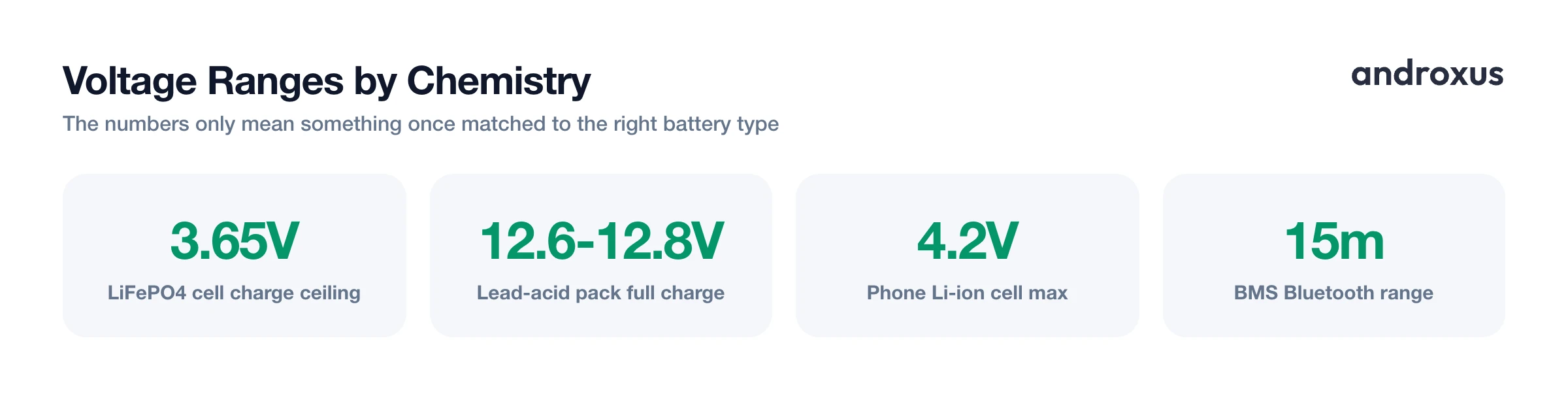
The numbers a BMS app reports depend on the pack's chemistry. LiFePO4 packs, common in e-rickshaws and solar storage, run 3.2V nominal per cell, with the BMS charging each cell up to a ceiling near 3.65V. 12V lead-acid packs read 12.6 to 12.8V resting at full charge, run 13.8 to 14.4V while charging, and are considered deeply discharged around 10.5 to 11.5V.
What a Phone Battery Monitor App Actually Does
Phone monitor apps read Android's public BatteryManager API. That means EXTRA_VOLTAGE and EXTRA_TEMPERATURE from the ACTION_BATTERY_CHANGED broadcast, plus BATTERY_PROPERTY_CURRENT_NOW and BATTERY_PROPERTY_CHARGE_COUNTER through getIntProperty and getLongProperty calls. Every one of those values describes the single battery built into the phone. There is no pairing step, and no second device is involved anywhere in the process.
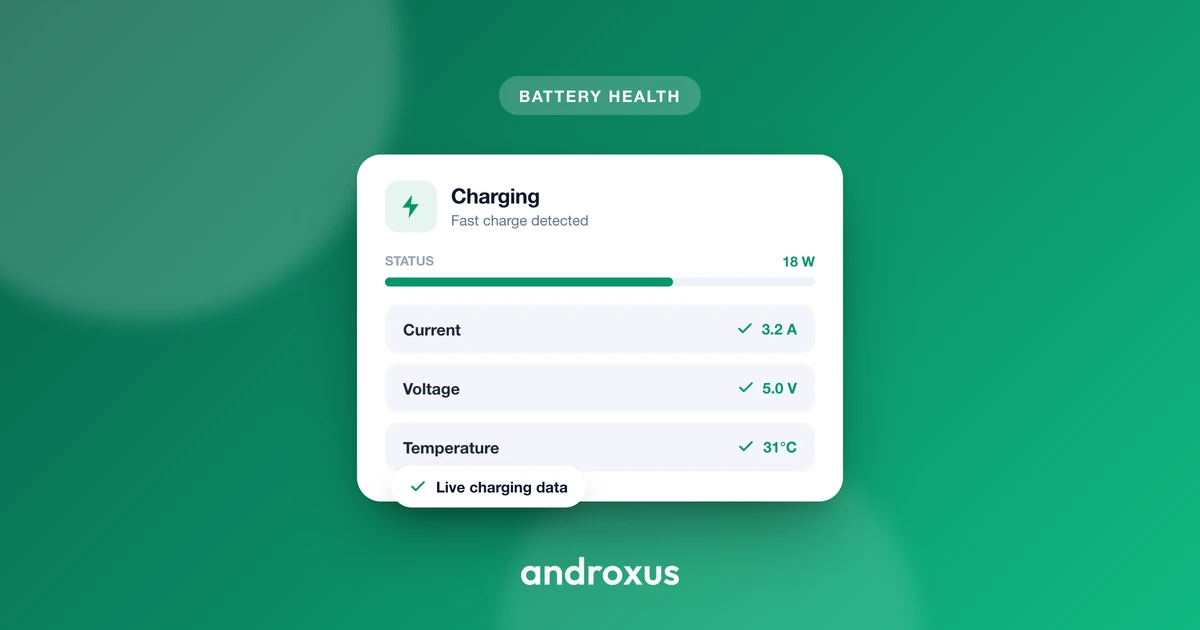
From those raw values, an app computes live wattage by multiplying volts and amps, estimates time remaining to 80% and 100% charge, flags fast charging from the current draw, and can estimate present capacity against original design capacity by comparing the charge counter across sessions.
AmpereFlow uses these same public values to show live watts and amps, charging power broken down by battery level, voltage and temperature, a battery health and capacity estimate, charge history with full session replay, and how a device ranks against other phones of the same model. None of this involves hardware pairing, remote toggling, or any external pack. It is read-only telemetry from the phone's own battery, refreshed with each system broadcast.
Why Two Identical Phones Can Show Different Numbers
Android's spec for BATTERY_PROPERTY_CURRENT_NOW calls for microamperes, positive when the battery is charging. In practice, manufacturer implementations vary. Some report in milliamperes instead of microamperes, a factor of 1,000 difference, and some invert the sign so charging shows up as negative current instead of positive.
A documented case: a Xiaomi Mi 8 running MIUI 10 on Android 9 reported -2000 while actively charging, where the Android spec predicts +2000. The magnitude was correct, the sign was backward. Read raw and uncorrected, that kind of quirk can make a charging phone look like it's discharging, or report current three orders of magnitude off, depending on the chipset and firmware build.
This is exactly what a battery monitor app's correction layer exists to fix, not hardware pairing, but unit and sign normalization across device models.
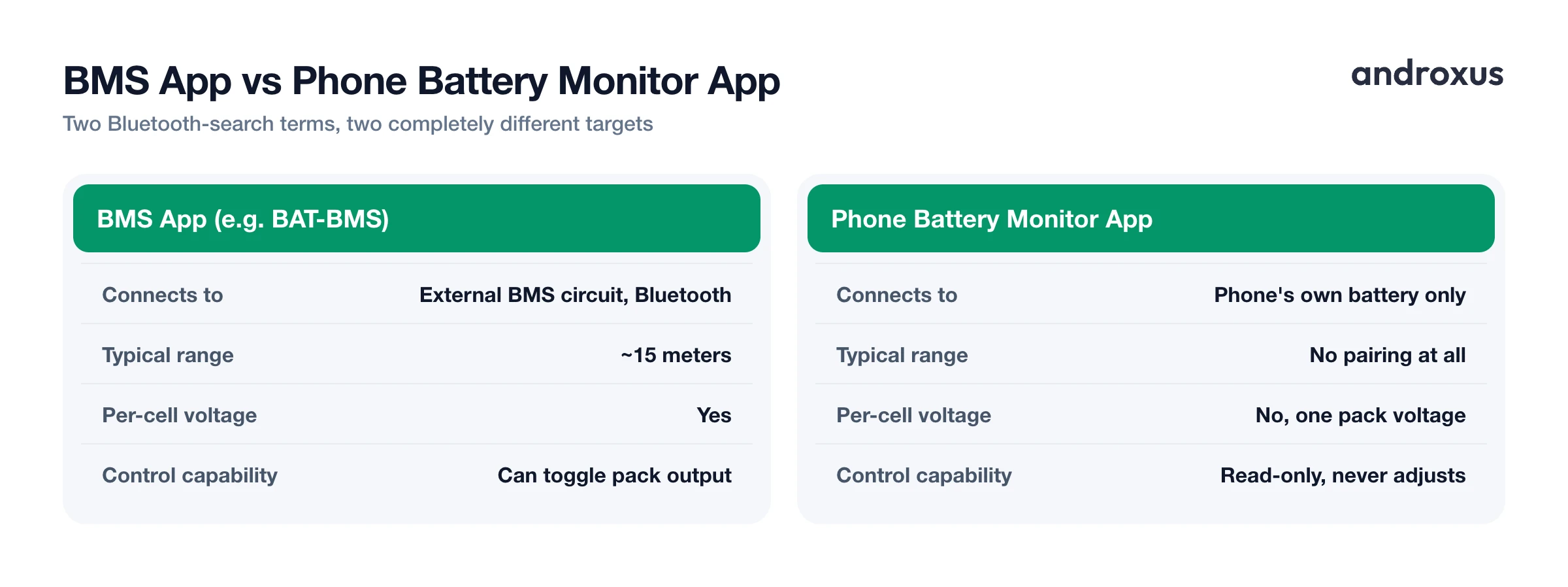
| Aspect | BMS App (e.g., BAT-BMS) | Phone Battery Monitor App |
|---|---|---|
| Connects to | External BMS circuit inside a battery pack, over Bluetooth Low Energy | Nothing external, reads the phone's own OS-level battery data |
| Typical range | About 15 meters, line of sight to the pack | Not applicable, no wireless pairing involved |
| Per-cell voltage | Yes, read directly from the pack's BMS chip | No, phones report one pack voltage from a single lithium-ion cell |
| Pack chemistry covered | LiFePO4 (3.2V nominal, 3.65V charge ceiling), lead-acid (12V nominal), Li-ion e-bike packs | Li-ion phone cell only (3.0 to 4.2V) |
| Control capability | Some models can toggle pack output on/off remotely | None, read-only, never adjusts charging behavior |
| Data source | BMS chip inside the external pack | Android BatteryManager API (EXTRA_VOLTAGE, EXTRA_TEMPERATURE, CURRENT_NOW, CHARGE_COUNTER) |
| Typical use case | Checking an e-rickshaw, e-bike, or solar pack's cell health and charge state | Checking phone charging speed, health, and charge history |
Matching Numbers to Chemistry and Charging Standard
Whichever app you're reading, the raw numbers only mean something if you know the expected range for the chemistry involved. A single lithium-ion cell, the kind inside phones and most e-bike or e-rickshaw packs, runs 3.0V to 4.2V, with 3.6 to 3.7V nominal. Charging above 4.2V or discharging below roughly 2.5V degrades or damages the cell.
Safe lithium-ion charging temperature is 0 to 45 degrees C (32 to 113 degrees F). Charging below 0 degrees C (32 degrees F) risks lithium plating on the anode and permanent capacity loss. Discharge tolerates a wider band, -20 to 60 degrees C (-4 to 140 degrees F).
Typical Android phones are rated for roughly 500 to 800 full charge cycles before capacity falls to about 80%. Apple rates iPhone 14 and earlier to 500 cycles for that same 80% mark, and iPhone 15 and later to 1,000 cycles.
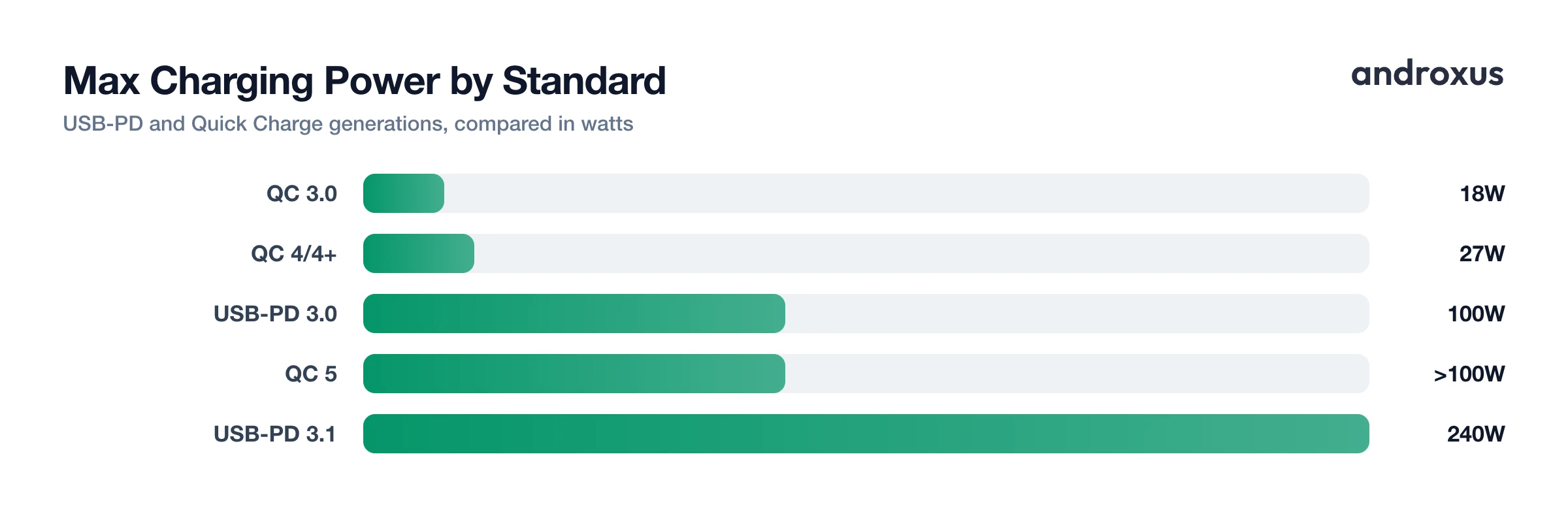
On the charging-standard side, USB Power Delivery 3.0 tops out at 100W (20V/5A) in Standard Power Range. PD 3.1 added Extended Power Range with fixed 28V, 36V, and 48V steps plus Adjustable Voltage Supply, reaching up to 240W. Qualcomm Quick Charge 3.0 reaches roughly 18W across 3.6 to 20V in 200mV steps, Quick Charge 4/4+ reaches 27W and layers onto USB-PD 3.0 PPS, and Quick Charge 5 exceeds 100W using 3.3 to 20V at up to 5A or more. None of these standards apply to the BMS side of an external pack, which typically charges from a dedicated wall charger sized to that pack's chemistry and capacity.
Background Behavior: Doze and App Standby
Android's Doze mode activates when a device is stationary, unplugged, and has had its screen off for a while. It defers background network access, ignores wakelocks, delays alarms, and pauses scheduled jobs until periodic maintenance windows. App Standby buckets an app's background access by recent usage, so apps used less recently get less frequent background execution regardless of Doze state.
Both restrictions affect any Android app that logs data in the background, including phone battery monitor apps building a history for later graphs. A foreground service or a persistent notification is the standard way such apps keep sampling battery data reliably through Doze.
BMS apps face a different constraint entirely. Since they need an active Bluetooth connection to the external pack, they generally only read data while the app is open in the foreground and the phone is within range of the pack, not continuously in the background. That's another reason a BMS app and a phone monitor app can't substitute for each other: one is built to sample continuously on-device, the other only works during a live, in-range session with external hardware.
How to Pick Between a BMS App and a Phone Battery Monitor App
- Identify what you're actually trying to measure. Decide whether you need data on your phone's own battery or on an external pack like an e-rickshaw, e-bike, or solar battery. Phone battery data calls for a monitor app, external pack data calls for a BMS app matched to that pack's hardware.
- Find the BMS app matched to your pack. If it's an external pack, identify the BMS module's manufacturer, then install only the app that matches it. Some e-rickshaw packs pair with the BAT-BMS app, for example, and BMS Bluetooth protocols are not interchangeable between brands.
- Install a phone battery monitor app for phone diagnostics. If it's your phone's own battery, install a phone battery monitor app and grant it battery-usage and notification permissions so it can keep sampling data reliably even under Android's Doze restrictions.
- Cross-check readings against known chemistry ranges. Compare what the app shows to the expected range for the chemistry involved: a single lithium-ion phone cell should read 3.0 to 4.2V, a LiFePO4 pack cell should read up to about 3.65V, and a 12V lead-acid pack should rest at 12.6 to 12.8V when full.
- Judge phone wattage figures by trend, not a single snapshot. If your phone model is known for reporting current in the wrong unit or sign, rely on an app that corrects for that quirk and judge charging speed by the trend across a session rather than one instantaneous number.
- Never use a phone monitor app to try to control an external pack. If you need to toggle or configure an e-rickshaw, e-bike, or solar BMS, use only the manufacturer's matching app, and set a Bluetooth password on the BMS if it supports one, since unsecured packs can be connected to and shut off by anyone within range.
Key takeaways
- A BMS app pairs over Bluetooth with the physical circuit board inside an external battery pack; a phone battery monitor app only reads your phone's own internal battery, and the two are never interchangeable.
- Phone monitor apps cannot connect to, pair with, or control an e-rickshaw, e-bike, solar, or lead-acid BMS, there is no hardware pairing feature in this category of app.
- Manufacturer firmware quirks, like reporting current in the wrong unit or with an inverted sign, are why identical phones can show different wattage in a monitor app, and why a correction layer matters more than raw pass-through numbers.
- Match the app to the chemistry: LiFePO4 cells top out near 3.65V, lead-acid packs rest at 12.6 to 12.8V full, and a phone's single lithium-ion cell runs 3.0 to 4.2V.
- If a BMS-controlled pack has no Bluetooth password, anyone within roughly 15 meters can connect and toggle its output, so setting one is worth doing regardless of which app you use.
Frequently asked questions
Can a phone battery monitor app connect to or control my e-rickshaw's BMS?
No. Phone battery monitor apps only read the phone's own internal battery through Android's BatteryManager API. They have no Bluetooth pairing feature for external battery packs and cannot show per-cell voltage or toggle power on an e-rickshaw, e-bike, or solar battery. For that you need a BMS-specific app matched to your pack's hardware, such as BAT-BMS, which is used with certain e-rickshaw packs.
What is the actual difference between a BMS app and a battery monitor app?
A BMS app pairs over Bluetooth with the physical BMS circuit board inside an external battery pack and reads per-cell voltage, pack current, cycle count, and temperature straight from that chip, and sometimes can toggle the pack's output. A battery monitor app reads only the phone's own internal battery through the operating system, with no pairing step and no external hardware involved.
Can a phone app show per-cell voltage for an external lithium pack?
No. Per-cell voltage requires a physical Bluetooth connection to the pack's own BMS circuit, which only a BMS-specific app provides. A phone battery monitor app has access to exactly one battery, the phone's, and reports a single pack voltage for it, since phones use a single lithium-ion cell rather than a multi-cell pack.
Why do two phones of the same model show different charging wattage in monitor apps?
Android's official spec for reporting current is microamperes with a positive sign while charging, but manufacturer firmware does not always follow it. Some devices report in milliamperes instead, a 1,000x difference, and some invert the sign so charging appears as negative current. Apps that correct for the specific model's quirk show consistent watts, apps that pass through the raw value do not.
What temperature range is safe for charging a lithium-ion battery?
Charging is safe from 0 to 45 degrees C (32 to 113 degrees F). Charging below 0 degrees C (32 degrees F) can cause lithium plating on the anode and permanent capacity loss. Discharging tolerates a wider range, -20 to 60 degrees C (-4 to 140 degrees F), though extremes at either end shorten long-term lifespan.
How many charge cycles before a lithium battery is considered worn out?
Most Android phones are rated for roughly 500 to 800 full charge cycles before capacity drops to about 80% of original. Apple rates iPhone 14 and earlier to 500 cycles for that same 80% mark, and iPhone 15 and later to 1,000 cycles. External packs such as e-rickshaw LiFePO4 batteries are typically rated for many more cycles, but that figure comes from the pack's own BMS or manufacturer spec, not from a phone app.
