Do Battery Saver Apps Actually Work?
Your phone's storage is full of "battery saver," "battery booster," and "battery optimizer" apps promising an extra hour of screen time with one tap. Most of them do nothing useful, and some quietly make battery life worse. The honest answer requires looking at what modern Android already does on its own, and what these apps are actually built to do underneath the marketing.
Quick answer: Mostly no. RAM-cleaner and one-tap "booster" apps mostly duplicate work Android has automated since Android 6.0 Marshmallow through Doze, App Standby Buckets, and Adaptive Battery, and their force-stop method can trigger costly cold restarts that use more battery than they save. What genuinely helps is built into the OS already: the built-in Battery Saver mode, lowering screen brightness, matching refresh rate to your usage, dark theme on OLED and AMOLED screens, and finding one specific misbehaving app through Settings > Battery. A measurement app can show you what's happening, but it cannot optimize anything for you.
What you'll learn
- What one-tap booster and RAM-cleaner apps actually do under the hood, versus what they claim
- How Android's own Doze, App Standby Buckets, and Adaptive Battery already handle background power management
- Why force-stopping apps can cost more battery than it saves, with the mechanism explained
- Which settings genuinely extend battery life, backed by real study numbers
- Why no app, including a measurement app, can change your battery's chemistry or charging speed
The Booster/Cleaner Trap: What These Apps Actually Do
RAM cleaners, one-tap boosters, and battery optimizer apps built their entire pitch in an earlier era of Android, before Android 6.0, when background services could run largely unchecked and genuinely did drag down performance and battery life. Their method has stayed the same since: force-stop a batch of apps, clear their cache, and show you a satisfying "optimized" animation.
The problem is that the Android version most people now carry has already closed the loopholes these apps relied on. Android 8.0 Oreo, released in 2017, introduced background execution limits: an app calling Context.startForegroundService() must call the service's startForeground() within 5 seconds, and apps can no longer register implicit broadcast receivers in their manifest to wake up silently. Android 14, released in 2023, went further and restricted the killBackgroundProcesses() API so an app can only kill its own background processes, not another app's. That closes the exact API loophole most one-tap booster apps used to force-stop apps that weren't theirs.
Google has periodically removed or flagged task-killer-style apps from Play for making unsubstantiated performance and battery claims. The category isn't just unnecessary anymore; parts of it no longer technically function the way they used to.
Android Already Automates This: Doze, App Standby, Adaptive Battery
The core reason a battery saver app struggles to add value is that Android's scheduler has been doing this job automatically for a decade, with system-level visibility no third-party app has.
| Feature | Introduced | What It Actually Does |
|---|---|---|
| Doze | Android 6.0 Marshmallow (2015); extended to non-stationary use in Android 7.0 Nougat (2016) | Defers background CPU and network activity when the device is stationary, unplugged, and screen off for an extended period |
| App Standby | Android 6.0 Marshmallow (2015) | Restricts background network activity for apps not recently used, even while the phone is in active use |
| App Standby Buckets | Android 9 Pie (2018); Restricted tier added Android 12 (2021) | Sorts every app into Active, Working Set, Frequent, Rare, or Restricted, each with its own job, alarm, and network quota |
| Adaptive Battery | Android 9 Pie (2018) | Uses on-device machine learning to predict which apps you'll use soon and throttles background activity for the rest |
| Background execution limits | Android 8.0 Oreo (2017) | Blocks apps from running unrestricted background services or registering manifest broadcast receivers while idle |
| killBackgroundProcesses() restriction | Android 14 (2023) | Limits an app to killing only its own background processes, closing the API loophole booster apps used on other apps |
Doze wakes the device briefly for maintenance windows and otherwise holds background work back while it's stationary and unplugged. App Standby extended that logic to apps you're not currently using, even while you're actively carrying and using the phone for something else. App Standby Buckets, added in Android 9 and expanded with a Restricted tier in Android 12, sort every installed app into one of five categories, each with a job, alarm, and network quota set entirely by the OS. Adaptive Battery layers machine learning on top, predicting which apps you'll open next and throttling the rest automatically, with no manual per-app toggling required from you or from any third-party app.
A battery saver app sitting on top of this stack has no additional background data to work from, and no permission level above what the OS itself already enforces.
Why Force-Stopping Apps Can Make Battery Life Worse
This is the part most booster apps never explain, and it's the reason the category can actively backfire.
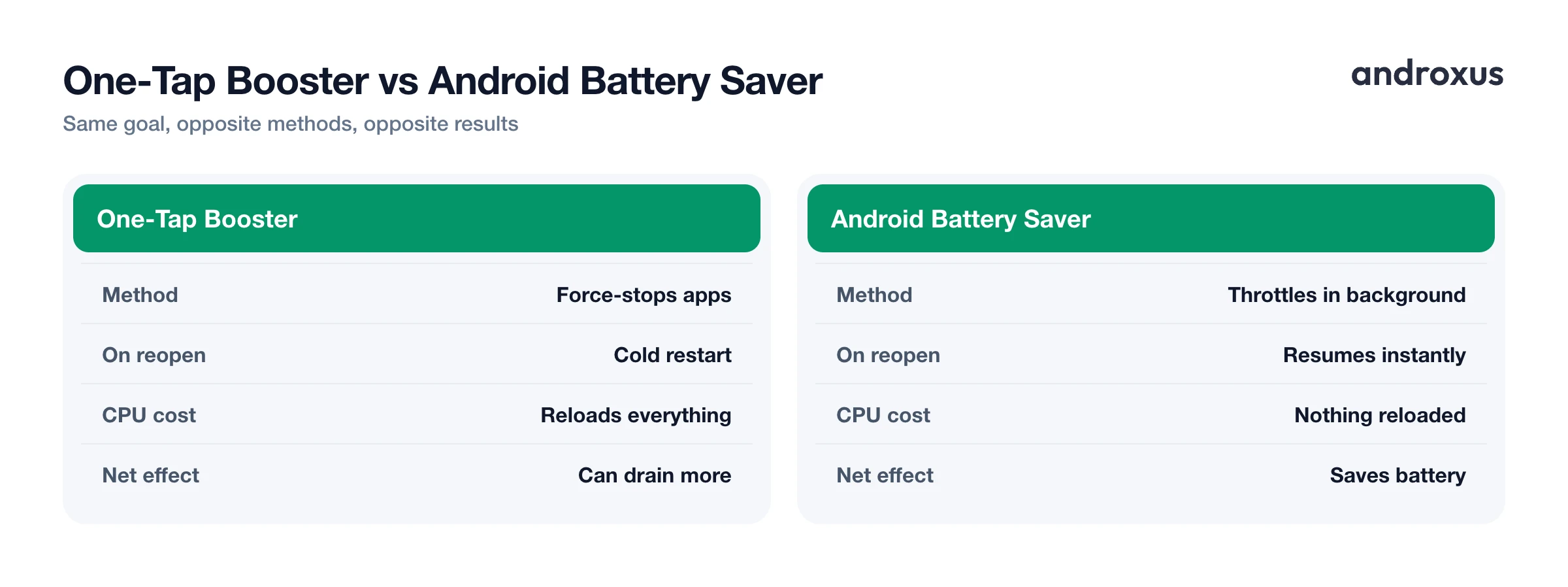
Force-killing a process removes it entirely from memory. The next time you open that app, Android has to perform a cold start: reallocating memory, reloading classes and resources, and reinflating layouts from scratch. That draws measurably more CPU and battery than simply resuming a process that was already paused, sitting quietly in RAM.
A backgrounded, paused app that isn't executing any code costs very little battery by itself. Android's own low-memory killer, lmkd, already reclaims that RAM automatically, but only when the system actually needs the space. A booster app force-stopping a dozen apps you'll reopen within the hour doesn't free up meaningful battery; it just guarantees a dozen expensive cold starts later. Repeated force-stop-and-relaunch cycles produce more wake-ups and more total CPU work than leaving Android's own scheduler alone.
What Genuinely Moves the Needle
None of this means battery life is fixed and unchangeable. Several things genuinely help, and all of them are either built into Android already or come down to a habit change.
Android's built-in Battery Saver, under Settings > Battery > Battery Saver, throttles background data and app refresh, pauses location updates when the screen is off, can enable dark theme, and trims some visual effects, all handled at the OS level rather than by a third-party app pretending to do the same thing.
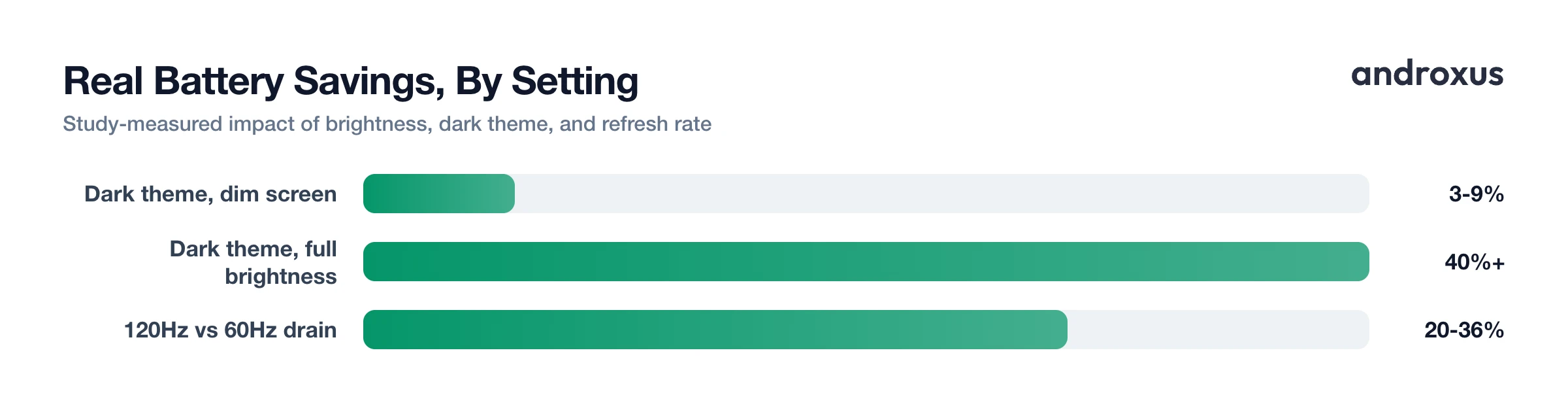
Screen brightness is the single largest lever most people overlook. A Purdue University study tested dark theme across the Pixel 2, Moto Z3, Pixel 4, and Pixel 5 and found it saved only 3 to 9 percent of power at 30 to 50 percent brightness, a fairly marginal difference. But at 100 percent brightness, savings passed 40 percent, because individually lit OLED and AMOLED pixels displaying black draw close to zero power, unlike a backlit LCD panel that lights every pixel regardless of color.
Refresh rate is the second lever people underweight. Real-world testing on the Samsung Galaxy S20 series showed roughly 20 to 36 percent shorter battery life at 120Hz versus 60Hz during active scrolling and browsing, though the gap shrinks to a few percentage points on mostly static screens. Enabling Adaptive or Auto refresh rate, where your device supports it, lets the display drop to 60Hz automatically for static content and only ramp up when it's actually scrolling or animating.
Finally, finding one genuinely misbehaving app, most often a stuck wake lock or a runaway sync loop, through Settings > Battery > Battery usage and then updating or removing it fixes real, measurable drain. A blanket optimizer can't target this because it treats every app identically; the fix here is specific, not general.
Battery Chemistry Sets the Real Limits, No App Changes Them
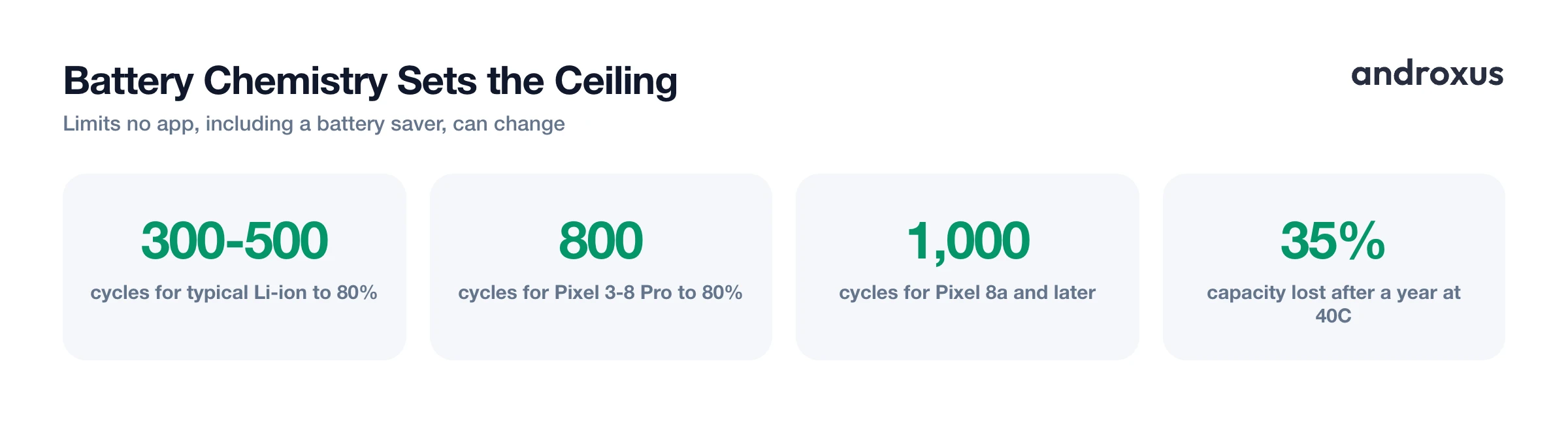
No amount of software can move the ceiling set by the battery cell itself. Lithium-ion cells used in phones are typically rated for 300 to 500 full charge cycles before capacity falls below 80 percent, though Google states that Pixel 3 through Pixel 8 Pro batteries hold 80 percent capacity for about 800 cycles, and Pixel 8a and later models are rated for about 1,000 cycles.
Fast charging is only safe within a defined temperature window. Li-ion cells can generally be fast-charged from roughly 5C to 45C (41F to 113F). Charging below 0C (32F) isn't permitted on consumer-grade cells due to lithium-plating risk, and sustained heat above 30C (86F) accelerates capacity loss; Battery University reports a cell stored a full year at 40C (104F) fully charged loses roughly 35 percent of its capacity. No software, including any battery saver or optimizer app, can change these chemical limits, and none can increase the actual current or voltage a charger delivers. Charging speed is negotiated entirely between the charger, the cable, and the phone's own charging hardware, a fixed handshake no app sits inside of.
Where a Measurement App Actually Fits
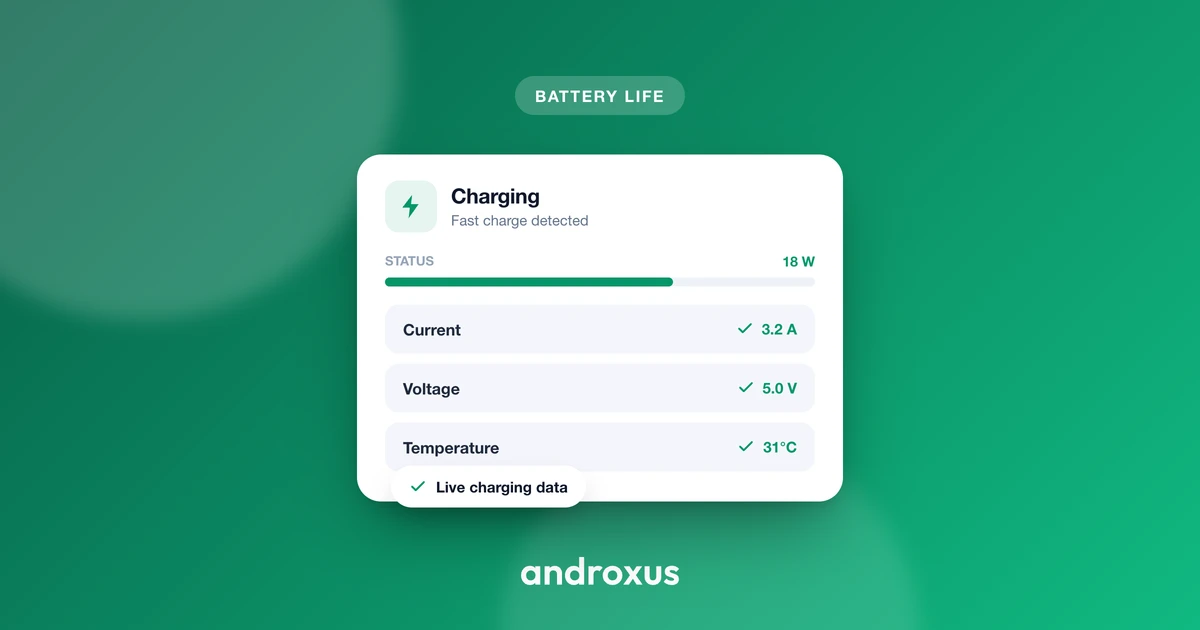
Measurement apps occupy a genuinely different category from boosters, because they don't claim to change anything. They read data Android's own BatteryManager framework already exposes, voltage, instantaneous current, charge counter, temperature, and plugged or charging state, and they have no software path to alter charging current, voltage, or CPU scheduling.
AmpereFlow's role is diagnostic rather than corrective: live watts and amps, fast-charging detection, charge time to 80 percent and 100 percent, battery health and capacity estimate, and charge history let you confirm whether a charger is underdelivering or a battery is genuinely degrading. That's information, not optimization, and the distinction matters. Its real differentiator is correcting manufacturer-specific current and voltage reporting quirks across thousands of device models, since many OEMs report skewed raw values through BatteryManager, not speeding up charging or boosting the battery in any way.
One scope note: it reads only your phone's own battery data. It does not connect to, pair with, or control external BMS hardware such as e-rickshaw, EV, scooter, solar, or lead-acid battery packs.
How to actually improve battery life on Android
- Check Settings > Battery for the real drain source. Open Settings > Battery > Battery usage and sort by consumption over the last 24 hours or since full charge. Look for any single app using a disproportionately large share of battery relative to its screen-on time; that app, not the phone in general, is usually the actual problem.
- Turn on Android's built-in Battery Saver. Go to Settings > Battery > Battery Saver and turn it on manually, or set it to activate automatically at a chosen percentage, for example 20 percent. This throttles background data, pauses location updates when the screen is off, and reduces background refresh at the OS level, no third-party app required.
- Lower screen brightness or switch to adaptive brightness. Set brightness to auto or adaptive, or lower it manually. Display power draw on OLED and AMOLED panels scales strongly with brightness, making this a bigger lever than any background-process trick.
- Match refresh rate to what you actually need. In Settings > Display > Refresh Rate, naming varies by manufacturer, choose Adaptive or Auto if available so the screen drops to 60Hz for static content on its own. If only a manual toggle exists and high refresh rate isn't needed, set it to 60Hz directly.
- Switch to a dark theme where it counts. Enable Dark theme under Settings > Display, and favor apps with true black or very dark backgrounds. Expect the biggest difference at higher screen brightness on OLED and AMOLED displays; at low indoor brightness the effect is small.
- Update or remove the one app actually responsible, and confirm with measurement. If step one identified a specific misbehaving app, update it, restart it, or uninstall it. Skip RAM-cleaner and one-tap boost apps entirely, since they force-stop processes Android would have paused on its own, and the resulting cold restart when you reopen the app typically costs more battery than it saved. A measurement app can confirm the fix worked by showing live current draw and charging behavior; it only reads and reports your phone's own battery data, it doesn't optimize or speed up anything.
Key takeaways
- RAM cleaners and one-tap boosters mostly duplicate background limits Android has enforced automatically since Doze arrived in Android 6.0, and Android 14 closed the API loophole most of them relied on.
- Force-stopping an app triggers a cold restart the next time you open it, which typically costs more battery than leaving a paused, backgrounded app alone.
- Screen brightness and refresh rate are the two biggest levers you actually control: dark theme savings jump from single digits to over 40 percent at full brightness on OLED and AMOLED panels, and 120Hz can cost 20 to 36 percent more battery than 60Hz during active use.
- No app, including a measurement tool, can change your battery's rated cycle count, its safe charging temperature window, or the actual current a charger delivers.
- A measurement app can tell you what's happening with your battery and charging, which is genuinely useful for diagnosis, but the fix always comes from Android's own settings or from identifying one specific app to update or remove.
Frequently asked questions
Do battery saver apps actually extend battery life on Android?
Not the RAM-cleaner or one-tap-booster category. Since Android 6.0 Marshmallow's Doze mode and Android 9's App Standby Buckets and Adaptive Battery, the OS already restricts background activity for apps you're not actively using. Third-party boosters duplicate this with cruder methods like force-stopping apps, which forces a cold restart that can cost more battery than it saves.
What is the difference between a task killer app and Android's built-in Battery Saver?
A task killer force-stops apps entirely out of memory, so the next time you open one, Android performs a cold start, reallocating memory and reloading classes, which typically uses more CPU and battery than resuming a paused app. Android's built-in Battery Saver, found under Settings > Battery > Battery Saver, instead throttles background data and app refresh and pauses location updates when the screen is off, without killing anything.
Does dark mode actually save battery on Android?
Yes, but mainly on OLED or AMOLED screens and mostly at high brightness. A Purdue University study across Pixel 2, Moto Z3, Pixel 4, and Pixel 5 found dark theme saved only 3 to 9 percent of power at 30 to 50 percent brightness, but savings passed 40 percent at 100 percent brightness, since OLED pixels showing black are switched off rather than dimmed.
Does a higher screen refresh rate like 90Hz or 120Hz drain the battery faster than 60Hz?
Yes, though the size of the effect varies by device and content. Real-world tests on the Samsung Galaxy S20 series showed roughly 20 to 36 percent shorter battery life at 120Hz versus 60Hz during active scrolling, with the base Galaxy S20 and S20 Plus at the higher end of that range and the S20 Ultra at the lower end, while mostly static usage shows a much smaller gap. Using Adaptive or Auto refresh rate, where the phone supports it, lets the display fall back to 60Hz automatically for static content.
Can a battery optimizer app make my phone charge faster?
No app, including AmpereFlow, can change how fast a phone charges. Charging speed is negotiated between the charger, cable, and the phone's own charging hardware. Apps can only read the data the phone already reports through Android's BatteryManager framework; they have no software path to alter the current or voltage actually delivered.
What actually causes a phone's battery to drain faster than normal?
Usually one specific misbehaving app, most often something holding a wake lock, running a broken sync loop, or polling location or network at an unusually high frequency. This shows up in Settings > Battery > Battery usage as one app consuming a disproportionate share relative to its screen-on time. Updating or removing that one app fixes the actual cause; a blanket optimizer running across every app does not target it.
