Best Dynamic Island Android Apps in 2026
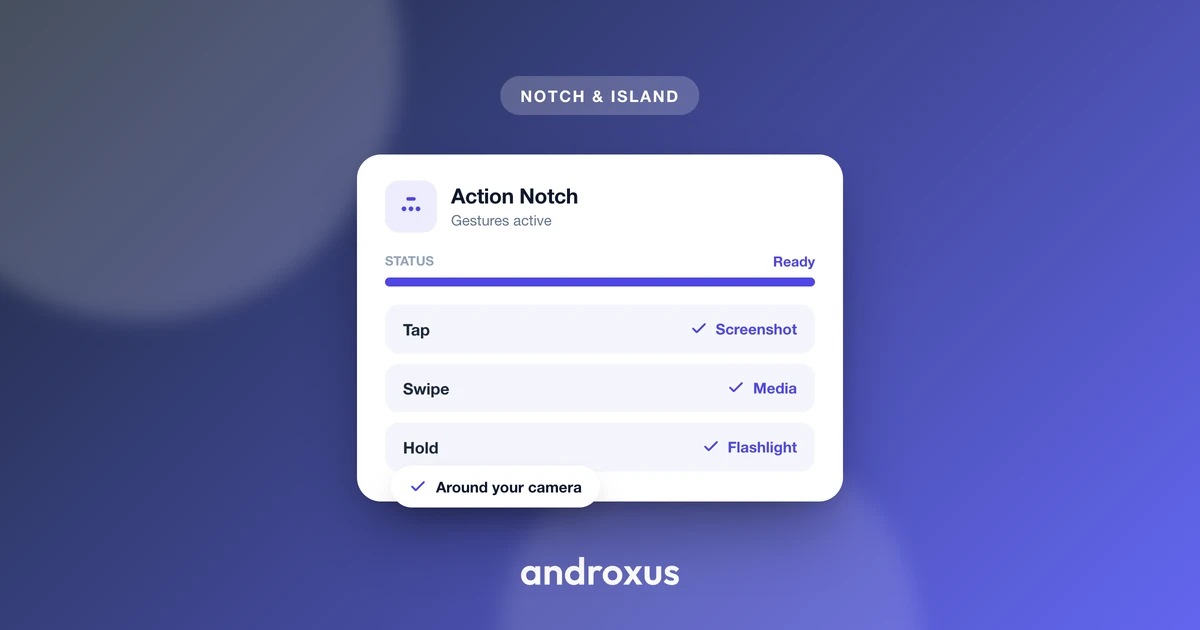
You have seen the screenshots: a black pill floating around a phone's camera cutout, showing a song title or a charging percentage like it grew there. Before installing anything, it helps to know what these apps really are, what they can honestly do, and how to tell a good one from a battery-draining knockoff.
Quick answer: there is no single "best" dynamic island android app in the way there's one iPhone with one Dynamic Island, because Android has no hardware equivalent. Instead, a handful of overlay apps recreate the effect in software around your existing notch or punch-hole camera, each with its own gestures, design, and permission requests. The strongest picks are lightweight, use a true black design, offer customizable gestures, request only the permissions their features need, skip lock screen ads, and get regular updates. Action Notch is a solid example that hits those marks with over 1 million downloads and a 4.57 star rating. A few phone makers, like realme with Mini Capsule, also build a similar effect directly into their software.
What you'll learn
- What a dynamic island app actually does on Android, technically speaking
- Which Android permissions these apps use, and why each one exists
- The honest criteria that separate a well built app from a battery drain
- How notch and punch-hole hardware differ, and why it does not matter for these apps
- How to set one up on your own phone in a few minutes
What a dynamic island app actually does on Android
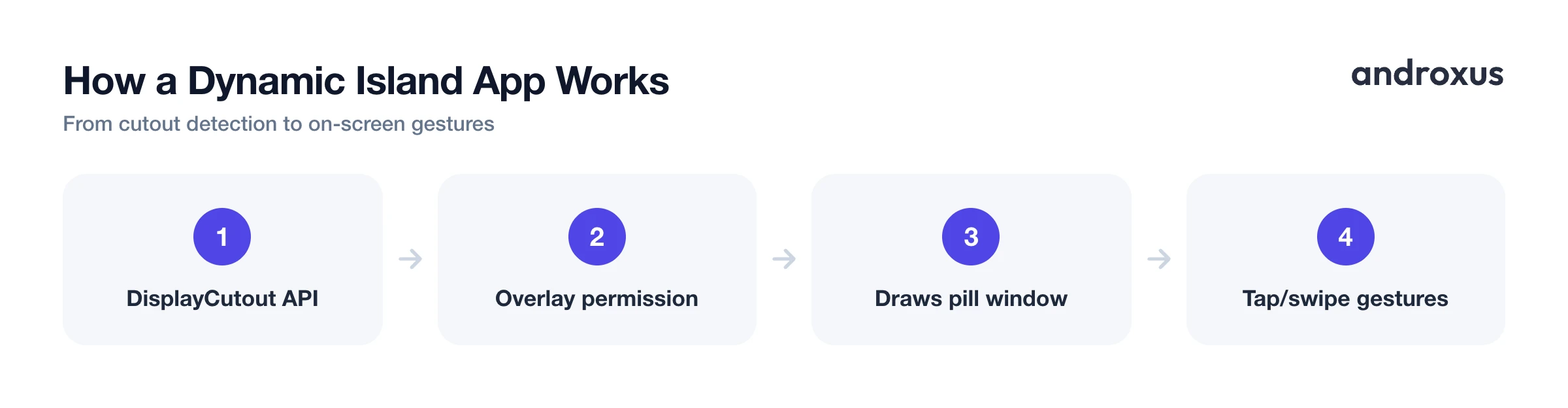
A dynamic island app is a software overlay, not a hardware feature. It uses Android's DisplayCutout API, available since Android 9 (API level 28), which exposes the bounding rectangle and safe insets of your phone's camera cutout so an app can draw content around it accurately instead of guessing at pixel coordinates.
The overlay itself is rendered using the Display over other apps permission, known to developers as SYSTEM_ALERT_WINDOW, which lets the app create a window that sits above other apps' content. That window is what you see animate, expand, or show a notification preview when something happens on your phone.
On top of that base layer, most apps add interaction: tapping, swiping, or long-pressing over the cutout can trigger actions like toggling the flashlight, taking a screenshot, or controlling music playback. None of this changes your phone's hardware or the physical shape of the cutout. It is a UI layer drawn on top of what is already there, which is exactly why the effect works on almost any notch or punch-hole phone rather than one specific model.
The permissions behind the effect
Because these apps draw over your entire screen and sometimes read your notifications, it is worth understanding exactly what each permission does rather than granting all of them blindly.
Display over other apps (SYSTEM_ALERT_WINDOW) is the one every dynamic island app needs, since it is what lets the app create the overlay window in the first place. Since Android 12, Google tightened default access to this permission and added a way for other apps to opt out of having overlays drawn over them, so a legitimate overlay app has to be explicit and well behaved about when and where it draws.
Gesture detection, meaning tap, swipe, and long-press actions over the cutout, typically requires an Accessibility service. This is a sensitive Android permission because an accessibility service can, in principle, observe a lot of what happens on screen, so it is reasonable to expect an app to explain clearly why it needs this and to limit what it actually does with it.
Showing notification previews inside the overlay requires Notification access, implemented through Android's notification listener system and granted separately in Settings. It is disabled by default for the same reason: it lets an app see the content of your notifications. A trustworthy app only asks for the subset of these three permissions that its enabled features actually require, not all three by default.
Root access is not part of this picture at all. None of the legitimate apps in this category need it, and any app that asks for root to show a cutout overlay is asking for more than the feature requires.
The real criteria for a good dynamic island app
Rather than ranking apps by star count alone, it helps to judge them against a short list of concrete criteria. These hold up regardless of which specific app you end up trying.
| Criterion | What good looks like | Underlying Android mechanism |
|---|---|---|
| Battery and performance impact | Small background footprint, no constant polling or heavy animation | Overlay is a lightweight application window, not a persistent heavy service |
| Visual design | True black or near-black theme that blends with the cutout | Rendered via the overlay permission, positioned using DisplayCutout bounds |
| Gesture customization | Tap, swipe, and long-press mapped to shortcuts you choose (flashlight, screenshot, media) | Accessibility service used to detect and dispatch gestures |
| Notification and media display | Shows previews and controls without needing full notification content by default | Notification listener service, granted separately as Notification access |
| Permission scope | Requests only what enabled features need, no root required | Display over other apps is the baseline; Accessibility and Notification access are optional add-ons |
| Lock screen behavior | No ads placed over the lock screen or notification shade | A trust and policy criterion rather than an API |
| Maintenance | Recent updates that track Android's periodic overlay and accessibility restrictions | Relevant since Android 12 tightened overlay permission defaults |
| OEM built-in reference | Manufacturer level feature, not a separate app, limited to specific phones | realme Mini Capsule, first on the realme C55, announced March 2023 |
Two of these deserve extra weight. Ads over the lock screen are a red flag specific to this category, since an app already has permission to draw over everything, which makes it an easy place to slip in ads users cannot dismiss. And active maintenance matters more here than in most app categories, because Android periodically restricts overlay and accessibility behavior at the OS level, so an app that has not been updated in a year or two is more likely to have quietly broken features.
Notch vs punch-hole: the hardware these apps work around
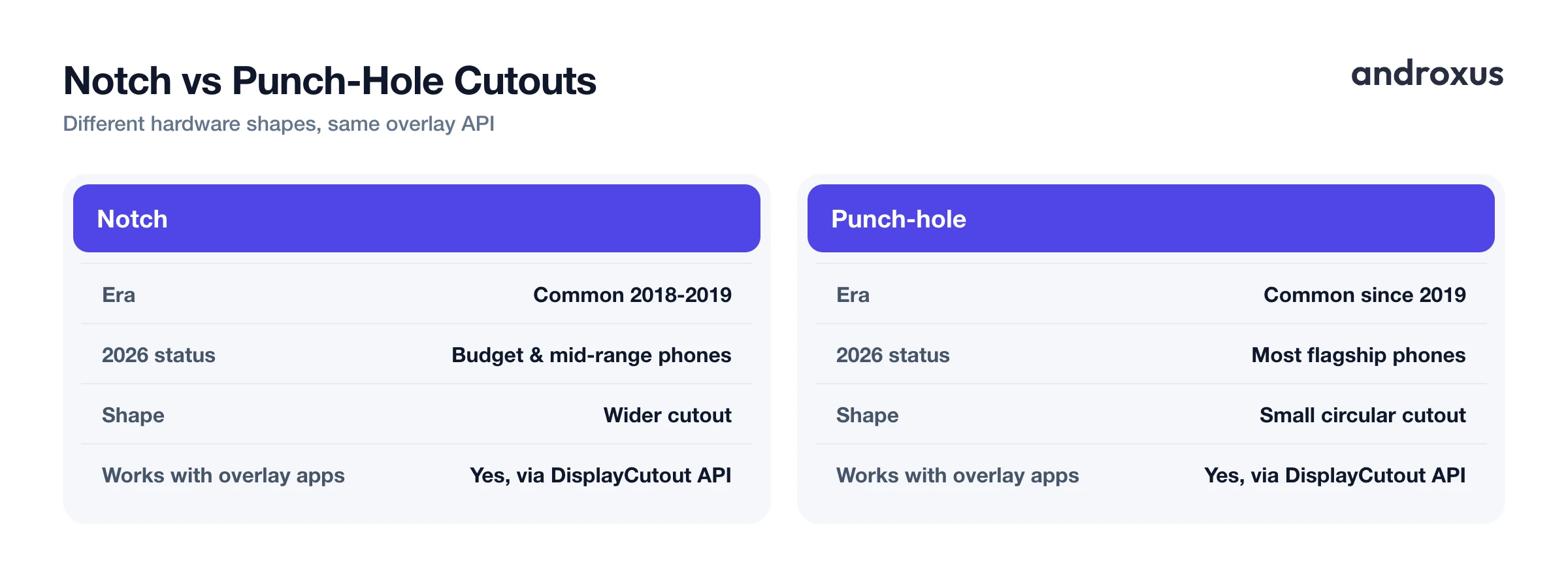
It helps to know what hardware these apps are actually working around, since it explains why one app can support such a wide range of phones. The wider notch design that was common around 2018 and 2019 was largely replaced industry-wide by smaller punch-hole cutouts starting around 2019, and as of 2026, notches mostly show up on budget and mid-range Android phones, while flagship devices favor punch-hole cutouts or under-display camera designs.
Because the DisplayCutout API reports the bounding shape of either a notch or a punch-hole, overlay apps can position their interactive zone correctly on both types of hardware without needing device-specific hacks. That is one reason this category of app can work across such a wide spread of phones and manufacturers rather than being tied to one screen design.
A genuine OEM alternative: realme's Mini Capsule
Not every version of this idea comes as a separate download. realme introduced Mini Capsule as a built-in manufacturer feature, first announced with the realme C55 in March 2023, and it later appeared on other realme models such as the Narzo N55. It animates around the phone's punch-hole camera to show information like battery alerts, charging status, step count, and data consumption, with some of these features arriving later through a software update rather than at launch.
Mini Capsule is worth mentioning because it shows this is not just a third-party app trend, a phone maker built essentially the same concept into its own software skin. But it is limited to specific realme phones and is not available if you own a phone from another manufacturer, which is exactly the gap that third-party overlay apps fill.
A recommended pick for phones without a built-in island
If you want this behavior on a phone that does not have a built-in version like Mini Capsule, Action Notch is a reasonable place to start. It is a software overlay app that turns a phone's notch or punch-hole area into an interactive zone, available for any compatible Android device rather than tied to one manufacturer's phones.
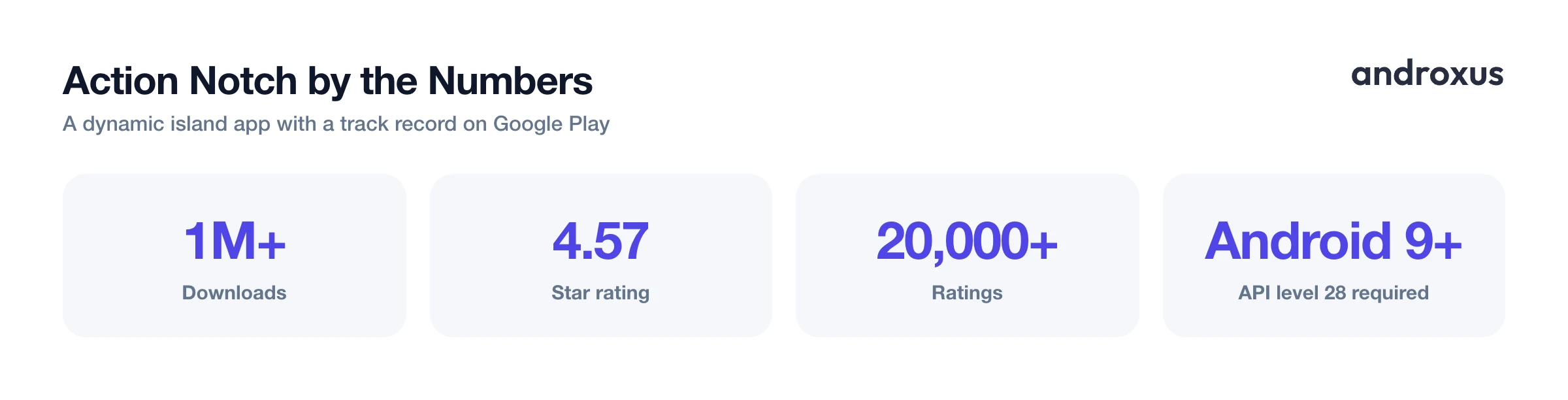
It shows notifications, media controls, and quick toggles around the cutout, and supports tap, swipe, and long-press gestures mapped to actions such as screenshot, flashlight, or media playback. It uses the same standard Android mechanisms covered above: Display over other apps for the overlay itself, plus an Accessibility service and Notification access depending on which features you turn on. It does not require root and does not modify your phone's hardware or the physical cutout. As of this writing it has over 1 million downloads, a 4.57 star rating, and more than 20,000 ratings on Google Play, which gives a decent sample size for the criteria above to hold up against.
How to set up a dynamic island app on Android
- Confirm your phone's cutout type. Check whether your phone has a notch or a punch-hole camera. This does not limit which apps you can use, since the DisplayCutout API exposes the bounding shape for either type, but it helps you judge whether an app's screenshots and demo actually match your screen.
- Install the app and grant Display over other apps. After installing, enable the Display over other apps permission in Android Settings when prompted. This is the baseline permission every overlay based app needs to draw its interface around the cutout.
- Grant Accessibility or Notification access only for the features you want. Enable the Accessibility service if you want gesture controls like tap, swipe, or long-press actions. Enable Notification access separately if you want notification previews inside the overlay. Skip either one if you will not use that feature, since both are sensitive permissions worth granting deliberately.
- Set an AMOLED friendly black theme. Choose a black or near-black overlay style so the interactive zone blends with the cutout instead of drawing attention to it, particularly on AMOLED screens where true black pixels stay off.
- Customize your gestures and shortcuts. Map taps, swipes, and long-presses to actions you actually use, such as flashlight toggle, screenshot, or media playback, rather than leaving default mappings you will not touch.
- Check for ad behavior and update history before keeping the app. Confirm the app does not show ads over the lock screen and has a recent update history, since active maintenance is one of the clearest signs of a well kept app in this category.
Key takeaways
- Dynamic island apps on Android are software overlays built on the DisplayCutout API and the Display over other apps permission, not a hardware feature like Apple's version.
- Judge an app by battery impact, AMOLED friendly design, gesture customization, permission scope, lock screen ad behavior, and update frequency rather than by screenshots alone.
- Notch and punch-hole cutouts both work with these apps because the underlying API reports the cutout shape regardless of which hardware design your phone uses.
- realme's Mini Capsule shows this idea also exists as a built-in manufacturer feature on select phones, separate from any downloadable app.
- None of the legitimate apps in this category need root access, and a well built one only requests the specific permissions its enabled features actually use.
Frequently asked questions
What is a Dynamic Island app on Android?
It is a software overlay that turns the area around a phone's camera cutout, whether a notch or a punch-hole, into an interactive zone. Using Android's DisplayCutout API to detect the cutout shape and the Display over other apps permission (SYSTEM_ALERT_WINDOW) to draw on top of other apps, it can show notification previews, media controls, and quick toggles, and respond to taps, swipes, and long-presses over that area.
Does Android actually have a Dynamic Island like the iPhone?
No. Apple's Dynamic Island is a hardware and software feature built into specific iPhone models around the camera hardware itself. Android has no equivalent hardware feature. Every Android app that offers Dynamic Island style behavior is a software emulation drawn as an overlay on top of the existing screen and camera cutout, not a hardware capability.
What permissions do Dynamic Island apps need, and are they safe?
At minimum they need Display over other apps (SYSTEM_ALERT_WINDOW), which lets an app draw an overlay window above other apps. Gesture based features typically require an Accessibility service to detect taps or swipes, and showing notification content on the overlay requires Notification access, a permission the user must explicitly enable in Settings. None of this requires root, and a well behaved app only requests the permissions its enabled features actually need.
Will a Dynamic Island app slow down my phone or drain the battery?
It depends on the app's implementation, not on the concept itself. A well built overlay app is a small background service and should have minimal CPU and battery impact. It does not modify phone hardware and does not improve performance or battery life either, it simply adds a UI layer. Heavy background polling, constant animations, or bloated services are signs of a poorly optimized app rather than something inherent to the category.
Are there Android phones with a built-in Dynamic Island style feature instead of an app?
Yes. realme introduced Mini Capsule, a built-in software feature on select models such as the realme C55 and Narzo N55, first announced in March 2023. It animates around the phone's punch-hole camera to show things like charging status, battery alerts, and step count. It is a manufacturer skin feature limited to specific realme phones, not a downloadable app, and like all Dynamic Island style features on Android, it is a software overlay rather than a hardware change.
What should I look for before installing a Dynamic Island app?
Check that it is lightweight and battery friendly, uses an AMOLED friendly black design that blends with the cutout, offers gestures you can actually customize, requests only the permissions its features need, does not show ads over the lock screen, and receives regular updates. These criteria matter more than any single feature list, since two apps can look nearly identical in a screenshot and behave very differently once installed.
