Bad Charger or Bad Cable: How to Tell
Your phone has been plugged in for twenty minutes and the battery percentage has barely moved, or the charging icon keeps flickering on and off. It is easy to blame the phone, but the real culprit is often a bad charger or a bad cable, and figuring out which one takes only minutes.
Quick answer: A bad charger or cable usually shows itself through slow charging, heat, an intermittent connection, or visible fraying. The fastest way to confirm which part is at fault is a one-variable-at-a-time swap test: keep the charger fixed and try a different cable, then keep the cable fixed and try a different charger, reading the live wattage each time. Whichever swap restores full charging speed points to the faulty part.
What you'll learn
- The concrete warning signs that separate a failing charger or cable from normal charging behavior
- What "normal" charging speed actually looks like across USB standards, so you know what to compare against
- The most common physical and electrical reasons chargers and cables degrade
- A step-by-step swap test to isolate exactly which component is at fault
- When heat or slow charging is expected battery behavior versus a real hardware problem
The Warning Signs of a Failing Charger or Cable
A handful of symptoms show up again and again when a charger or cable is on its way out, and most of them are easy to notice if you know what to look for.
- Slow charging. The phone takes noticeably longer to reach full, or the battery percentage barely moves over 15 to 20 minutes plugged in.
- Heat. The cable, connector, or charger brick gets hot to the touch rather than just mildly warm, often paired with charging suddenly slowing down once it heats up.
- Intermittent connection. The charging icon flickers on and off, or the phone repeatedly shows "charging" then "not charging" without the cable being touched.
- Physical damage. Fraying or exposed wire near the connector, a bent or discolored USB-C or Lightning tip, or a connector that wobbles or needs to be held at an angle to charge.
- System warnings. The phone may surface a notification such as "charging slowly" or "this charger is not supported," which is the OS's own signal that the negotiated power fell back to a low tier.
A charger or cable that worked fine for months and then degrades gradually is more often a wear failure in the connector or wire than a sudden electrical fault, so gradual slowdown is just as worth investigating as a sudden stop.
What Normal Charging Speed Actually Looks Like
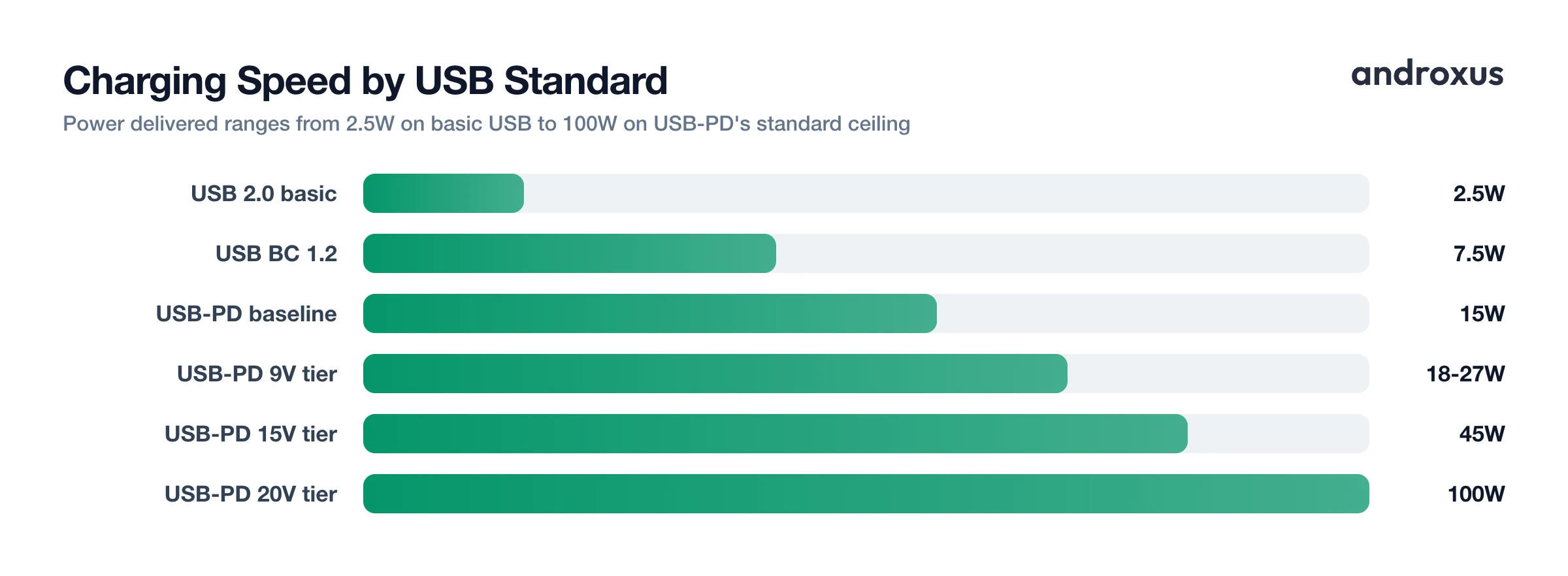
Before calling a charger or cable "bad," it helps to know what normal looks like, since it varies a lot by standard. A basic USB connection without fast-charging negotiation delivers only 5V at 0.5A, about 2.5 watts, under the original USB 2.0 spec, or up to 5V at 1.5A (7.5 watts) from a dedicated charging port under USB Battery Charging 1.2. Fast charging looks very different.
| Standard / Tier | Typical Voltage & Current | Power Delivered |
|---|---|---|
| USB 2.0 (basic, unconfigured) | 5V @ 0.5A | 2.5W |
| USB Battery Charging 1.2 (dedicated port) | 5V @ 1.5A | 7.5W |
| USB-PD baseline | 5V @ 3A | 15W |
| USB-PD 9V tier (common phone fast charge) | 9V @ 2-3A | 18-27W |
| USB-PD 15V tier | 15V @ 3A | 45W |
| USB-PD 20V tier (standard ceiling) | 20V @ 5A | 100W |
| USB-PD 3.1 Extended Power Range | up to 48V @ 5A | up to 240W |
| Qualcomm Quick Charge 3.0 | 3.6-20V, 200mV steps | up to 18W (60W Class B) |
| Qualcomm Quick Charge 4/4+ | 3.3-20V, 20mV steps | up to 100W |
| Qualcomm Quick Charge 5 | variable | up to 100W |
| OPPO/OnePlus 150W SuperVOOC | 20V @ 7.5A | 150W |
| OPPO 240W SuperVOOC | 20V @ 12A input / 10V @ 24A device-side | 240W |
| USB-C cable, standard (no e-marker) | up to 3A | up to 60W |
| USB-C cable, e-marked | up to 5A | up to 240W |
The spread is wide on purpose: a 150W SuperVOOC setup can take a 4500mAh battery from 1% to 50% in about five minutes, while a plain USB port would need well over an hour to do the same. Because "normal" depends entirely on your phone and charger, the only reliable check is comparing a live reading against your device's own rated maximum, not a universal number.
What Actually Causes Chargers and Cables to Fail
Most failures trace back to a small set of physical and electrical causes.
- Bending at the strain relief. Repeated flexing where the cable meets the connector is the single most common failure point; internal copper strands fatigue and break long before the outer jacket looks damaged.
- Port contamination. Corrosion, dust, or lint buildup inside a USB-C port increases contact resistance and can cause intermittent connection or a port that only charges when the cable is wedged at an angle.
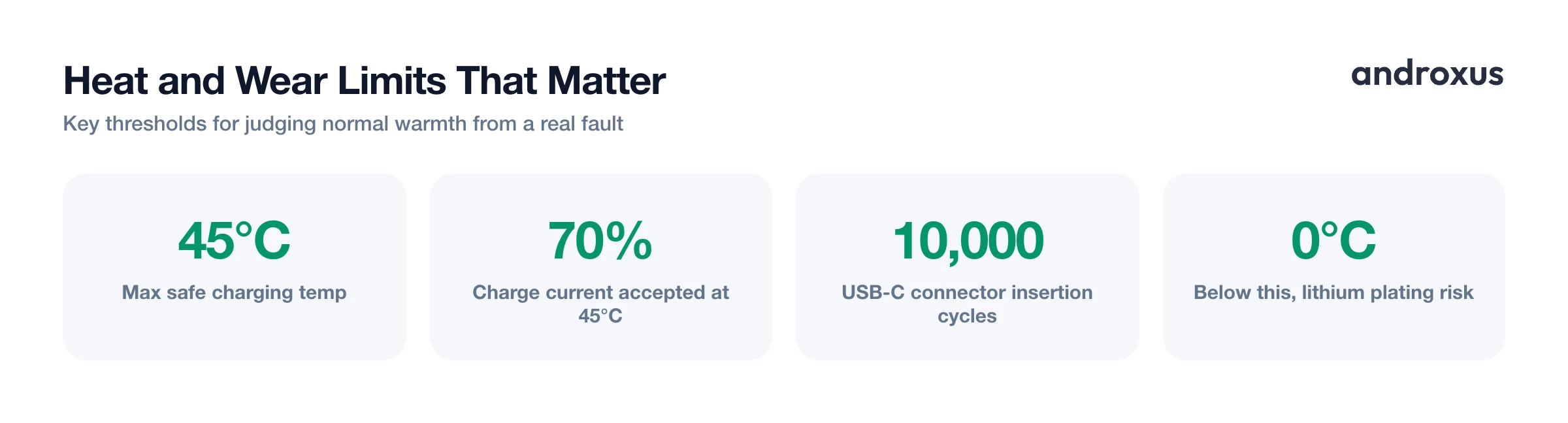
- Connector wear. USB-C connectors are broadly rated for around 10,000 insertion cycles, and daily use for a few years can approach or exceed that.
- Undersized cables. Cables rated for only 3A (up to 60W) will cap charging speed even on a charger and phone capable of more; higher-power charging above 3A requires a 5A cable with an embedded e-marker chip that reports its rating to the charger.
- Cheap or counterfeit wiring. Undersized or non-compliant wire gauge raises resistance, wastes power as heat, and can cause voltage to sag under load even when the cable looks fine externally.
- Heat as an accelerant. Running a marginal cable hot repeatedly degrades the insulation and connector plating faster, which is why a cable that runs warm tends to get worse over time rather than staying the same.
Safe Limits and When to Retire a Part
Not every slowdown or bit of warmth means something is broken, so it helps to know where normal ends and where a real fault begins. Lithium-ion cells are broadly rated to charge safely between 0 and 45 degrees Celsius (32 to 113 degrees Fahrenheit), with many manufacturers recommending a tighter 10 to 40 degree Celsius window to minimize long-term wear. At 45 degrees Celsius, a lithium-ion battery can only accept about 70 percent of its full rated charge current, so charging that visibly slows down as the phone warms up is expected battery-management behavior, not necessarily a broken charger. Charging below 0 degrees Celsius risks lithium plating on the anode, a permanent form of degradation, which is why phones throttle or pause charging in cold conditions.
What is not normal: any visible damage, fraying, exposed conductors, a cracked charger housing, or a connector that gets uncomfortably hot. Those are reasons to stop using that cable or charger immediately rather than keep it as a spare. Likewise, a charger or cable that cannot deliver more than basic USB power despite both the phone and the other component supporting fast charging has failed its core job and should be replaced, even if it still technically charges the phone. Discoloration or a burning smell at the connector is a stop-use-now signal regardless of how the phone is charging in that moment.
How to Test and Isolate the Culprit
Guessing which part is bad wastes time and money on the wrong replacement. A short, structured swap test settles it.
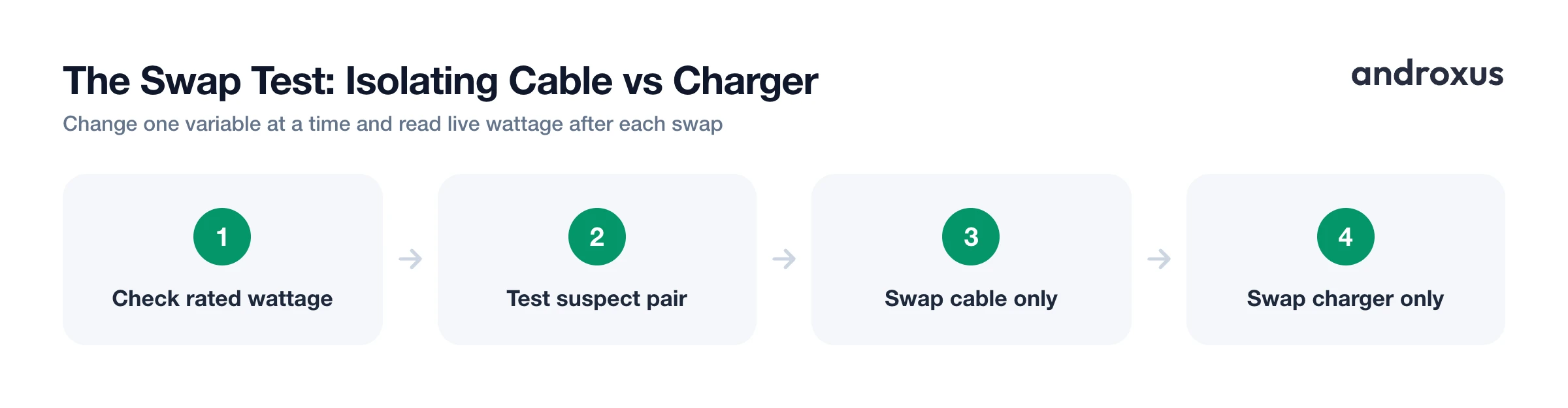
- Find your phone's rated fast-charging wattage. Check the phone's spec sheet, box, or manufacturer support page for its maximum charging wattage (for example 25W, 45W, or 65W). This is the number you will compare your live readings against, so you know what normal looks like for your specific device.
- Charge with the suspect cable and charger together and read the live wattage. Plug in using the pairing you suspect is faulty and let the phone charge for at least 2 to 3 minutes so the charging protocol can negotiate its full speed. Use a meter app such as AmpereFlow to read the live watts and amps rather than trusting the on-screen charging icon alone, since Android gives no wattage number by default.
- Swap only the cable, keep the charger and outlet the same. Connect a different, known-good cable to the same charger and same wall outlet. Watch the live wattage again. If it jumps back up to near the phone's rated maximum, the original cable was the bottleneck.
- Swap only the charger, keep the cable the same. Reverse the test: use the original cable with a different charger you know works well. If wattage recovers this time instead, the charger, not the cable, is the failing part.
- Watch for heat and connection drops during both tests. While each pairing is under load, feel the connector and charger body (they should stay comfortably warm, not hot) and watch for the charging icon flickering or the live reading dropping to zero and restarting. Persistent heat or repeated disconnects point to a physical fault even if the wattage looks acceptable in short bursts.
- Inspect the failing part and retire it if damaged. Once you have isolated the cable or charger, check it for fraying, bent or discolored pins, a loose-fitting connector, or a cracked housing. Any visible damage means the part should be replaced outright rather than kept as a backup, since damaged cables and chargers are a shock and fire risk, not just a performance issue.
This test works because it removes guesswork: instead of comparing how charging "feels," you are comparing an actual number against your phone's known rated maximum. A meter app such as AmpereFlow helps here because it accounts for manufacturer-specific reporting quirks, so the watts and amps on screen better reflect what is happening rather than a rounded figure some phones report to generic meter apps.
Key takeaways
- Slow charging, heat, flickering connections, and visible fraying are the four clearest signs of a bad charger or cable.
- What counts as "normal" charging speed depends entirely on your phone's rated wattage, so check that number before judging any reading as too low.
- Most cable failures start at the strain relief from repeated bending, while most charger failures relate to wear, heat, or an incompatible fast-charging protocol.
- A one-variable-at-a-time swap test, changing only the cable and then only the charger, is the most reliable way to isolate which part is actually failing.
- Any cable or charger with visible damage, a burning smell, or a connector too hot to hold should be retired immediately rather than kept in rotation.
Frequently asked questions
How do I tell if it's the cable or the charger that's bad?
Swap one component at a time. Keep the charger and wall outlet the same and try a different, known-good cable; if charging speed recovers, the original cable was the problem. Then reverse the test: keep the cable the same and try a different charger. Whichever swap fixes the slow or intermittent charging is the faulty part. A live watt and amp reading (AmpereFlow shows this) makes the comparison exact instead of guesswork.
Is it normal for a charger or phone to feel warm while charging?
Mild warmth, roughly up to 40 to 45 degrees Celsius (104 to 113 degrees Fahrenheit), is normal, especially during fast charging. Lithium-ion cells are only rated to accept a full charge current up to 45 degrees Celsius, and above that the battery's charge acceptance drops sharply. If a charger, cable connector, or phone is hot enough that it is uncomfortable to hold, or the charging rate suddenly drops right when it gets hot, treat that as a warning sign, not a normal fast-charging quirk.
Can a bad cable actually damage my phone or its battery?
A degraded cable will not directly damage a modern phone's battery because charging ICs regulate voltage and current, but a cable with high internal resistance or a loose connector causes repeated micro-disconnects. Each reconnect restarts the charging negotiation, which means more start-stop cycling, more heat at the connector, and less predictable charge times. Frayed cables with exposed conductors are also a short-circuit and fire risk and should be replaced immediately, not just used carefully.
Why does my phone say 'charging slowly' or show a much lower wattage than the charger's rating?
This almost always means the phone, cable, or charger fell back to a lower charging profile: a basic USB port or old cable often negotiates only 5V at 0.5 to 1.5A (2.5 to 7.5 watts) instead of the 18 to 65 watt fast-charging profile the phone supports. Common causes are a cable that is not rated for the charger's full current, a charger that does not support the phone's fast-charging protocol, a dirty or damaged USB-C port, or a cable and charger combination that was never PD- or Quick Charge-compatible in the first place.
What amperage or wattage should my phone charger actually be delivering?
It depends entirely on the phone model, since fast-charging ceilings range from about 18 to 25 watts on many phones up to 65, 100, even 150 to 240 watts on some Chinese-market flagships. Check your phone's spec sheet or box for its rated maximum, then compare that against a live reading from a meter app while charging. If the live wattage consistently sits far below the phone's rated maximum with a compatible charger and cable, something in the chain is underperforming.
How long do USB-C cables and chargers typically last before they should be replaced?
There is no fixed lifespan, but USB-C connectors are commonly rated for around 10,000 insertion cycles, and the wire itself tends to fail first from repeated bending near the connector's strain relief, not from age alone. A cable that is visibly fraying, kinked, or discolored at the connector, or one that has started charging inconsistently, should be replaced regardless of how long you have owned it.
