Why Charging Slows After 80 Percent (And It's Not a Fault)
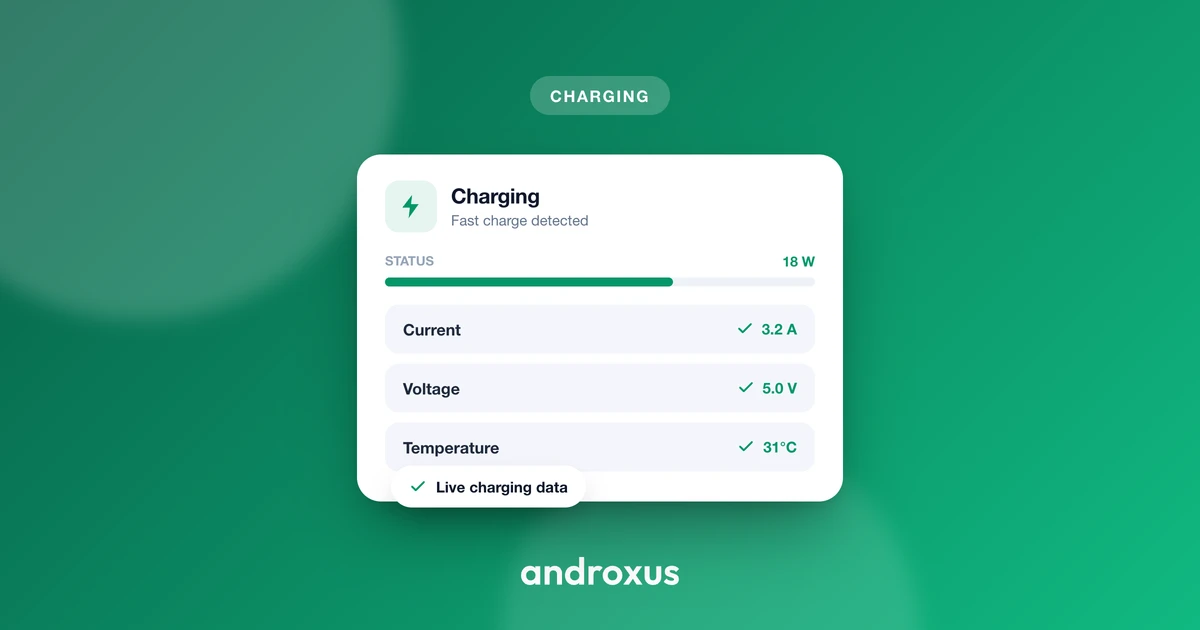
You plug in at 20 percent and watch the number climb fast, then you glance back twenty minutes later and it has barely moved past 85. It feels like something broke, but nothing did. Charging slows after 80 percent on every lithium-ion phone ever made, and the reason comes down to a two-phase charging curve that every compliant charger and battery follows on purpose.
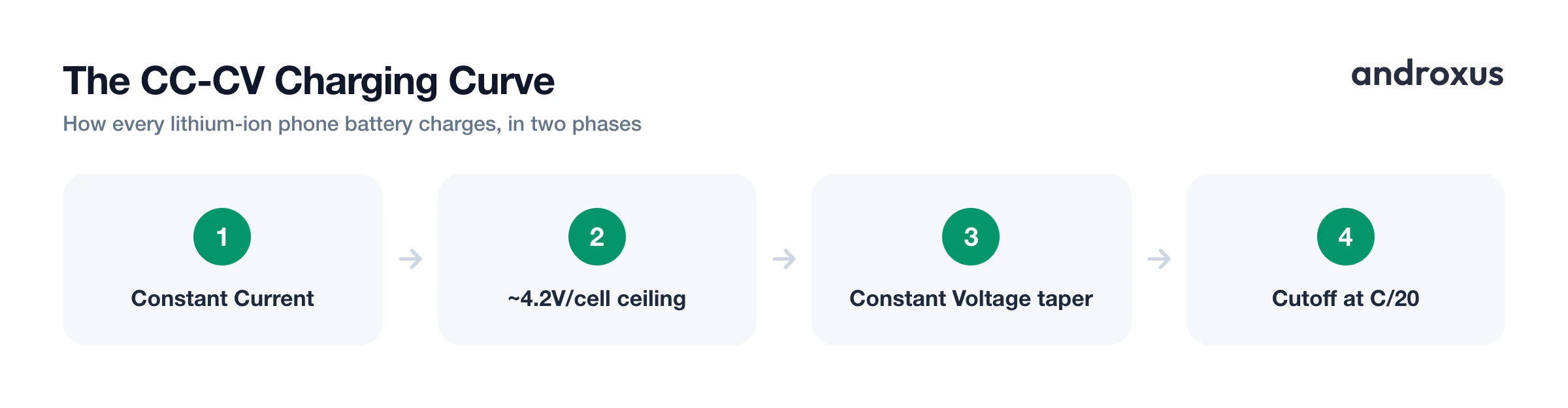
Quick answer: Charging slows after 80 percent because lithium-ion batteries charge in two phases: constant current (CC), which delivers full power up to roughly 70 to 80 percent, followed by constant voltage (CV), which holds voltage steady near 4.2 volts per cell and lets current taper off as the cell fills. Since wattage equals voltage times current, a falling current means falling delivered power, which is exactly the slowdown you feel. It is standard CC-CV behavior enforced by the phone's battery management system to protect the cell, not a sign of a bad battery or charger.
What you'll learn
- How the constant-current and constant-voltage (CC-CV) charging phases actually work
- Why the roughly 4.2 volt per cell ceiling exists and why crossing it is dangerous
- Why the last 20 percent of a charge can take as long as the first 80 percent
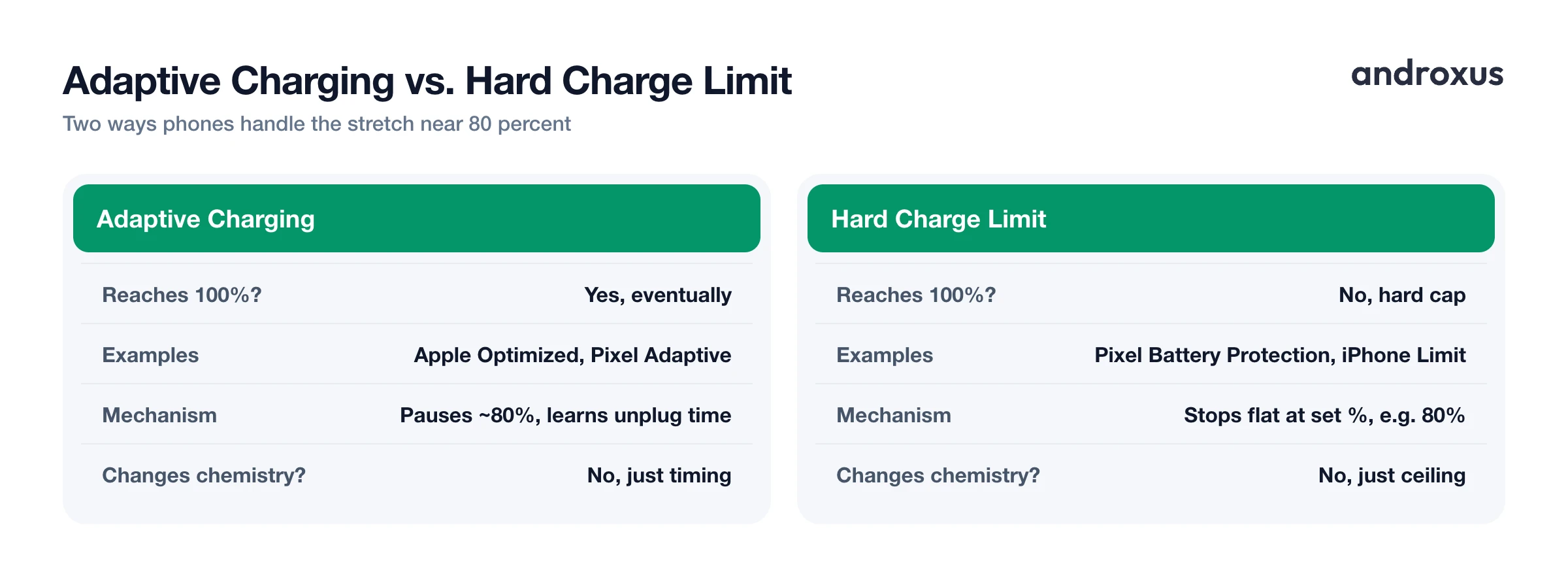
- How adaptive charging and hard 80 percent charge limits differ from the natural taper
- How to watch your own phone's charging curve slow down in real time
The Two-Phase CC-CV Charging Curve Explained
Every lithium-ion phone battery charges using an algorithm called constant current, constant voltage, or CC-CV. It is used industry-wide, across phone brands, chargers, and battery management systems, because it is the only widely proven way to fill a lithium-ion cell quickly without damaging it.
In the constant current (CC) phase, the charger delivers a steady current, commonly somewhere in the 0.5C to 1C range, where C equals the battery's rated capacity in mAh. While that current stays fixed, the cell's voltage climbs steadily from a resting level around 3.7 volts nominal toward its charge ceiling. This is the phase that gives fast charging its bragging rights: the charger is pushing near its full rated wattage into the cell.
That phase ends once the cell reaches approximately 4.2 volts per cell, which is the standard full-charge voltage for the cobalt-oxide and NMC lithium-ion chemistries used in nearly all smartphones. At that point the charger switches to constant voltage (CV): it holds voltage steady at that ceiling and lets current fall gradually as the cell approaches full. In practice, the CC phase typically covers roughly 70 to 80 percent of a phone's charge, and the remaining 20 to 30 percent happens during CV. Because wattage equals voltage multiplied by current, and voltage is now pinned nearly flat while current keeps dropping, delivered power falls in step, even though the charger's own rated wattage never changed. That is the slowdown, and it is baked into the physics, not a symptom of anything wrong with your hardware.
Why the Voltage Ceiling Is Deliberate Chemistry Protection, Not a Fault
The roughly 4.2 volt per cell cutoff is not an arbitrary manufacturer choice. It is a chemistry-driven safety limit. Push a lithium-ion cell even about 100 millivolts past that ceiling and you accelerate electrolyte decomposition, which can lead to permanent capacity fade or, in worse cases, gas venting inside the cell. The phone's battery management system (BMS) exists specifically to prevent that: it enforces the CC-to-CV switch, tapers current as the cell nears the ceiling, balances cells where applicable, and continuously monitors voltage, current, and temperature.
Temperature plays into this same protection logic. The generally accepted safe charging window for lithium-ion cells is 0 to 45 degrees Celsius, or 32 to 113 degrees Fahrenheit, with many manufacturers recommending a tighter 10 to 40 degree Celsius (50 to 104 degree Fahrenheit) band for long-term health. Charging below 0 degrees Celsius (32 degrees Fahrenheit) causes lithium plating on the anode, a permanent and non-reversible loss of usable capacity, which is why phones throttle or halt charging current when the cell is cold. This CC-CV tapering pattern shows up in every compliant charger and every phone regardless of brand, so seeing it happen is confirmation the system is working, not evidence of a defective unit.
Why the Last 20 Percent Can Take as Long as the First 80
This is the part that trips people up the most, because it feels backwards. During the constant-voltage phase, current decays roughly exponentially as the cell's voltage asymptotically approaches its 4.2 volt per cell ceiling. Charging is typically terminated once current during that CV phase falls to a cutoff threshold, commonly cited as around C/20, or about 5 percent of the battery's rated capacity.
Because wattage is voltage times current, and current keeps falling while voltage stays nearly flat near the ceiling, delivered power in the CV phase can drop to a small fraction, often well under 20 percent, of the CC phase's peak wattage. Some phones rated for 60 watts only sustain that full rated power for a couple of minutes before settling into a steadier CC-phase rate, and once the CV taper kicks in, the remaining charge stretches out considerably. The net effect is counterintuitive but consistent: even though the last 20 to 30 percent of a charge is only a quarter to a third as much energy as the first 70 to 80 percent, it can take a comparable or even longer amount of time to deliver, simply because it arrives at much lower average wattage.
Adaptive Charging That Deliberately Pauses at 80 Percent Overnight
Some phones add a software layer on top of this hardware curve that deliberately delays the CV taper's finish. Apple's Optimized Battery Charging uses on-device machine learning to learn a user's routine; it needs at least 14 days and at least 9 charging sessions of 5 or more hours in one location before it activates. Once active, it pauses the phone at 80 percent overnight and completes the remaining charge shortly before the phone predicts you will unplug.
Google's Adaptive Charging on Pixel phones, available since December 2020, works similarly: it charges normally up to 80 percent, then uses the phone's alarm to estimate a typical wake time and completes the final 20 percent about an hour before that. Both features are scheduling logic layered on top of the same underlying CC-CV hardware curve; neither changes the charging chemistry itself, they simply delay when the CV taper is allowed to finish. Crucially, a phone with adaptive charging enabled will still reach 100 percent by the time you unplug it: only the timing of that final stretch changes, not the destination.
Hard 80 Percent Charge Limits on Modern Phones
A hard charge limit is a different thing entirely, and increasingly common. Google Pixel, starting with Android 15, added a Battery Protection setting that hard-caps charging at 80 percent and simply will not let the phone exceed that while the setting is enabled. Samsung's Protect Battery behaves differently depending on software version: on One UI 6.0 and earlier, turning it on caps charging at 85 percent, while One UI 6.1 and later offers three modes, Basic, Adaptive, and Maximum, where Maximum always stops charging at 80 percent.
Apple's iOS 18 Charge Limit, available on the iPhone 15 and 16 lineups, gives you a slider with 80, 85, 90, 95, and 100 percent options; the phone charges to within a few points of the chosen limit and only resumes charging if the level drops more than 5 percent while still connected. Choosing any limit under 100 percent on iPhone automatically disables Optimized Battery Charging, since the two features solve the same overcharge-stress problem in different ways. The shared rationale across all three implementations is the same one driving the CC-CV curve itself: keeping peak cell voltage below the roughly 4.2 volt per cell ceiling reduces long-term stress. Most phone batteries are engineered to retain at least 80 percent of original capacity for roughly 500 to 1,000 full charge cycles, and shallower charging is consistently gentler on that cycle budget.
Typical Charging Power by Battery Level
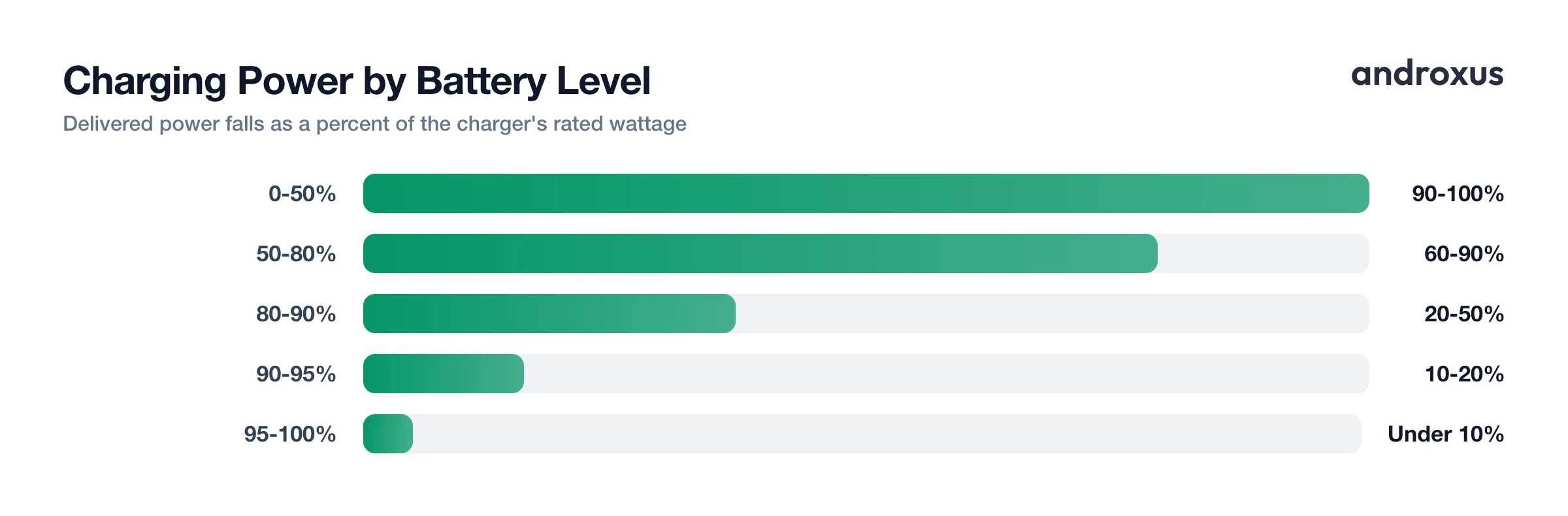
The table below shows the general pattern of delivered power across the charge, expressed as a percentage of the charger's rated wattage. Exact breakpoints vary by device, charger, cable, and ambient temperature, but the shape of the curve is universal.
| Battery level band | Charging phase | Typical power delivered (% of charger's rated wattage) | What is happening |
|---|---|---|---|
| 0% to 50% | Constant current (CC), early | 90% to 100% | Cell resistance is low, so the charger sustains close to its full rated current and wattage. |
| 50% to 70-80% | Constant current (CC), late | 60% to 90% | Some phones step current down in stages here to manage heat before the voltage ceiling is reached. |
| 70-80% to 90% | Constant voltage (CV), early taper | 20% to 50% | Cell voltage reaches about 4.2V per cell, the charger switches from constant current to constant voltage, and current begins falling. |
| 90% to 95% | Constant voltage (CV), mid taper | 10% to 20% | Voltage holds nearly flat near the 4.2V per cell ceiling while current keeps decaying. |
| 95% to 100% | Constant voltage (CV), termination | Under 10% | Current approaches the charger's cutoff threshold, commonly around C/20, 5% of rated capacity, before charging stops. |
Note that a classic continuous trickle charge, a slow steady low current used to keep an already-full lead-acid battery topped off, is not what phones do at the end of a charge. Lithium-ion cells cannot be safely trickle charged in that continuous sense, since it risks lithium plating on the anode. Instead, the battery management system simply stops delivering current once the CV cutoff threshold is reached, and only resumes briefly if the level drops again.
How To See Your Own Charging Curve Slow Down After 80 Percent
- Watch the wattage, not just the percentage. Open a battery meter app that shows live watts and amps rather than only the percentage number. Note the wattage reading while the battery is below 50 percent; this is close to your charger's constant-current phase peak.
- Watch wattage fall after roughly 70 to 80 percent. Keep watching as the percentage crosses that range. Wattage should start dropping steadily from here, marking the shift into the constant-voltage taper as the cell approaches about 4.2 volts per cell. This drop is expected, not a malfunction.
- Rule out heat as a separate cause. If wattage falls earlier than 70 percent, check the battery temperature reading. Phones commonly throttle current above roughly 35 to 40 degrees Celsius, 95 to 104 degrees Fahrenheit, which is thermal throttling layered on top of the normal curve, not the same thing as the post-80-percent taper.
- Compare time-to-80% against time-to-100%. Check charge-time estimates for reaching 80 percent versus 100 percent, a feature AmpereFlow provides. In most cases the last 20 percent takes as long as, or longer than, the climb from 0 to 80 percent, confirming the constant-voltage taper's effect on total charge time.
- Check whether a hard 80 percent limit is active. If charging always stops flat at 80 percent instead of tapering gradually toward 100 percent, a hard charge limit is enabled, such as Pixel Battery Protection, Samsung Protect Battery's Maximum mode, or the iPhone Charge Limit slider, rather than the natural taper simply running its course.
- Track charge cycles instead of guessing at battery age. Use a battery health or capacity estimate feature to see roughly how many full charge cycles the battery has been through. Capacity fade tracks cycle count more closely than calendar age, and most phone batteries are engineered to retain at least 80 percent of original capacity for roughly 500 to 1,000 full cycles.
Key Takeaways
- Charging slows after 80 percent because of the CC-CV curve: constant current covers roughly the first 70 to 80 percent at near-full power, then constant voltage tapers current as the cell nears about 4.2 volts per cell.
- The slowdown is deliberate chemistry protection enforced by the battery management system, not a sign of a failing battery or a bad charger.
- The last 20 percent of a charge can take as long as the first 80 percent, since delivered wattage in the constant-voltage phase can fall to a small fraction of the peak rate.
- Adaptive charging (Apple, Google) delays the final stretch until near your usual unplug time but still reaches 100 percent, while hard charge limits (Pixel, Samsung, iPhone) cap charging at a fixed percentage like 80 percent and never go further while enabled.
- Watching live watts and amps, rather than only the percentage, is the clearest way to see your own phone's charging curve and confirm the taper is behaving normally.
Frequently asked questions
Why does my phone charge fast up to about 80 percent and then slow down?
Lithium-ion cells charge in two phases. During constant current (CC), the charger pushes a steady current into the battery and voltage climbs, covering roughly the first 70 to 80 percent. Once the cell reaches about 4.2 volts per cell, the charger switches to constant voltage (CV): it holds that voltage steady and lets current fall so the cell is never pushed past its safe ceiling. Since wattage is voltage times current, falling current means falling wattage, which is what you feel as the slowdown.
Is the slowdown after 80 percent a sign of a failing battery or a bad charger?
No. Every lithium-ion phone and charger does this; it is standard constant-current, constant-voltage (CC-CV) behavior enforced by the phone's battery management system, not a defect. The one exception worth checking is if wattage stays low from the very start of a charge, even below 50 percent, which usually points to a weak cable, an underpowered charger, or a dirty charging port rather than the normal CC-CV curve.
What is a trickle charge, and does my phone still use one?
Classically, a trickle charge is a slow, constant low current used to keep an already-full battery topped off against self-discharge. Lithium-ion cells cannot safely be trickle charged in that continuous sense because it risks lithium plating on the anode, so phones do not do this. Instead, the battery management system ends charging once current during the constant-voltage phase falls to a low cutoff, commonly around C/20, or 5 percent of the battery's rated capacity, and only resumes delivering current once the level drops again.
What is the difference between adaptive charging and an 80 percent charge limit?
Adaptive charging, such as Apple's Optimized Battery Charging or Google's Adaptive Charging on Pixel, still charges to 100 percent eventually. It pauses around 80 percent and uses your learned habits or alarm to finish the last stretch shortly before you usually unplug. An 80 percent charge limit, like Pixel's Battery Protection, Samsung's Protect Battery in Maximum mode, or the iPhone Charge Limit slider, is a hard cap: the phone simply will not charge past that percentage while the setting is turned on.
Why can the last 20 percent of a charge take as long as the first 80 percent?
That last stretch happens entirely in the constant-voltage phase, where current decays roughly exponentially as the cell voltage approaches its 4.2 volt per cell ceiling. Delivered wattage in that phase can drop to a small fraction of the constant-current phase's peak wattage. So even though the last 20 percent is only a quarter of the energy of the first 80 percent, it is delivered so much more slowly that the two portions of the charge can end up taking a similar amount of time.
Does AmpereFlow make my phone charge faster or protect the battery hardware?
No. AmpereFlow only reads and displays your phone's own battery and charging data, such as live watts and amps, charging power by battery level, and estimated time to 80 percent and 100 percent. It never speeds up charging and never optimizes, boosts, or protects the battery itself, and it does not connect to or control external battery hardware such as e-rickshaw, EV, scooter, solar, or lead-acid battery packs. It works strictly with the data your phone's own operating system reports about its internal battery.
