Why Is My Phone Charging Slowly? Causes and Fixes
You plug in expecting a quick top-up, and twenty minutes later the battery has barely moved. Phone charging slowly is one of the most common complaints people search for, and it almost always traces back to a handful of specific, fixable causes.
Quick answer: Phone charging slowly is usually caused by a weak or damaged cable, a low-wattage or mismatched adapter, a dirty or corroded charging port, heat from background apps or the environment, or an aging battery. Start by swapping the cable and adapter for known-good, higher-wattage originals, then check the port for debris and let the phone cool if it feels warm. If none of that helps, the battery itself has likely lost capacity with age.
What you'll learn
- What counts as a normal charging speed, so you know if your phone is actually slow
- The five most common causes of slow charging, from cables to battery age
- How much power different chargers, cables, and wireless pads actually deliver
- A step-by-step way to isolate which part of your setup is the bottleneck
- How to tell whether it's your accessories or your battery that's aging out
What "Normal" Charging Speed Actually Looks Like
Before troubleshooting, it helps to know what to expect. Charging speed depends on the protocol your phone and charger both support, not just the number printed on the box.
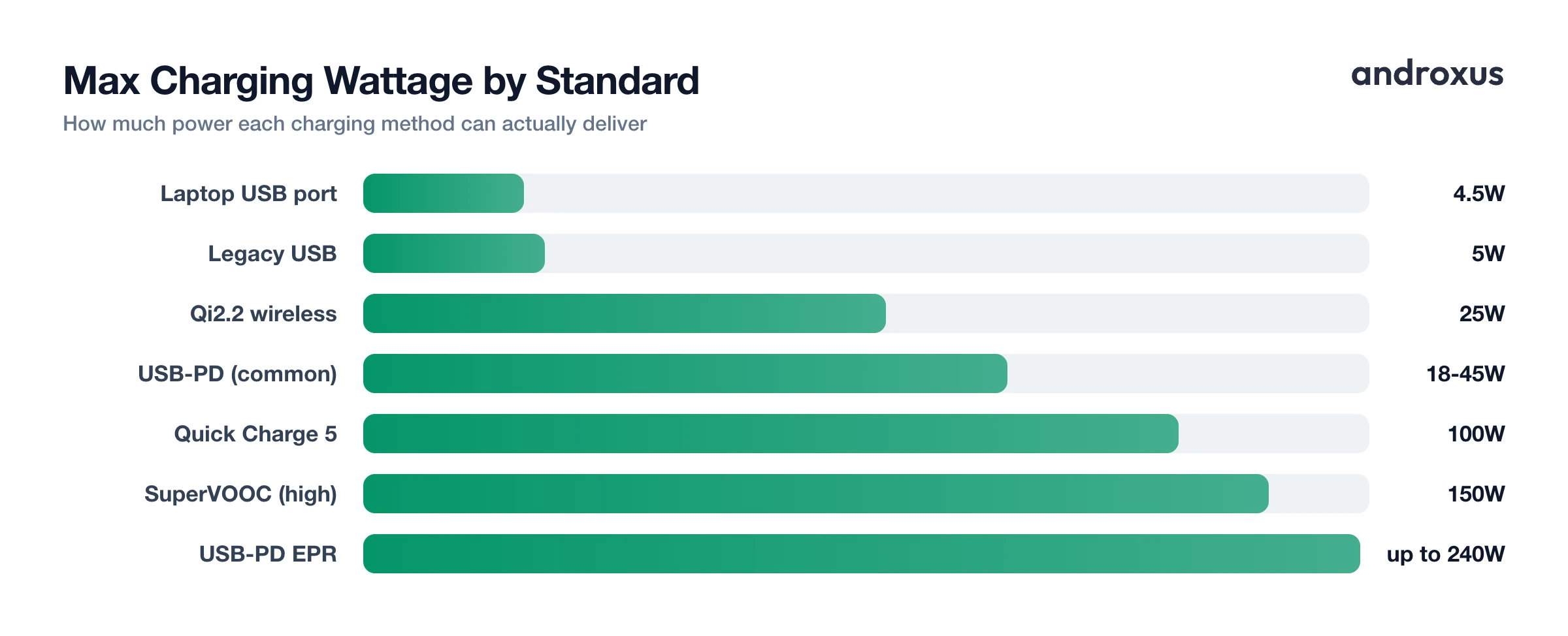
Legacy USB chargers deliver 5V at 1A, or 5W, standard on phones roughly a decade ago. Most current mid-range and flagship Android phones now ship with 18W to 45W chargers using USB Power Delivery (USB-PD) or a manufacturer-specific protocol, topping out at 100W in the original PD spec, with the newer Extended Power Range addition allowing up to 240W.
Proprietary systems push further: Quick Charge 3.0 tops out around 36W, and Quick Charge 5 reaches up to 100W. OPPO's SuperVOOC line spans 80W up to a 240W demo variant that fills a 4,500 mAh battery in about 9 minutes. Wireless charging is inherently slower: original Qi tops out around 5W to 7.5W, Qi2 sets a 15W standard, and Qi2.2 allows up to 25W, well below typical wired speeds.
| Charging Standard | Voltage / Current | Max Wattage | Typical Use |
|---|---|---|---|
| Legacy USB | 5V / 1A | 5W | Old phones, basic USB hubs |
| Laptop/PC USB port (no charger) | 5V / 0.5-0.9A | 2.5-4.5W | USB-A ports on computers |
| USB-PD (common phone fast charging) | 5-20V / up to 3A | 18-45W | Most modern Android flagships |
| USB-PD (high power) | 20V / 5A | 100W | Laptops, high-end phones |
| USB-PD EPR (2023+) | 28-48V | up to 140-240W | Newest high-power chargers |
| Qualcomm Quick Charge 3.0 | 12V / 3A | 36W | Older Qualcomm-based phones |
| Qualcomm Quick Charge 5 | up to 20V | up to 100W | Recent Qualcomm-based phones |
| OPPO SuperVOOC (high) | 20V / 7.5A | 150W | OnePlus 10T |
| OPPO SuperVOOC (demo) | 20V / 12A | 240W | OPPO flagship demo units |
| Qi wireless (original) | inductive | 5-7.5W | Older wireless pads |
| Qi2 / Qi2.2 wireless | inductive | 15-25W | Current and newest wireless pads |
Charging is also not linear. Lithium-ion batteries fast-charge in a constant-current phase up to roughly 80 percent, then taper into a slower constant-voltage phase for the final 20 percent. That last stretch is supposed to feel slow, so if that's the only part that seems sluggish, your phone is behaving normally.
Cause 1: A Worn, Damaged, or Underspecified Cable
The cable is the most overlooked part of the charging chain, and it's often the culprit. A standard USB 2.0 path is limited to 0.5A at 5V (2.5W), and USB 3.0 only raises that to 0.9A (4.5W). Dedicated charging cables can carry up to 1.5A (7.5W), but reaching higher wattages needs a cable actually built and rated for it.
Cables rated for USB-PD above 60W need an embedded e-marker chip to safely negotiate higher current. A cheap cable without one quietly caps the connection at a lower speed, even when the charger and phone are both capable of more. Physical wear matters too: bent connectors, exposed wiring, or thin internal copper gauge all increase resistance and slow charging, often with no visible sign of damage.
If you suspect the cable, swap in a different one, ideally the one that shipped with the phone or an equivalent-wattage replacement, and see if speed improves.
Cause 2: A Weak, Mismatched, or Wrong-Source Adapter
Plugging into a laptop or PC USB port instead of a wall adapter caps charging at that port's current limit, typically 0.5A to 0.9A (2.5W to 4.5W), versus 10W or more from most wall chargers. An old 5W legacy adapter will only ever deliver 5W to a phone that supports 25W to 65W fast charging, because the charger, not just the phone, has to support the higher protocol.
Fast charging also requires the phone and charger to agree on a protocol: USB-PD, Quick Charge, or a proprietary scheme like SuperVOOC. A mismatched or generic adapter can fall back to a slow default rate. USB hubs, power strips, and multi-port travel adapters can also split output across ports, quietly reducing what any single device receives.
Use the manufacturer-specified or an equivalent-wattage wall adapter plugged directly into an outlet, not a hub, and confirm it supports your phone's fast-charging protocol.
Cause 3: A Dirty, Damaged, or Corroded Charging Port
Pocket lint, dust, and debris can physically block pins inside a USB-C or Micro-USB port from making full contact, which limits current flow or breaks fast-charging negotiation entirely. Moisture exposure can also corrode the port's internal contacts over time. A bent or worn connector from years of cable insertion can leave a loose connection that still charges, just slowly.
To check, power the phone off, inspect the port with a flashlight, and gently clear debris with a dry soft-bristle brush or a wooden toothpick. Avoid metal tools, canned air at close range, or liquids. If you see corrosion or bent pins, have a repair technician look at it rather than forcing a cable in further.
Cause 4: Background Apps and Heat
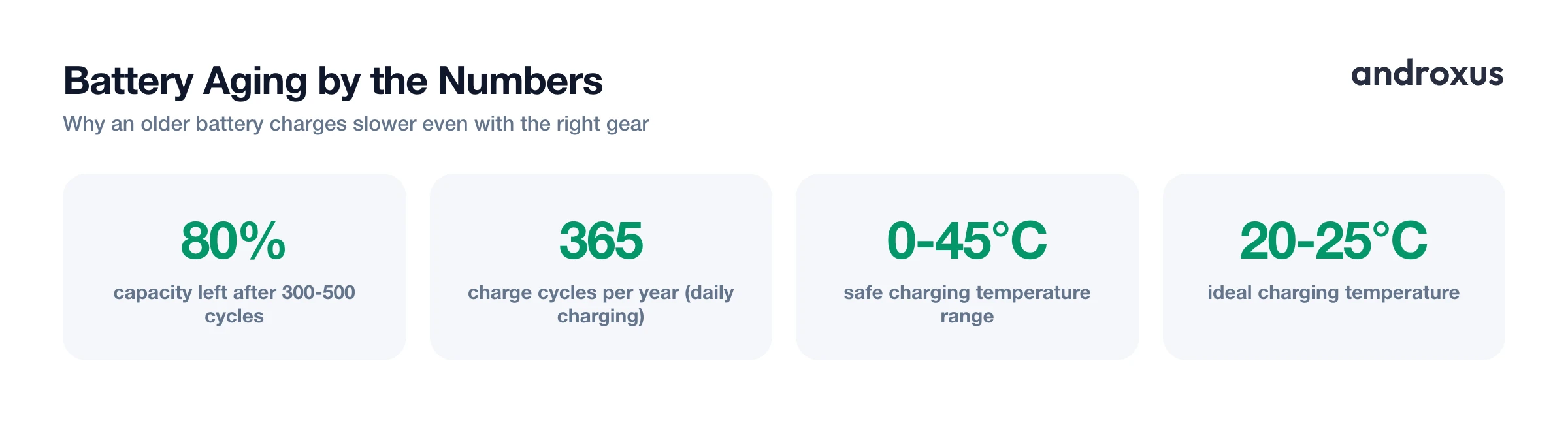
Lithium-ion batteries are only rated to charge safely between about 0°C and 45°C (32°F to 113°F), and charging below freezing causes lithium plating and permanent capacity loss. Performance is best in the roughly 20°C to 25°C (68°F to 77°F) range.
Many phones automatically throttle charging current as internal temperature rises, whether the heat comes from charging itself, a hot car, direct sunlight, or a case trapping heat. Demanding background activity, like streaming, navigation, gaming, or syncing large files while plugged in, competes with the battery for power and generates extra heat, both of which slow effective charging.
If your phone feels warm while charging slowly, remove the case, avoid direct sunlight or a hot car, close demanding apps, and let it cool before expecting fast-charging speeds again.
Cause 5: Battery Wear and Aging
Sometimes the accessories are fine and the battery itself is simply older than it feels. Typical lithium-ion smartphone batteries are commonly cited as retaining about 80 percent of original capacity after roughly 300 to 500 full charge cycles, though the range varies by quality and usage. Some modern cells and battery-management systems hold 80 percent capacity out to 1,000 or even 1,600 cycles. A daily full charge works out to roughly 365 cycles a year, so noticeable degradation can appear within 18 to 24 months of typical use.
An aged, higher-resistance battery can cause a phone's charging controller to accept current more slowly or cautiously as a safety measure, independent of the cable, adapter, or port used. Checking the battery directly, rather than swapping accessories repeatedly, saves time.
Your phone's built-in battery health or maximum capacity figure in Settings is a good starting point. A monitoring app like AmpereFlow can add more context: it measures and reports live watts and amps, whether fast charging is detected, and charging power at each battery level, using calibrations that correct for manufacturer-specific reporting quirks that trip up generic meter apps. It won't make your phone charge faster or optimize the battery; it shows you, accurately, whether the slowdown is coming from your accessories, the phone's own throttling, or the battery's age.
How to Troubleshoot a Phone That Is Charging Slowly
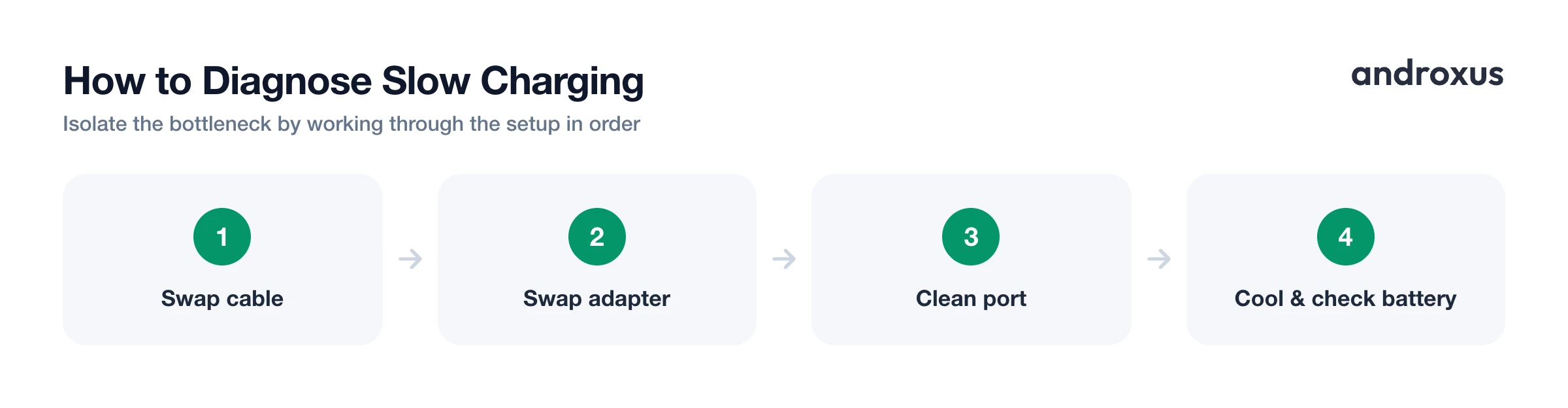
Work through these steps in order to isolate the cause:
- Confirm what "slow" actually means for your phone. Check your phone's rated charging wattage against how long a charge actually takes: legacy chargers are 5W, most modern phones support 18W to 45W, and some go higher.
- Swap the cable. Try a different, known-good cable rated for your phone's wattage. A worn or thin-gauge cable adds resistance and caps speed even when the adapter and phone both support more.
- Swap the adapter and the outlet. Use the phone's original or an equivalent-wattage wall charger instead of a laptop USB port or a cheap 5W brick; laptop ports typically cap out at 2.5W to 4.5W.
- Inspect and clean the charging port. With the phone powered off, check for lint, dust, or corrosion with a flashlight, and clear debris with a dry soft brush or a wooden toothpick. Never use metal tools or liquids.
- Close background apps and let the phone cool. Heat from CPU-intensive apps, navigation, gaming, or direct sunlight reduces charging current. Close demanding apps, remove the case, and let the phone cool before charging.
- Check battery health and charging behavior. Check battery health or capacity in Settings, or use a monitoring app like AmpereFlow to see the live watts and amps being delivered, whether fast charging is detected, and how power changes by battery level. This shows whether accessories, throttling, or a genuinely aged battery is the bottleneck.
Key takeaways
- Phone charging slowly is usually one of five things: a weak cable, a low-wattage or mismatched adapter, a dirty port, heat, or an aging battery.
- Cables and adapters both need to support your phone's fast-charging protocol; a capable phone paired with a weak cable or a 5W brick will only charge at the slower rate.
- Charging naturally slows past 80 percent as batteries shift from constant-current to constant-voltage charging, so a slow final stretch is expected, not a fault.
- Heat, whether from background apps, direct sunlight, or the charging process itself, causes phones to deliberately throttle charging current.
- If accessories and temperature check out, a battery health or capacity reading will usually reveal whether age, not equipment, is the real bottleneck.
Frequently asked questions
Why does my phone charge faster plugged into the wall than into my laptop?
A standard USB 2.0 port on a laptop is limited to 0.5A at 5V (2.5W), and USB 3.0 ports typically cap at 0.9A (4.5W), while even a basic wall charger is usually rated 10W to 20W and a fast-charging wall adapter can deliver 20W to 65W or more. Laptop ports simply cannot supply the current a modern phone charger can.
Does wireless charging always charge slower than a cable?
Usually, yes. Most Qi wireless pads top out at 5W to 15W (Qi2 standardizes at 15W, with the newer Qi2.2 spec allowing 25W), while wired USB-PD or manufacturer fast-charging on the same phone often delivers 20W to 65W or more. Induction also loses some energy as heat, so wireless is generally the slower, less efficient option.
Is it normal for charging to slow way down after 80 percent?
Yes. Lithium-ion batteries charge in two phases: fast constant-current charging up to roughly 80%, then a slower constant-voltage taper for the remaining 20% as the battery reaches full voltage. This tapering is a deliberate, built-in behavior that protects the battery, not a malfunction.
Can a damaged or cheap cable actually slow down charging?
Yes. A frayed or low-quality cable with thin internal wiring adds electrical resistance, which limits how much current can pass through even if the charger and phone both support high wattage. Cables also need the right build (and, for USB-PD above 60W, an e-marker chip) to carry higher currents at all.
How can I tell if my battery's age, not the charger, is the real problem?
Check your phone's battery health or maximum capacity reading in Settings (or a monitoring app). A battery that has dropped well below its original capacity, commonly cited as around 80% remaining after roughly 300 to 500 full charge cycles for a typical lithium-ion cell, will charge more slowly and lose charge faster regardless of which cable or charger you use.
Does hot or cold weather really affect charging speed?
Yes. Lithium-ion batteries are only rated to charge safely between about 0°C and 45°C (32°F to 113°F), with the best charging performance around 20°C to 25°C (68°F to 77°F). Many phones automatically reduce charging current as internal temperature climbs, and charging can pause entirely if the phone is too hot or too cold.
