AC vs USB vs Wireless Charging Speed: Which Is Faster?
Plug the same phone into a wall charger, a laptop's USB port, and a wireless pad, and you will get three very different charging speeds, sometimes hours apart. The gap comes down to physics and protocol, not luck, and once you know the numbers you can stop guessing which pad is actually worth using.
Quick answer: Wired AC charging is the fastest option by a wide margin, with USB-PD wall chargers reaching 18W to 45W and proprietary protocols like SuperVOOC hitting up to 240W. Standard computer USB ports are the slowest common method at just 2.5W to 4.5W. Wireless charging (Qi, Qi2, and Qi2.2) sits in the middle at 5W to 25W but loses extra energy as heat, so its real-world full-charge time (about 2 to 2.5 hours) is still slower than most wired options.
What you'll learn
- How AC wall charging, USB charging, and wireless charging actually differ in delivered watts
- Why a computer's USB port is the slowest way to charge a modern phone
- How proprietary fast-charging protocols like SuperVOOC reach 240W and beyond
- Why wireless charging runs hotter and slower than its wattage rating suggests
- How to check and compare your phone's real charging speed across methods
How wired AC (wall) charging actually delivers its watts
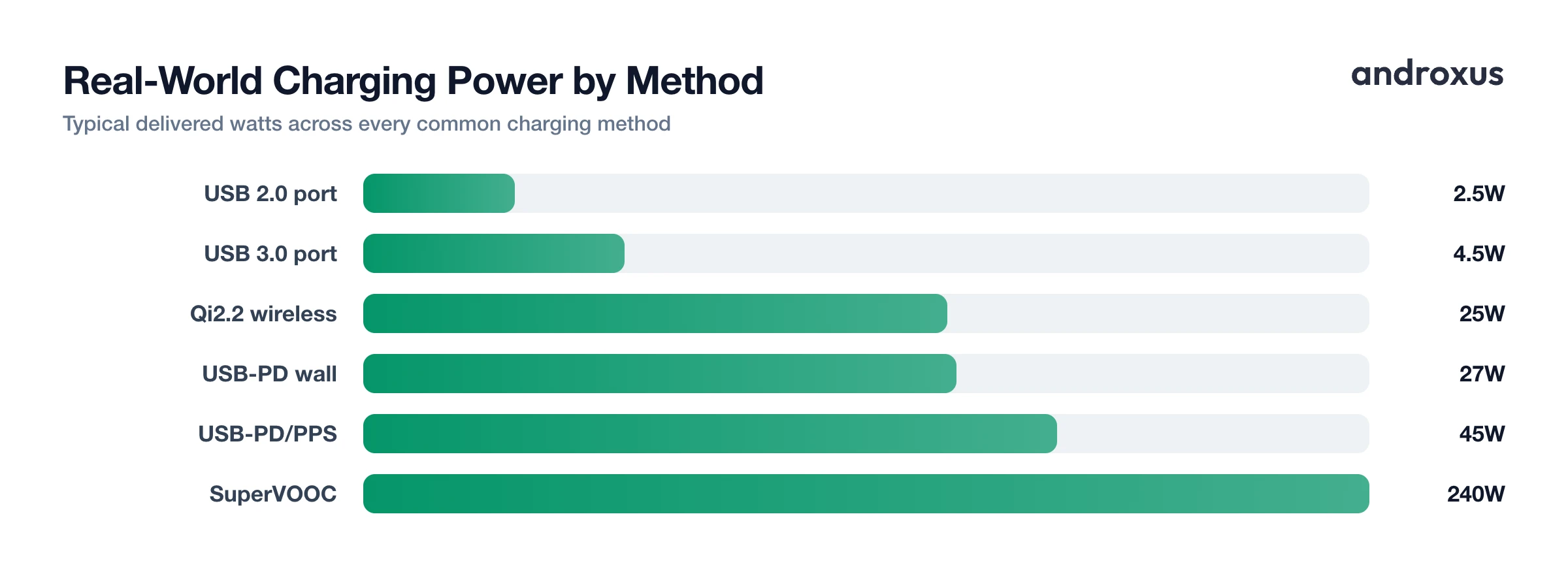
A basic legacy wall charger delivers 5V at 1A, just 5W total, the original USB baseline speed. Modern phones have moved well past that thanks to USB-PD (Power Delivery), the current wall-charging standard. Common phone-relevant tiers are 18W, 20W, 27W, and 45W, and USB-PD 3.1 Extended Power Range now supports 140W up to 240W using EPR-rated cables, mostly for laptops and high-end phones.
Real phones land at different points on that scale. iPhone 15 and 16 cap around 20 to 27W, while the iPhone 17 and 17 Pro pull up to about 40W. Samsung's Galaxy S24 and S25 Ultra reach 45W, but only with a charger that supports PPS (Programmable Power Supply); without it, they fall back to 25W or lower. Wired charging efficiency, wall power in versus energy stored in the battery, runs roughly 85 to 95 percent, the highest of the three methods, because the connection is a direct electrical path with minimal conversion loss.
Proprietary super-fast wired charging: SuperVOOC and friends
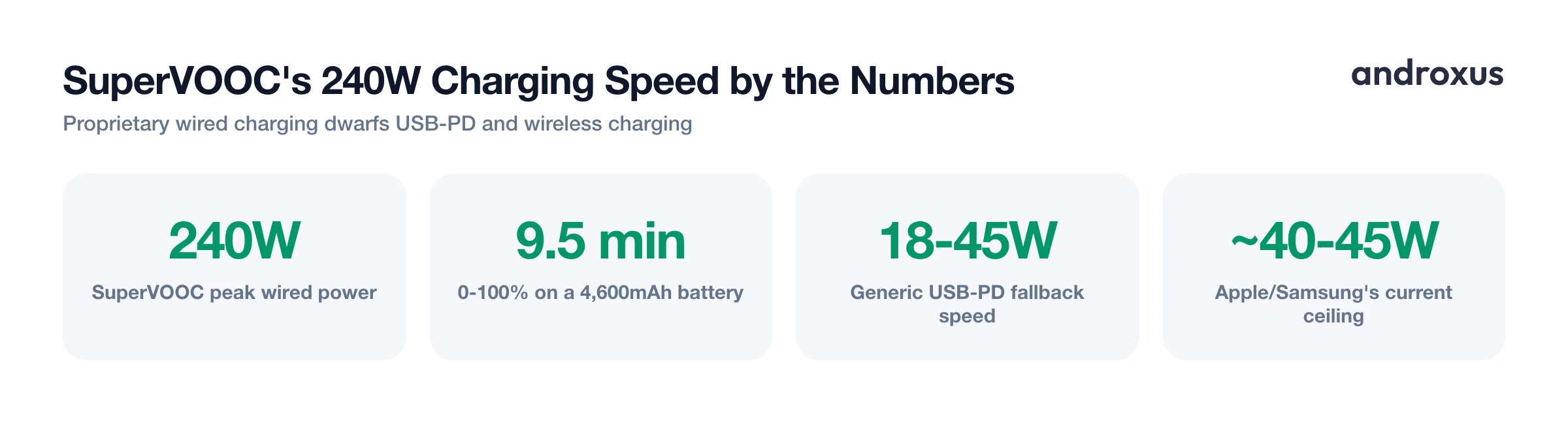
If you want the fastest charge available anywhere today, it comes from a proprietary wired protocol, not USB-PD. OPPO's SuperVOOC and the related VOOC family (shared across OPPO, OnePlus, Vivo, Realme, and iQOO) currently top out at 240W on phones like the Realme GT3, with newer flagships from the same manufacturers pushing higher still on select markets.
To put that in perspective, a 4,600mAh battery on 240W SuperVOOC has been measured filling in about 9.5 minutes, versus well over an hour on a standard USB-PD charger. These protocols rely on custom communication between the charger, cable, and phone, so a generic USB-PD charger typically falls back to 18 to 45W instead of the full rated speed. Apple and Samsung don't currently support charging above roughly 40 to 45W, so ultra-fast proprietary charging remains largely an Android, mostly Chinese-brand, advantage.
USB and computer charging: why it's the slowest common option
Charging from a computer feels convenient, but it is by far the slowest common method. USB 2.0 ports are limited to 5V at 0.5A, or 2.5W total. USB 3.0 Type-A ports do a bit better at 5V and 0.9A, or 4.5W. Either way, that is under 10 percent of what even a modest laptop needs to charge itself, which is part of why laptops moved to USB-C PD rather than USB-A for their own charging.
For your phone, this means plugging into a computer's USB-A port instead of a wall adapter can turn an 18 to 45W charge into a 2.5 to 4.5W trickle, stretching a full charge from roughly 60 to 90 minutes to 3 to 6 or more hours. USB-C ports on newer computers are different: they can support USB-PD and negotiate much higher wattages, often 15W up to 100W. But that depends entirely on the specific port and cable, so a USB-C port is not automatically a fast one.
Wireless charging: why it's slower and runs hotter
Wireless charging has improved on paper, but it still trails wired charging in practice. Original Qi charging typically delivers 5 to 7.5W. Qi2 raised the ceiling to 15W with a magnetic alignment ring, and the newest Qi2.2 tier, often marketed as "Qi2 25W," reaches 25W. Apple's MagSafe sits in the same range as Qi2, at 15W, not faster.
Despite those wattage increases, real-world full-charge times for 7.5W Qi, 15W Qi2, and 25W Qi2.2 mostly land in a similar band of roughly 2 to 2.5 hours, because heat and battery-protection throttling erase much of the theoretical gain. That comes down to efficiency: inductive charging runs at roughly 60 to 80 percent efficiency for original Qi and about 80 to 85 percent for Qi2, compared to 85 to 95 percent for wired charging. The lost energy becomes heat in the coils, which can push the back of the phone to 40 to 45 degrees C, noticeably warmer than wired charging under the same load, and heat is what accelerates lithium-ion aging over time.
Comparing every method side by side
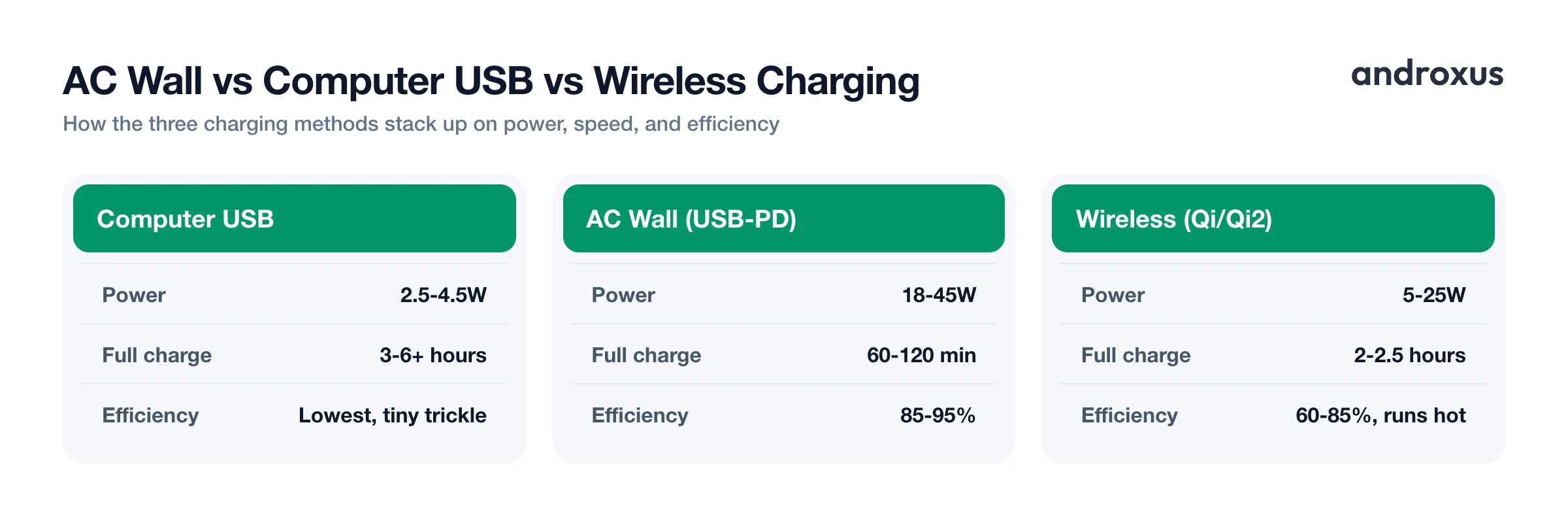
| Charging method | Typical real-world power | Approx. 0-100% time (mid-size 4,500-5,000mAh battery) | Notes |
|---|---|---|---|
| USB 2.0 port (computer) | 2.5W (5V / 0.5A) | 4-6+ hours | Data-only ports often cap here; slowest common method |
| USB 3.0 Type-A port (computer) | 4.5W (5V / 0.9A) | 3-4 hours | Still far below any wall charger with fast-charging support |
| Basic AC wall charger (legacy 5W) | 5W (5V / 1A) | 3-4 hours | Common with older or budget in-box chargers |
| USB-PD wall charger (standard) | 18-27W | 90-120 minutes | Typical iPhone 15/16 and budget Android ceiling |
| USB-PD/PPS wall charger (mid fast charge) | 25-45W | 60-75 minutes | Samsung Galaxy S24/S25 Ultra ceiling (45W needs PPS) |
| Quick Charge 5 (Qualcomm, real-world) | Up to ~45W in practice (100W rated) | 45-60 minutes | Rated 100W+ rarely reached by phones; real draw much lower |
| Proprietary wired fast charge (SuperVOOC and similar) | 100-240W | 9-20 minutes | Requires matching phone, cable, and charger; not USB-PD compatible at full speed |
| Qi wireless (original) | 5-7.5W | 2.5-3 hours | Throttles further with any coil misalignment |
| Qi2 wireless | 15W | 2-2.5 hours | Magnetic alignment ring reduces heat loss vs Qi |
| Qi2.2 / "Qi2 25W" wireless | 25W | ~2 hours | Newest wireless tier; still slower than 25W+ wired |
| MagSafe (Apple wireless) | 15W | 2-2.5 hours | Apple's implementation of magnetic wireless charging |
Why charging speed tapers no matter which method you use
All of this happens within the safe operating range of a lithium-ion cell, generally 0 to 45 degrees C (32 to 113 degrees F), with 20 to 25 degrees C considered the optimal window for both performance and long-term health. Charging below 0 degrees C risks lithium plating on the anode, a permanent, non-recoverable form of degradation, which is why many devices block or slow charging in cold conditions. Above roughly 45 degrees C, the electrolyte breaks down faster and capacity fade speeds up, following the rough rule that every 10 degree C increase above room temperature roughly doubles the rate of loss.
That is exactly why every fast-charging method, wired or wireless, delivers its highest wattage in the first 40 to 50 percent of a charge and then tapers sharply after 80 percent, following the classic CC-CV (constant current, then constant voltage) curve. Protecting the cell from heat matters more to the phone's charging controller than shaving a few extra minutes off the last 20 percent. Battery capacity is reported in mAh while charging speed is measured in watts; converting between them requires voltage, roughly Wh = (mAh / 1000) x nominal voltage, which is why two phones with the same mAh rating can charge at very different watt levels depending on their charger and protocol.
How to check and compare your phone's charging speed
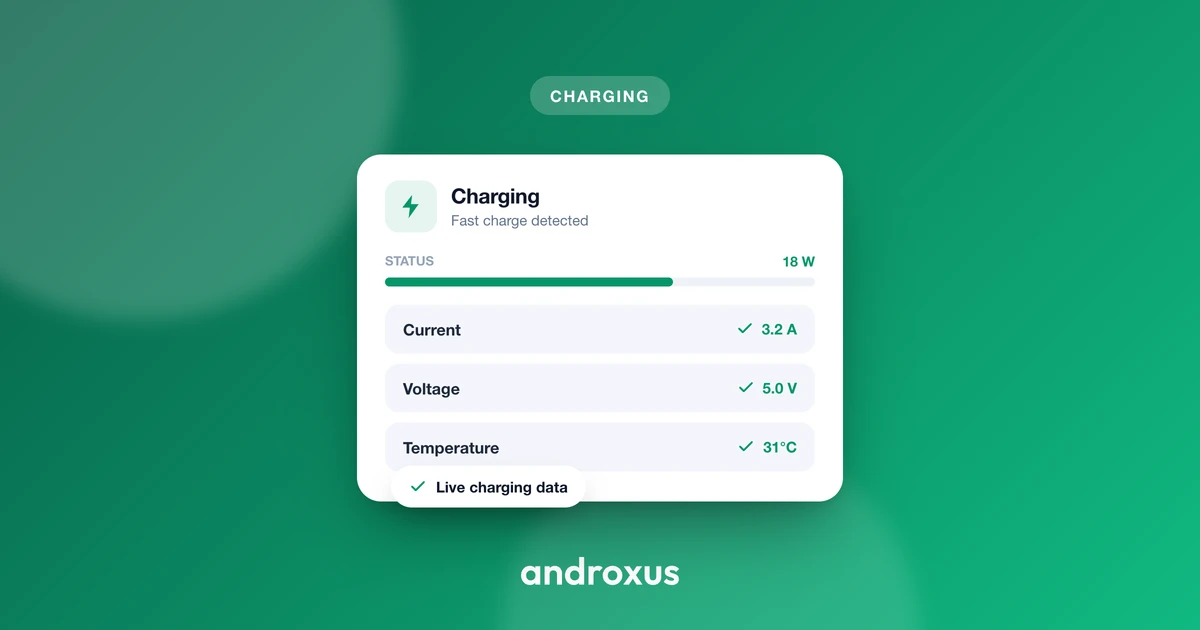
- Check which charging method is active. Plug in and open a battery-monitoring app (AmpereFlow works well here) to confirm whether the phone reports AC, USB, or wireless charging, since some third-party wireless pads and cables can silently fall back to a slower mode.
- Read the live watts and amps. Look at the live power reading rather than trusting the box the charger came in. A charger rated 45W can still deliver far less if the cable, port, or phone negotiates a lower profile.
- Compare the same phone across AC, USB, and wireless. Try the same phone on a wall (AC) charger, a computer's USB port, and a wireless pad, noting the wattage each shows in the first 10 minutes, when the gap between methods is largest.
- Watch the temperature during the first 15 to 20 minutes. Higher wattage plus higher temperature is the combination worth avoiding. If a method pushes the phone noticeably hot (roughly above 40 to 45 degrees C), the effective speed will throttle anyway and heat will do more long-term damage than the extra watts are worth.
- Match the charger to the phone's certified protocol. Use a charger and cable that support the phone's actual fast-charging standard, whether that is USB-PD/PPS, Quick Charge, or a proprietary protocol like SuperVOOC, since a mismatched charger commonly falls back to 18W to 45W.
- Recheck charge time to full. Note the time from empty to 100 percent for each method and compare it against the phone's advertised fast-charging time; a monitoring app's charge-history or time-to-full feature makes this a one-glance check instead of a manual stopwatch.
Key takeaways
- Wired AC charging wins on raw speed: USB-PD covers most phones at 18 to 45W, while proprietary protocols like SuperVOOC push as high as 240W on supported devices.
- A computer's USB port is the slowest common charging method, often just 2.5 to 4.5W, turning a 90-minute charge into a 4 to 6 hour one.
- Wireless charging (Qi, Qi2, Qi2.2) ranges from 5W to 25W but loses more energy as heat, so its real-world full-charge time stays around 2 to 2.5 hours regardless of wattage tier.
- Charging speed always tapers after about 80 percent on every method, because protecting the battery from heat matters more than raw watts.
- The only way to know your true wireless charging speed, or any charging speed, is to check the live watts and amps rather than trust a box's advertised number.
Frequently asked questions
Is wired charging always faster than wireless charging?
In practically every real-world case, yes. Wired USB-PD or proprietary fast charging tops out far higher (45W to 240W+ on supported phones) than wireless Qi/Qi2 (7.5W to 25W), and induction loses more energy as heat, so wireless takes roughly 2 to 3 hours for a full charge versus 30 to 90 minutes wired.
Why does my phone get so hot on a wireless charger?
Induction is inherently lossy. About 20 to 40 percent of the energy sent to the coil is lost as heat instead of reaching the battery, and that heat has nowhere to go but into the phone and the case, unlike a wired connection where most of the energy goes straight into the cell.
Does charging from a laptop USB port charge my phone slower than a wall charger?
Yes. A standard USB-A port on a laptop is capped at 4.5W (USB 3.0) or as low as 2.5W (USB 2.0), while a modern wall adapter using USB-PD can deliver 18W to 45W or more, so the same phone can take two to four times longer plugged into a computer.
What is the fastest way to charge an Android phone right now?
A phone's own proprietary fast-charging protocol paired with its matching wall charger, such as SuperVOOC (up to 240W on select 2026 devices), gives the highest real watts. For phones without a proprietary protocol, a USB-PD/PPS charger rated at the phone's maximum (commonly 25W to 45W) is the fastest widely compatible option.
Is fast charging bad for battery health?
Heat, not current, is the main driver of long-term battery wear. Phones manage this by pulling peak wattage only in the first half of a charge and tapering sharply after 80 percent, so certified fast charging from an approved charger is generally safe as long as the phone stays reasonably cool.
How can I tell what speed my phone is actually charging at?
A battery-monitoring app that reads live watts and amps, such as AmpereFlow, will show the real charging power and flag which method (AC, USB, or wireless) is active, which is the only reliable way to confirm you are getting the speed a charger or cable claims.
