What Does mAh Mean? Phone Battery Capacity Explained
You have probably seen "5,000 mAh" printed on a phone box and assumed bigger automatically means better. So what does mAh mean, exactly? It is a fair guess, but it only tells part of the story, and it has almost nothing to do with how fast that phone charges.
Quick answer: mAh stands for milliamp-hour, a unit of electric charge. A battery rated for 4,000 mAh can theoretically supply 4,000 milliamps of current for one hour, or a smaller current for longer, before it runs out. It measures how much charge a battery holds, not its total energy (that depends on voltage too) and not how quickly it can be charged (that depends on wattage).
What you'll learn
- What mAh actually measures, in plain terms
- How mAh relates to voltage and watt-hours, and why that distinction matters
- Why a bigger mAh number does not mean faster charging
- Real capacity and charging numbers for popular phones today
- How temperature and charge cycles affect battery health over time
What mAh Actually Measures
mAh, short for milliamp-hour, is a unit of electric charge. One mAh equals one-thousandth of an amp-hour (Ah), which is itself a measure of how much current a battery can deliver over time. A battery rated for 4,000 mAh can, in theory, deliver 4,000 milliamps of current for one hour, or half that current, 2,000 milliamps, for two hours, before it is fully depleted.
The key thing to understand is that mAh measures charge capacity, not energy. It says nothing about voltage on its own. Two batteries can share the same mAh rating and still store different amounts of usable energy if their voltages differ. That is why comparing phones purely by mAh, without accounting for voltage, can be misleading.
It is also worth knowing that real-world runtime is never exactly the rated mAh divided by your phone's power draw. Usable capacity shrinks as a battery ages, drops in cold temperatures, and gets cut off early by the phone's power management before it actually hits 0 percent. The number on the spec sheet is a starting point, not a guarantee.
mAh, Voltage, and Watt-Hours: The Full Picture
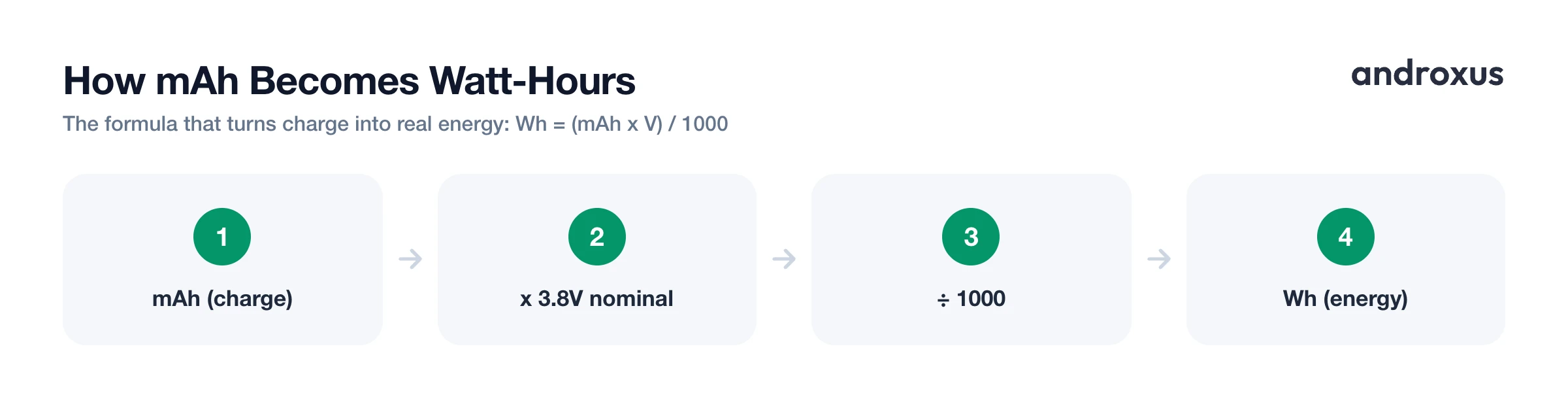
To get the full energy picture, you need voltage too. The formula is simple:
Wh = (mAh x V) / 1000
Smartphone lithium-ion cells run at roughly 3.8 to 3.85 volts nominal, which is the average voltage across a full discharge cycle. That is lower than the peak voltage of a freshly charged cell, which is closer to 4.2 to 4.45 volts. Using the nominal figure, a 4,000 mAh battery holds about 15.4 watt-hours (Wh) of energy.
This distinction matters because comparing two phones by mAh alone can be misleading if their pack voltages differ. Watt-hours is the fairer apples-to-apples energy comparison. It is also why regulations like the airline carry-on battery limit are stated in Wh (typically capped around 100 Wh) rather than mAh: energy, not raw charge, is what determines real capability and safety risk.
Why a Bigger mAh Number Is Not the Same as Faster Charging
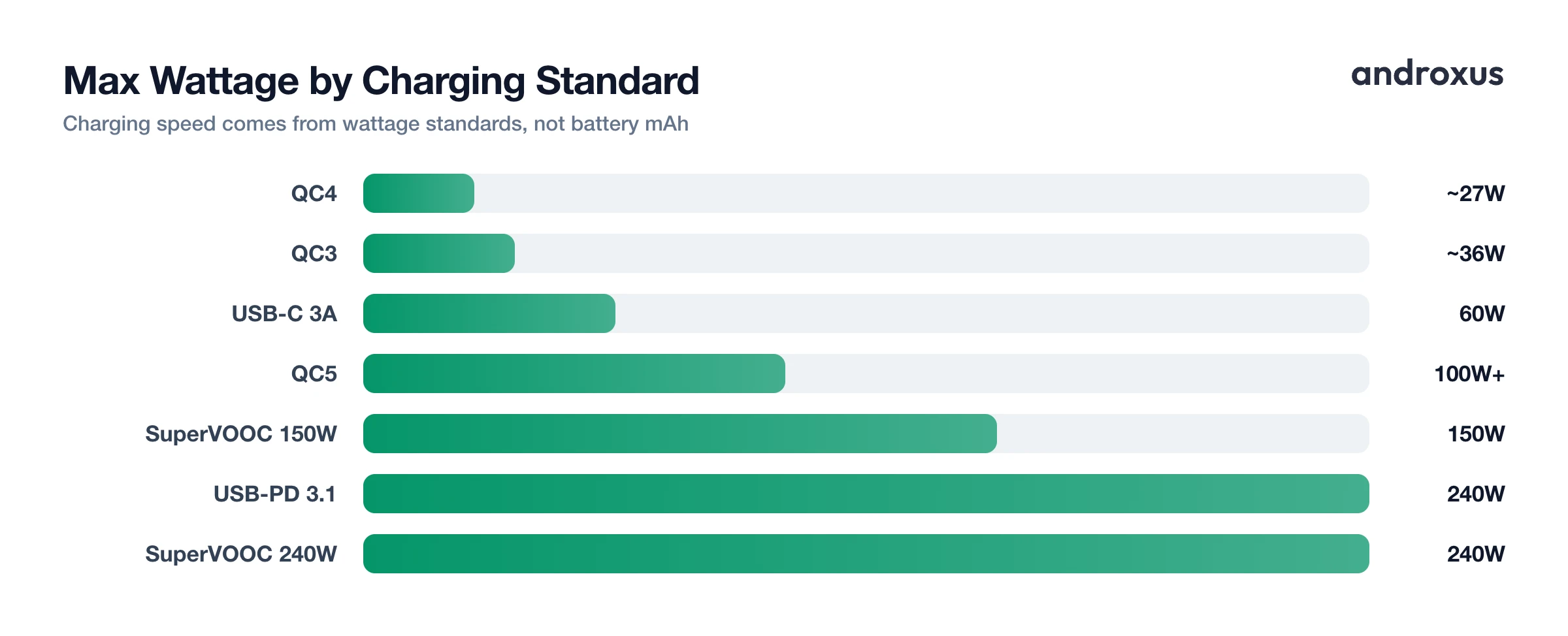
This is the most common mix-up. Charging speed is set by wattage, which is volts multiplied by amps, and wattage is negotiated between the charger, the cable, and the phone. The battery's mAh rating plays no role in setting that speed. A phone with a 6,000 mAh battery and a basic 10W charger will charge slower than a phone with a 4,000 mAh battery and a 65W charger.
A handful of charging standards define how high that wattage can go:
| Standard | Max Wattage | Notes |
|---|---|---|
| USB-PD 3.1 | 240W (48V/5A) | Requires a cable and charger explicitly rated for 240W or 5A |
| USB-C base cable (3A) | 60W (20V/3A) | Default limit for a standard USB-C cable without a higher rating |
| Qualcomm Quick Charge 3 | ~36W | Range of 3.6 to 20V, up to 4.6A |
| Qualcomm Quick Charge 4 | ~27W | In USB-PD compatibility mode |
| Qualcomm Quick Charge 5 | 100W+ | Above 20V and 5A |
| OPPO/OnePlus SuperVOOC 150W | 150W | Roughly 1-50% in 5 minutes, full in about 15 minutes on a 4,500 mAh cell |
| OPPO SuperVOOC 240W (demo-stage) | 240W | 0-100% in about 9 minutes on a 4,500 mAh cell |
A phone only charges as fast as the weakest link in that chain. Charger wattage, cable rating, and the phone's own maximum accepted input all cap the speed, no matter how large the battery is. Charging speed also tapers automatically above roughly 80 percent, since the charge curve flattens out to protect the cell. That slowdown near the top is normal lithium-ion behavior, not a malfunction, and it is one of the more common things people mistake for a problem when they are simply watching the percentage climb more slowly.
Typical Phone Battery Capacities Today
Here is how current phones stack up on rated capacity, approximate energy, and typical wired charging speed:
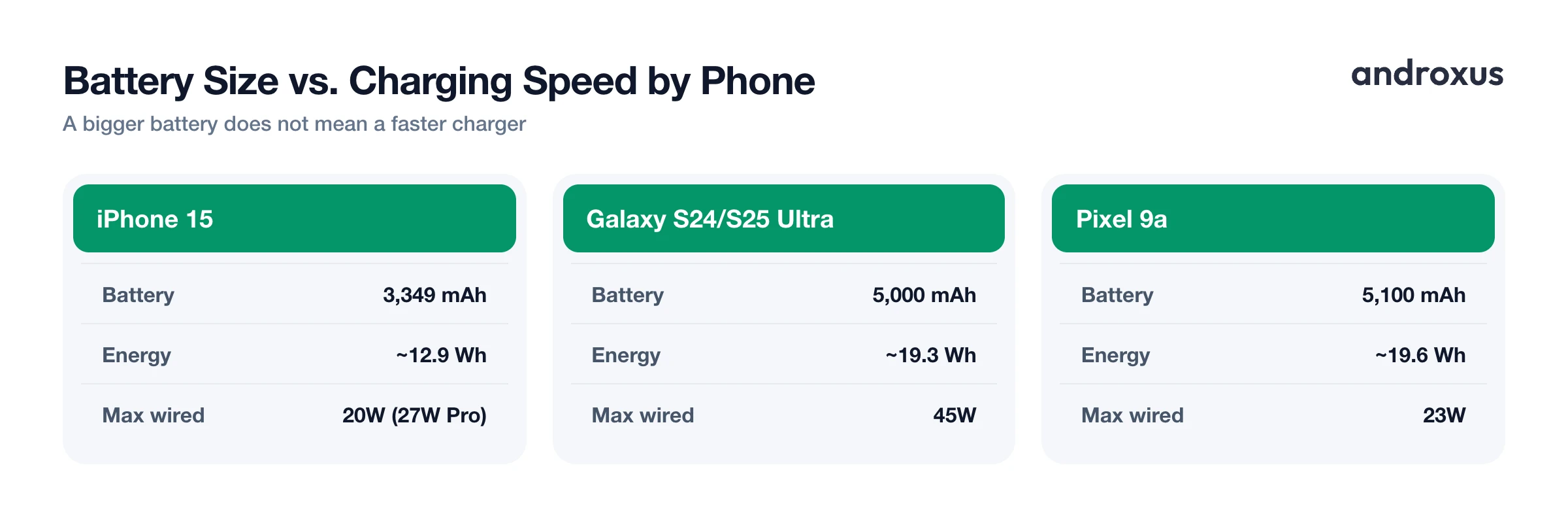
| Device | Battery Capacity | Approx. Energy (Wh) | Typical Max Wired Charging |
|---|---|---|---|
| iPhone 15 | 3,349 mAh | ~12.9 Wh | 20W (27W on Pro/Pro Max) |
| iPhone 16 | 3,561 mAh | ~13.7 Wh | 20W spec minimum, ~30W measured |
| Samsung Galaxy S24 | 4,000 mAh | ~15.4 Wh | 25W |
| Samsung Galaxy S24 Ultra / S25 Ultra | 5,000 mAh | ~19.3 Wh | 45W (0-65% in about 30 min) |
| Google Pixel 9 | 4,700 mAh | ~18.1 Wh | 27W |
| Google Pixel 9a | 5,100 mAh | ~19.6 Wh | 23W |
| Typical budget Android phone | ~5,000 mAh | ~19.3 Wh | 10-33W |
Notice the pattern: many budget and mid-range phones ship with larger batteries, often around 5,000 mAh, but pair them with fairly modest charging hardware. That is partly a cost decision, since adding cell capacity is cheaper than adding fast-charging components. It is a good reminder that mAh and charging speed are two separate specs that manufacturers mix and match independently.
Battery Health, Heat, and Safe Charging Habits
Charge capacity does not stay fixed forever. Lithium-ion cells degrade gradually with use, and temperature is one of the biggest factors in how fast that happens. The recommended charging temperature window is about 32 F to 113 F (0 C to 45 C), with a comfortable long-term range of 59 F to 95 F (15 C to 35 C). Charging below freezing risks lithium plating, a form of permanent capacity loss that does not reverse. Sustained heat above 113 F accelerates electrode and electrolyte wear, and temperatures near 140 F risk swelling or gas venting, well before the roughly 266 F threshold where thermal runaway can begin.
Manufacturers also design around charge cycles. Apple specs the iPhone 14 and earlier to retain 80 percent of original capacity after 500 full charge cycles, while the iPhone 15 and later are rated for 80 percent after 1,000 cycles. Most Android flagships fall in a similar 500 to 1,000 cycle range for that same 80 percent mark. Simple habits help: taking a phone out of a thick case, avoiding direct sunlight, and not gaming while it fast-charges are among the easiest ways to keep it cooler during a charge.
How to Check What Your Phone's mAh Rating Actually Means for You
- Find your phone's rated battery capacity. Check the manufacturer's spec sheet, or on newer Samsung phones (Galaxy S23 and later on One UI 6.1+) check Settings > Battery > Battery information. Most other Android phones do not list the mAh figure in settings at all, so the spec sheet or manufacturer's website is the more reliable source.
- Check today's real-world charging power. Plug in and open a battery meter app such as AmpereFlow to see live watts and amps flowing into the phone right now, since stock Android does not expose this.
- Confirm whether fast charging actually kicked in. Look for a fast-charging indicator or a wattage reading above your charger's base 5W/10W rate. If the number stays low, try a different cable or a PD- or QC-rated charger, since a phone can only fast-charge when the charger and cable pairing actually supports it.
- Track charge time to full and by level. Use a charge-history or charge-time-to-full feature to see how long a complete charge takes and how power tapers as the phone approaches 100 percent, which is expected lithium-ion charge-curve behavior rather than a fault.
- Watch battery health and temperature over time. Periodically check the battery health and capacity estimate along with voltage and temperature readings to catch abnormal heat or a shrinking capacity trend before it shows up in daily use.
Key takeaways
- mAh measures electric charge capacity, not total energy or charging speed; a 4,000 mAh battery can deliver 4,000 milliamps for one hour, or less current for longer.
- Converting to watt-hours, using Wh = (mAh x V) / 1000, gives a fairer energy comparison between phones with different battery voltages.
- Charging speed depends on wattage negotiated between charger, cable, and phone, so a bigger mAh battery is not automatically a faster-charging one.
- Real phones today range from around 3,300 mAh in compact flagships to over 5,000 mAh in some budget and Ultra-tier models, with wired charging speeds spanning roughly 10W to 150W or more.
- Keeping charging temperature in the 59 F to 95 F comfort zone and avoiding extremes helps protect long-term capacity retention across hundreds of charge cycles.
Frequently asked questions
What does mAh mean on a phone battery?
mAh stands for milliamp-hour, a unit of electric charge equal to one-thousandth of an amp-hour. A 4,000 mAh battery can theoretically supply 4,000 milliamps of current for one hour, or 1,000 milliamps for four hours, before it is empty. It measures charge capacity, not the phone's total energy or how fast it can charge.
Is a higher mAh always better?
Usually, but not always. A higher mAh number generally means more available charge and, all else equal, longer battery life. But screen size and resolution, chipset efficiency, and 5G radio use all affect real-world runtime, so a 4,500 mAh battery in an efficient phone can easily outlast a 5,000 mAh battery in a power-hungry one.
Does a bigger mAh battery charge faster?
No. Charging speed is set by wattage (volts multiplied by amps) that the charger, cable, and phone all agree to negotiate, not by the battery's mAh rating. A 6,000 mAh battery paired with a 10W charger will charge slower than a 4,000 mAh battery paired with a 65W charger.
How do I convert mAh to watt-hours (Wh)?
Multiply the mAh rating by the battery's nominal voltage, then divide by 1,000: Wh = (mAh x V) / 1000. Phone lithium-ion cells run at roughly 3.8 to 3.85 volts nominal, so a 4,000 mAh battery holds about 15.4 Wh of energy.
What is a safe temperature range for charging a lithium-ion battery?
Charge between 32 F and 113 F (0 C to 45 C), with 59 F to 95 F (15 C to 35 C) considered the comfort zone for long-term health. Charging below freezing can cause permanent lithium plating, and sustained heat above 113 F speeds up capacity loss, so a phone that feels hot while charging should be taken off the case or moved out of direct sun.
How can I check my phone's real battery capacity and charging speed?
Stock Android only shows a rough percentage and a generic battery-usage screen (Settings, Battery). For live watts and amps, fast-charging detection, a measured capacity estimate versus the original spec, and charge time to full, a dedicated meter app like AmpereFlow reads the data your charging chip already reports and corrects for the reporting quirks that make some phones show inflated or understated numbers.
